# The Hackathon Playbook
> Battle-tested hackathon strategy from 36+ wins and $100K+ in prizes, by Bill Zhang. Team formation, ideation, execution, pitching, and submission.
Canonical: https://thehackathonplaybook.dev/
---
## The Hackathon Playbook
Guides and prompts from 50+ hackathons and 36+ wins.
[Open Playbook →](https://thehackathonplaybook.dev/playbook)[For Non-Coders →](https://thehackathonplaybook.dev/non-coders)[Read the Blog →](https://thehackathonplaybook.dev/blog)
In a hackathon right now?[Cheat Sheet: copy-paste prompts →](https://thehackathonplaybook.dev/cheat-sheet)
Bring the Playbook into your AI agent via MCP.
bill@hackathons ~ % whoami
## Bill Zhang [@IdkwhatImD0ing](https://github.com/IdkwhatImD0ing)
I started doing hackathons to land an internship, and got an interview within my first four.
36+
Wins
$100K+
Prizes
50+
Hackathons
\>
1st place at HackUTD 2024, UC Berkeley AI Hackathon 2024, LA Hacks 2024 — 1,000+ person events, plus 33 other hackathon wins
\>
Google Developer Student Challenge — Top 10 Global (only US team in 3 years)
\>
Hackathon judge at LA Hacks 2026 — returning for the LA Hacks AI Hackathon
\>
Co-founder of WeCracked — 4,000+ member hackathon community
\>
Software Engineer 2 at Pinterest — ex-Applied AI Engineer at Scale AI
\>
Co-founder of Dispatch AI — $1M valuation, Berkeley SkyDeck funded
\>
USC MS in Computer Science (AI) — UCSC undergrad
[HackUTD 2024
TalkTuahBank](https://devpost.com/software/talktuahbank)[UC Berkeley AI
Dispatch AI](https://devpost.com/software/dispatch-ai)[LA Hacks 2024
AdaptED](https://devpost.com/software/teachme-3p7bw1)[Google DSC
SlugLoop](https://www.universityofcalifornia.edu/news/uc-santa-cruz-students-behind-bus-tracking-app-selected-only-us-team-google-solution)[VTHacks 12
Linguify](https://devpost.com/software/linguify-katunw)[+31more winsView on Devpost](https://devpost.com/IdkwhatImD0ing)
[Portfolio](https://v2.art3m1s.me/)[GitHub](https://github.com/IdkwhatImD0ing)[LinkedIn](https://www.linkedin.com/in/bill-zhang1/)[Devpost](https://devpost.com/IdkwhatImD0ing)[For AI & Agents](https://thehackathonplaybook.dev/ai)
© 2026 The Hackathon Playbook
[Got feedback? feedback@thehackathonplaybook.dev](mailto:feedback@thehackathonplaybook.dev)
---
# The 7-Phase Playbook
> A battle-tested 7-phase system for winning hackathons: team formation, ideation, validation, execution, pitching, submission, and post-hackathon strategy.
Canonical: https://thehackathonplaybook.dev/playbook
---
[#### Team Formation
Pick teammates who cover four roles, and build a steady squad if you want to keep winning.
Enter section →](https://thehackathonplaybook.dev/playbook/team-formation)[#### Ideation
Combine tools and problems you already know into an idea you can build in time.
Enter section →](https://thehackathonplaybook.dev/playbook/ideation)[#### Validation
Test the riskiest part of your idea early, and prep your stack if you're competing to win.
Enter section →](https://thehackathonplaybook.dev/playbook/validation)[#### Execution
How to spend your hours so you finish with a working demo.
Enter section →](https://thehackathonplaybook.dev/playbook/execution)[#### Pitching
Build your pitch around the demo, and get ready for judge questions.
Enter section →](https://thehackathonplaybook.dev/playbook/pitching)[#### Submission
What to put in your Devpost, README, and demo video, and when to submit.
Enter section →](https://thehackathonplaybook.dev/playbook/submission)[#### Post-Hackathon
Post your project and follow up with people you met, so it keeps helping you after judging.
Enter section →](https://thehackathonplaybook.dev/playbook/post-hackathon)
---
# Team Formation
> Pick teammates who cover four roles, and build a steady squad if you want to keep winning.
Canonical: https://thehackathonplaybook.dev/playbook/team-formation
Last updated: 2026-09-14
---
## Find Your Persona
Eight questions to find the role you fall into by default.
TL;DR Know your default role so you can recruit teammates who cover the other three.
### What's Your Hackathon Persona?
8 scenario-based questions. No wrong answers. Discover which role you naturally gravitate toward in hackathon teams.
## The Four Personas
A hackathon team has four jobs. One person can take more than one, so you don't need a big team.
TL;DR Before you commit to a team, put a name next to each role. If one is blank, recruit for it or make it someone's second job.
#### The Designer
Makes the project look finished before you say a word. A polished UI stands out next to terminal demos, and it makes your 4AM code look intentional.
Strengths
- Carries online judging, where your screenshots are the project
- Simplifies complex features so they're easy to follow
Watch Out For
Polishing past the point where "good enough" would ship.
Spot them: they open Figma before VS Code.
#### The Pitcher
Explains why the project matters. They decide when to lead with the problem, when to show the demo, and how to answer "so what?"
On Dispatch AI, my teammate Spike O'Carroll delivered our whole 4:34 pitch video. It opens on understaffed 911 call centers and saves the live call to our AI dispatcher for the last 77 seconds. [See the breakdown](https://thehackathonplaybook.dev/playbook/pitching).
Strengths
- Fits the story into whatever slot the event gives, sometimes 90 seconds before questions
- Takes the hard judge questions in Q&A. When I judged LA Hacks, each team had five minutes, and 3.5 of them were questions.
Watch Out For
Promising features you haven't built, or prepping the pitch instead of helping build.
#### The Architect
Asks "how will this integrate?" before "how will this look?" While others go deep on features, the Architect wires the API to the frontend and the model to the UI.
Strengths
- Prevents integration failure. If the frontend and backend never connect, there's no demo.
- Cuts scope so the project fits the time you have
Watch Out For
Building for scale when you need to build for demo.
#### The Strategist
Says "no" to feature creep at 3AM. When someone wants to add something, they're the one asking "What gets cut if we add this?"
Strengths
- Runs short check-ins and time-boxes debates, so everyone stays on one plan and timeline
- Owns logistics and the submission so the builders can keep building
Watch Out For
Over-planning and rigidity. Too much process slows a 48-hour sprint.
[Meredith Belbin](https://www.belbin.com/) — management researcher, Henley Management College
> “Nobody is perfect, but a team can be.”
Belbin identified eight team roles at Henley and found that teams covering different roles beat equally talented teams with overlapping strengths. The personas map loosely onto his roles: the Pitcher to his Resource Investigator, the Architect to the Monitor Evaluator, and the Strategist to the Co-ordinator. The Designer fits least, since his Plant is an idea generator rather than a visual designer.
— Belbin's often-quoted maxim; team roles from [Management Teams: Why They Succeed or Fail, 1981](https://www.belbin.com/)
## Where to Find Teammates
Six places to look. Use more than one.
TL;DR Hack with someone once at a low-stakes event before you team up for one you want to win.
Hackathon Discords
Join the event's team-matching channel early. Post which role you cover and which ones you need.
Hackathon Communities
WeCracked (4K+ members), MLH groups, and local clubs. I co-founded WeCracked, so I'm biased.
University Clubs
CS clubs, ACM chapters, and hackathon orgs, where people already build things outside class.
Devpost Scouting
Browse past winners and message the people whose projects impressed you.
Fun Hackathons
Build something with someone once and you'll see how they handle a deadline.
Social Media
LinkedIn groups, Twitter/X tech communities, and hackathon subreddits.
TL;DR Pick attitude over raw skill. In 24-48 hours, a brilliant teammate who causes friction costs more than they add.
> “Hire character.
> Train skill.”
— [Peter Schutz, CEO of Porsche AG from 1981 to 1987](https://en.wikipedia.org/wiki/Peter_Schutz), his often-quoted hiring maxim
Look for teammates who
- Speak up when stuck instead of going silent
- Pivot when the plan isn't working
- Back the team decision even if it wasn't their first choice
- Stay calm when the build breaks late at night
Google Project Aristotle
Across 180+ teams over two years, Google found that how members interacted mattered more than who was on the team. Psychological safety was the #1 predictor of performance, ahead of dependability, structure, meaning, and impact. It means people can admit a mistake or ask a question without being embarrassed or punished.
— [Google re:Work, 2015](https://rework.withgoogle.com/guides/understanding-team-effectiveness/)
## How serious are you about hackathons?
Most people do one or two for fun, and everything above is all you need. The squad-building system below is for people chasing repeat wins.
###
TL;DR Train newer teammates on a JV list, then bring only proven varsity teammates to the events you most want to win.
#### JV Teammates
Your development squad. People you're still training and learning to work with.
- Proven attitude and work ethic
- Still developing time management, prototyping, and pitching
1-3
hackathons to join
2-8 hackathons
2-8 hackathons
#### Varsity Teammates
Your championship squad.
- Deep trust, and shortcuts for communication and code review
- Self-directed: each person owns their role, no micromanagement
- Shared toolkit: templates, favorite APIs, deployment pipeline
3-8+
hackathons to earn varsity
What earns a varsity spot is how well you work together under time pressure. A varsity teammate may be a worse coder than a JV one. Psychologist Bruce Tuckman described four stages a group goes through before it works at full strength: forming, storming, norming, and performing. With a new JV teammate you're in the first two. You're still learning how each of you works and how you'll communicate, so expect disagreements about scope and stack. Better to work through those at a training hackathon than at one you want to win.
— Bruce Tuckman, psychologist, U.S. Naval Medical Research Institute, [Developmental Sequence in Small Groups, Psychological Bulletin, 1965](https://en.wikipedia.org/wiki/Tuckman%27s_stages_of_group_development)
###
TL;DR Use fun events to scout, training events to build your JV, and competitive events for varsity-only wins.
#### Fun Hackathons
Low stakes. You're there to scout more than to win.
TEAM WITH
People you meet or match with at the event, and friends trying hackathons
1 event
to earn JV consideration
#### Training Hackathons
Practice runs. Go through the full workflow together: ideation, architecture, execution, pitching.
TEAM WITH
JV teammates only
Pro Tip
Run it like a competitive event. Set internal deadlines and rehearse the full pitch before you submit.
2-8+ events
to train a team to varsity
#### Competitive Hackathons
The events you most want to win.
TEAM WITH
Varsity only
Pro Tip
Pre-plan the stack, ready your boilerplates, and assign roles before kickoff, so you make fewer decisions during the event.
Win mode
going for first place
[J. Richard Hackman](https://en.wikipedia.org/wiki/J._Richard_Hackman) — Leading Teams
Hackman's Harvard research names a compelling direction, a purpose that is clear, challenging, and consequential, as one of five conditions for team effectiveness.
For your team, that means agreeing before each event on whether you're there to train or to win.
— [Leading Teams: Setting the Stage for Great Performances, 2002](https://en.wikipedia.org/wiki/J._Richard_Hackman)
---
# Ideation
> Combine tools and problems you already know into an idea you can build in time.
Canonical: https://thehackathonplaybook.dev/playbook/ideation
Last updated: 2026-09-14
---
## The Little Alchemy Method
Start with basic elements and keep combining them until one result is worth building.
TL;DR Pair technologies with industries, many times over, and keep the few pairings that land.
In the game Little Alchemy you combine fire, water, earth, and air into steam, lava, and life, then keep combining the results into hundreds of other things.
Hackathon ideas work the same way, with technologies and industries as the elements.
#### Your Building Blocks
Tools that do something. Single technologies from companies or research papers.
OpenAI 4o (LLM)
Google Veo 3 (Text to Video)
Twilio API (Phone Calls)
SunoAI (Text to Music)
combine
combine
#### Your Problem Spaces
Spaces that need something. Industries, domains, and user groups.
Sports
Health
Education
Defense
Finance
Entertainment
The method: list 20-30 elements and combine them at random. Most pairings flop, which is why you need a lot of them.
### Try It Yourself
Drag elements into the workspace and drop one onto another.
0 / 69discovered
Drag elements into the workspace below to combine them
TECH
LLMs
Twilio API
Google Veo 3
SunoAI
Vision AI
Blockchain
IoT Sensors
INDUSTRIES
Health
Education
Defense
Finance
Entertainment
Sports
Climate
Legal
Drag elements here, then drop them on each other
Double-click a workspace element to remove it
## Combinations in Action
How the method produced DispatchAI, our Grand Prize winner at the UC Berkeley AI Hackathon.
TL;DR Once you have one combination, swap a single element to get a new idea out of it.
#### DispatchAI — UC Berkeley AI Hackathon Grand Prize
It started as two combinations.
Step 1
Step 2
[Live demo](https://dispatchai.art3m1s.me/)[GitHub](https://github.com/IdkwhatImD0ing/DispatchAI)[Devpost](https://devpost.com/software/dispatch-ai)
#### Mental Health AI Agent
Same tech, different industry. The 911 dispatcher becomes a mental health support line.
#### AI Ad Commercial Creator
Swap the industry for another technology. An LLM directs video generation to prototype ads fast.
AdaptED
LA Hacks
Best Use of Google
[Live demo](https://adapted.art3m1s.me/)[GitHub](https://github.com/IdkwhatImD0ing/TeachMe)[Devpost](https://devpost.com/software/teachme-3p7bw1)
DispatchAI
UC Berkeley AI Hackathon
Grand Prize
[Live demo](https://dispatchai.art3m1s.me/)[GitHub](https://github.com/IdkwhatImD0ing/DispatchAI)[Devpost](https://devpost.com/software/dispatch-ai)
TalkTuahBank
HackUTD
1st Overall + Goldman Sachs
[Live demo](https://talktuah.art3m1s.me/)[GitHub](https://github.com/aurelisajuan/TalkTuahBank)[Devpost](https://devpost.com/software/talktuahbank)
All three projects came from the same method.
## Go Deeper
Optional background and prep.
###
TL;DR Make sure your list has tools that just became possible and problems you've had yourself.
#### The Adjacent Possible
> “Good ideas are not conjured out of thin air; they are built out of a collection of existing parts, the composition of which expands (and, occasionally, contracts) over time.”
Johnson calls that expanding edge the “adjacent possible,” a term he borrowed from biologist Stuart Kauffman. Every new API, model, or dataset expands it.
— Steven Johnson, science writer, [Where Good Ideas Come From, 2010](https://en.wikipedia.org/wiki/Where_Good_Ideas_Come_From)
#### Notice, Don't Invent
> “Live in the future, then build what's missing. … The verb you want to be using with respect to startup ideas is not ‘think up’ but ‘notice.’”
— Paul Graham, Y Combinator co-founder, [How to Get Startup Ideas, 2012](https://paulgraham.com/startupideas.html)
###
TL;DR If you're competing to win, build this list before the event starts.
#### Tech Elements
APIs, AI models, hardware, protocols, research papers.
- LLMs (GPT-4o, Claude, Gemini, Llama)
- Speech APIs (Twilio, Deepgram, ElevenLabs)
- Vision models (YOLO, SAM, GPT-4V)
- Generative media (Veo, Suno, Midjourney)
10-15
tech elements minimum
#### Domain Elements
Industries, user groups, and problem spaces.
- Healthcare, mental health, eldercare
- Education and accessibility
- Finance and insurance
- Defense, emergency services, public safety
5-10
industries minimum
#### Wild Card Elements
Things that add an angle. Unusual constraints, trends, and sponsor challenges.
- Sponsor APIs (free credits = an edge)
- Trending topics (what's viral now?)
- Personal pain points and hobbies
- Weird constraints (“What if it were voice-only?”)
5+
wild cards
[Linus Pauling](https://en.wikipedia.org/wiki/Linus_Pauling) — Two-Time Nobel Laureate (Chemistry 1954, Peace 1962)
> “The best way to have a good idea is to have a lot of ideas.”
— Quoted in Fortune, April 1960
On PBS's NOVA in 1977 he added the other half: you also need “some sort of principle of selection.”
###
TL;DR After you combine, go do something else and write down whatever comes to mind.
#### TFT Helps Me Win Hackathons
Yes, Teamfight Tactics by Riot Games.
Rapid Context Switching
TFT keeps you switching between the board and your idea list, and that back-and-forth is where unexpected pairings show up.
Built-in Downtime
Unlike Valorant or League, TFT has long pauses between rounds, perfect for jotting down ideas. Try brainstorming mid-clutch in Valorant: it doesn't work.
You don't have to play TFT. Cooking, cleaning, the gym, or a walk work too. Put the break on your schedule.
#### Focused vs. Diffuse Thinking
Barbara Oakley, professor of engineering at Oakland University, popularized two thinking modes in A Mind for Numbers (2014) and in the Coursera course [Learning How to Learn](https://www.coursera.org/learn/learning-how-to-learn) (2014), which she teaches with neuroscientist Terrence Sejnowski:
Focused Mode
Concentrated work on a known problem, like forcing ideas at a whiteboard.
Diffuse Mode
Relaxed and associative. It's why the idea hits on the walk to get coffee, or between TFT rounds.
> “Sometimes we need to lose concentration so we can think more clearly.”
— Barbara Oakley and Terrence Sejnowski with Alistair McConville, [Learning How to Learn](https://www.penguinrandomhouse.com/books/563935/learning-how-to-learn-by-barbara-oakley-phd-and-terrence-sejnowski-phd-with-alistair-mcconville/), 2018
## The Ideation Toolkit
For when random combining stops turning up new ideas.
TL;DR Run SCAMPER on your top ideas, or pick a random noun and force a connection to your problem.
#### SCAMPER Method
Education author Bob Eberle's [Scamper: Games for Imagination Development](https://archive.org/details/scampergamesfori0000eber) (1971) turned Alex Osborn's brainstorming questions into a checklist that expands any idea in seven directions.
Substitute: Replace a component
Combine: Merge two features
Adapt: Reuse in new context
Modify: Change scale or shape
Put to another use: New application
Eliminate: Remove complexity
Reverse: Flip the perspective
Try each letter on your top ideas. Could you substitute the API? Could you drop the most complex step?
#### Random Input
Maltese physician and author Edward de Bono, who coined [lateral thinking](https://en.wikipedia.org/wiki/Lateral_thinking), devised this technique for provoking new connections with randomness, set out in Serious Creativity (1992).
1. Pick a random noun: open a dictionary, use a generator, or point at something in the room
2. Force-connect it to your problem. How is your idea like a “lighthouse”?
3. Follow the links that come up, even the weird ones
Let the word be random. If you pick one that already relates to your problem, you'll get the same ideas back.
#### Antidisciplinary Thinking
Joi Ito, then director of the MIT Media Lab, on finding innovation in the white space between fields, from his 2014 essay [Antidisciplinary](https://joi.ito.com/weblog/2014/10/02/antidisciplinar.html).
Interdisciplinary work has existing fields collaborate. Antidisciplinary work fits none of them, so don't drop an idea just because you can't say which field it belongs to. “An AI 911 dispatcher?” sounded strange until DispatchAI won the Grand Prize.
Ask Yourself
- Which field would never normally work on this problem?
- What would a musician, a chef, or a game designer do with it?
> “Creativity is just connecting things. …
> The broader one's understanding of the human experience, the better design we will have.”
— Steve Jobs, co-founder of Apple, [Wired interview, 1996](https://www.wired.com/1996/02/jobs-2/)
## Ideation Checklist
If you're competing to win, finish this before the event. If you're there to learn, you can run it at the event with the people you meet.
TL;DR Combine 20-30 elements into 15-20 candidates, then pick one your team can ship in the time you have.
Build a list of 20-30+ tech, domain, and wild card elements
Combine at random without filtering. Aim for 15-20 combinations before you judge any
Take a break and jot down what comes to you
Run SCAMPER on your top 3 ideas, all 7 letters
Favor ideas that use something that just became possible
Validate with your team: does it excite everyone, and can you ship it in 24-48 hours?
---
# Validation
> Test the riskiest part of your idea early, and prep your stack if you're competing to win.
Canonical: https://thehackathonplaybook.dev/playbook/validation
Last updated: 2026-09-14
---
## The Lego Method
Build the project out of small blocks you've each tested, the way you'd build with Legos.
TL;DR Test one integration at a time, on its own, before you connect anything.
Wire untested pieces together and, when something breaks, you can't tell which piece it was. Every block you test also goes into your Lego library, so at the next hackathon it's already working.
#### Test One Thing
Give each integration its own small test. Stream a response from OpenAI. Trigger a Twilio call from Python. Play text-to-speech audio in a browser.
#### Make It Bulletproof
Once a block works, find out how it fails. Learn its rate limits and latency, and handle the errors it throws. Then it's less likely to break during the demo.
#### Snap Together
OpenAI streaming + Twilio voice + a React frontend = a voice AI agent. When each piece already works, connecting them is the fast part.
## Pre-Hackathon Validation
What to test in side projects before a hackathon, and what's left for the weekend itself.
TL;DR If you're going for a prize, test your tools in side projects in the weeks before the event.
At the event you want to spend your hours combining pieces you've already tested. If you're going to learn or have fun, you can skip the prep and still get a lot out of the weekend: brainstorm with people you meet, build something on the spot, and find teammates there.
#### Build Your Lego Library
Blocks worth testing in side projects:
- OpenAI streaming: latency, token limits, error handling
- Twilio voice: triggering, receiving, processing audio
- Supabase: real-time subscriptions and auth flows
- Infra: file uploads, WebSockets, deployment pipelines
then combine
then combine
#### Combine and Create
Your time goes to the part that's new.
- Combine blocks you've tested, and spike only the piece you haven't (see Spike Solutions below)
- Spend the saved hours on the demo and the pitch
## Sponsor Recon
Sponsor lists usually go up before the event. Use that window.
TL;DR If you want a sponsor prize, get that sponsor's API working before kickoff.
Each sponsor can mean a prize category and free credits. Some judges are sponsor employees scoring how deeply you used their platform, and they can tell when you already know it well.
#### Read the Docs
Sign up and run the quickstart. You should have a “hello world” running within 30 minutes.
If it takes longer, or the API requires manual approval, plan around it.
#### Check for Gotchas
Look for what could stop you: rate limits, missing SDKs, deprecated endpoints, and free tiers or credits that run out mid-demo. The marketing page won't list them, so you find them by calling the API.
#### Validate the Integration
Build a tiny proof of concept that calls the API end to end. If it works, it goes in your library for hackathon day. If it fails, you know before the event starts.
## Pick Your Stack
Lock in your stack before the hackathon, using tools you've already built with.
TL;DR Default to the stack you build fastest with. Swap a piece only for a sponsor prize or a real project need.
My default is Next.js, FastAPI, and Supabase. If your team is faster in something else, use that instead. Just don't swap in a tool because it's new and trendy.
#### Next.js
App Router, React 19, TypeScript. Server components for speed, client components for interactivity. Add shadcn/ui and Tailwind and the UI looks finished in minutes.
Swap when: the hackathon requires a specific framework, or you're building a mobile app (use React Native or Flutter).
#### FastAPI
Async Python, auto OpenAPI docs, and direct access to Python's AI and ML libraries.
Swap when: the project is frontend-only (use Next.js API routes), or you want one language across the stack (use Node). FastAPI supports WebSockets, so real-time alone isn't a reason to switch.
#### Supabase
Postgres, auth, storage, real-time in one service. The free tier is usually enough for a weekend, and auth takes about 10 minutes to set up.
Swap when: MongoDB is a sponsor (use MongoDB Atlas), or you need a vector DB for RAG (add Pinecone or pgvector).
Learning a new tool at the event: If you're trying to win, a hackathon is a bad place to learn a new database. If you're there to learn, it can pay off in other ways.
## Target Your Prize
If you're competing, pick 1-2 prizes before the event. That choice shapes what you build and how you pitch it.
TL;DR Pick your target prize before your idea, then work backward from its description.
If you build something cool and look for a prize at the end, you're fitting the project to a category it wasn't built for. The prize description is the closest thing you'll get to the judges' rubric, so read it like one.
#### Less Competition, More Focused
Fewer teams go for them, because they need a specific sponsor's API. If you've already got that API working (see Sponsor Recon), you start ahead.
- Make the sponsor's tech central to your demo
- Name the sponsor in your pitch
#### Highest Stakes, Widest Pool
The hardest prize to win, because every team is in the running. You need technical depth, a polished UI, a strong pitch, and a compelling problem.
- Optimize for wow factor in the demo
- Airtight pitch: every judge sees it
One project can take both kinds of prize. Dispatch AI won the Grand Prize at the UC Berkeley AI Hackathon 2024 and Best Use of Intel AI.
Pro strategy: Make one sponsor prize your primary and “Best Overall” your stretch. Build for the sponsor category, then polish enough to compete overall.
## The Go Bag
The scaffolds and configs you've already tested, kept in one place and brought to every hackathon.
TL;DR Keep auth, UI, AI scaffolds, and deploy config in a private repo so you don't rebuild them at the event.
Fill it from your side projects, and only with things you've used in a real project. Add to it after each hackathon. It only covers setup; you still build the features at the event.
#### Authentication
- Supabase Auth with Google/GitHub OAuth pre-configured
- Protected-route middleware to drop into any Next.js app
- Polished login/signup pages
Don't build auth from scratch at a hackathon. It takes hours, and Supabase Auth takes about 10 minutes.
#### Interface Components
- shadcn/ui layout: navbar, sidebar, dashboard ready to go
- Dark mode, responsive breakpoints, consistent palette
- Loading states, error boundaries, toasts
#### Agent Scaffolds
- OpenAI Agents SDK scaffold with tool-calling and streaming wired up
- Prompt templates: summarization, extraction, classification
- RAG pipeline: chunking, embeddings, vector search
#### Deployment & Config
- Vercel config with environment variables templated
- Docker Compose for local dev with hot reload
- .env.example with every API key slot you use
Deploy in the first hour. A live URL makes the project feel real to judges.
### Assemble Your Go Bag
Pick one tool per category to build your personal hackathon loadout. Click a tool, then click its slot. Or drag and drop.
Auth
Click a tool below to equip
UI Framework
Click a tool below to equip
Deployment
Click a tool below to equip
LOADOUT
0 / 6 equipped
0%
AI / ML
Click a tool below to equip
Database
Click a tool below to equip
Realtime / Comms
Click a tool below to equip
Inventory — click to equip, or drag onto a slot
Auth
Supabase Auth
Clerk
NextAuth.js
Firebase Auth
Auth0
UI Framework
shadcn/ui
Chakra UI
Material UI
Ant Design
Mantine
AI / ML
OpenAI SDK
Anthropic SDK
LangChain
Hugging Face
Vercel AI SDK
Database
Supabase
Firebase
MongoDB Atlas
PlanetScale
Neon
Deployment
Vercel
Railway
Fly.io
Render
Netlify
Realtime / Comms
Twilio
WebSockets
Pusher
Ably
Stream
## Spike Solutions — Test the Riskiest Piece First
From Kent Beck's Extreme Programming Explained (1999): a small, throwaway experiment to test a risky technical assumption before committing to a full implementation.
TL;DR Before writing real code, spend 30-60 minutes testing the one assumption most likely to kill the idea.
#### What a Spike Looks Like
> “A spike solution is a very simple program to explore potential solutions. … Most spikes are not good enough to keep, so expect to throw it away.”
— [Don Wells, Extreme Programming: A Gentle Introduction, extremeprogramming.org](http://www.extremeprogramming.org/rules/spike.html)
The Rule
If the spike fails, change the plan before you sink more time into it. If it works, the biggest risk is gone.
Example Spikes
Can GPT-4 actually triage 911 calls accurately?
~ 45 min spike
Can Twilio handle real-time audio streaming to an LLM?
~ 30 min spike
Can we run inference fast enough for a live demo?
~ 60 min spike
###
TL;DR IDEO in design and Alistair Cockburn in software both find out whether something works by building a tiny version of it early.
#### Prototype Over Meetings
> “If a picture is worth a thousand words, a prototype is worth a thousand meetings.”
My rule of thumb: a 30-minute prototype answers more than a 2-hour whiteboard session.
— [A saying at IDEO, quoted by the Interaction Design Foundation, Design Thinking: Get Started with Prototyping](https://ixdf.org/literature/article/design-thinking-get-started-with-prototyping)
#### Walking Skeleton
> “A Walking Skeleton is a tiny implementation of the system that performs a small end-to-end function. It need not use the final architecture, but it should link together the main architectural components.”
— [Alistair Cockburn, Agile Manifesto co-author, Crystal Clear, 2004](https://wiki.c2.com/?WalkingSkeleton)
Step 2 of the Validation Ladder below is built on this.
## The Validation Ladder
Four stages, from 'can we technically do it?' to 'can a judge use it and understand it?'
TL;DR With tested blocks from side projects, you can start day one at step 2 or 3.
Proof of Concept
Can we technically do it?
One person runs the spikes from Spike Solutions above. Throwaway code is fine.
Walking Skeleton
Can we connect all the pieces?
The smallest end-to-end path: click a button, the backend processes it, the result shows on screen. It doesn't have to look good.
Prototype
Does the flow feel right?
Clickable, with the whole user journey. Hand it to a teammate without explaining anything. If they get confused, fix the flow before adding features.
Demo-Ready MVP
Can a judge use it and understand it?
Polish only the path you'll demo, until the core flow runs smoothly and the main screens look clean. Edge cases can wait.
## Two-Way Door Decisions
Sort each decision by whether you can undo it. Most of what you decide at a hackathon, you can.
TL;DR Decide reversible (two-way door) choices in under 5 minutes. Spend your deliberation on the few you can't undo.
> “Some decisions are consequential and irreversible or nearly irreversible – one-way doors – and these decisions must be made methodically, carefully, slowly, with great deliberation and consultation. … But most decisions aren't like that – they are changeable, reversible – they're two-way doors.”
— [Jeff Bezos, founder of Amazon, 2015 Letter to Shareholders](https://www.aboutamazon.com/about-us/shareholder-letters)
#### Decide Fast, Swap Later
- Tech stack: swap a library anytime
- Feature scope: add or cut as you go
- UI layout: iterate quickly
- API choice: test one, swap if it fails
#### Deliberate Carefully
- Core idea: pivoting mid-event costs hours
- Team composition: roles are hard to change once you start
- The problem you solve: everything else depends on it
- Prize track: it sets your constraints
#### 80/20 Decision Time
Spend 80% of your decision energy on one-way doors. A slightly wrong framework costs you less than 2 hours spent debating which one to use.
## Validation Checklist
The whole page, as one list.
TL;DR If you're competing, do the first five in the weeks before the event and the rest once it starts.
Build a library of tested blocks during side projects
Read each sponsor's docs and run one test per sponsor API
Lock in a default stack (Next.js + FastAPI + Supabase); swap only for a sponsor prize or a real need
Pick your target prize and read its description like a rubric
Pack your go bag: the auth, UI, agent scaffolds, and deploy config you've already tested
Spike the riskiest technical assumption first, in 30-60 minutes. If it fails, change the plan
Get a walking skeleton working in the first 2-4 hours, one path from UI to data
Test each new block by itself before you connect it to another
Make two-way door decisions in under 5 minutes; save deliberation for one-way doors
---
# Execution
> How to spend your hours so you finish with a working demo.
Canonical: https://thehackathonplaybook.dev/playbook/execution
Last updated: 2026-09-14
---
### Plan Your 24 Hours
Split 24 hours across the six phases, then check your plan. The feedback assumes you're competing to win.
TL;DR To compete for the win, pick your idea before the event and, if the rules allow, prep the demo after submitting.
Time Allocator
Distribute 24 hours across phases
24-Hour Timeline
0h / 24h
0h4h8h12h16h20h24h
Ideation & ArchitectureIdeation
0h
Finalize idea, assign roles, sketch architecture, deploy boilerplate.
Core PipelineCore
0h
Get the flow working end to end, however ugly.
Build SprintBuild
0h
Heads-down feature work in timeboxed blocks. Cut what takes too long.
Integration & PolishPolish
0h
Connect pieces, fix critical bugs, polish the happy path UI.
Demo PrepDemo
0h
Record demo video, build pitch deck, prep Q&A slides.
Rehearse & SubmitSubmit
0h
Practice pitch 3+ times, submit all deliverables early.
24h unallocated
0/24h
## The Hackathon Timeline
A 24-hour plan for when everything happens at the event. For 36 or 48 hours, scale the hours and keep the order.
TL;DR Have the core flow working by hour 4 and add no new features after hour 16.
This is the safe default for a team starting cold. The planner at the top of the page rewards a more aggressive version: settle the idea before the event starts, then do demo prep and rehearsal in the gap between the code deadline and judging, so every hackathon hour goes to building. Use that version when your event has that gap.
Ideation and Architecture
Finalize the idea, assign roles, and sketch the architecture. Set up the repo from a boilerplate and deploy it so 'hello world' is live in the first hour. If you're competing to win, pick the idea before the event; if you're there to learn and meet people, picking it here is fine.
Core Pipeline
Get the flow working end to end, however ugly. Hardcode values and skip error handling; nothing else starts until this works.
Build Sprint
Feature work in timeboxed 2-3 hour blocks, with a 'Can we demo right now?' check after each one. Cut any feature that runs long, and sleep in shifts.
Integration and Polish
Connect the pieces and fix only the bugs that would break the demo. Polish the screens judges will see. No new features: if something isn't working by hour 16, cut it.
Demo Prep
Record the demo video, build the deck, and prep Q&A appendix slides. If your event has a gap between submission and judging, do this step in the gap instead and spend hours 20-22 polishing what already works. Check the rules first: many events need the video link at submission.
Rehearse and Submit
Practice the pitch at least 3 times and time it. Submit everything early (Devpost, video, repo), then leave the code alone and rest before judging.
## The Speed Mindset
How long to spend on a feature, and how to tell if it belongs at all.
TL;DR Give every feature a time limit, and skip anything that doesn't make the demo better.
#### Timebox Every Feature
Once the core flow works, add features one at a time, each with a time limit you set before you start it.
If a feature takes more than 2 hours, question whether it belongs in the demo at all.
#### Build for the Demo
Build a proof of concept. Before you add anything, ask:
“Does this make the demo better?” If not, skip it, including edge cases that won't come up in the demo.
## Scope Hammering
The deadline is fixed, so cut features until what's left fits.
TL;DR Build one core flow and one demo moment; hardcode a user and skip signup, admin panels, and edge-case handling.
[Ryan Singer's Shape Up methodology](https://basecamp.com/shapeup) (Basecamp, 2019) defines scope hammering as “forcefully questioning a design, implementation, or use case to cut scope and finish inside the fixed time box.” At a hackathon, that means sorting every feature into one of two piles.
#### The Vital 20%
The part of the project the demo depends on.
- One core flow that works end to end
- One demo moment that shows the idea
- Polished UI on the screens you'll demo
cut here
cut here
#### The Comfortable 80%
Features that feel important, but the demo doesn't need them.
- Auth and login: hardcode a user, skip signup
- Admin panels, settings, profiles
- Edge cases, error handling, validation
- Migrations, multiple user types, permissions
## The AI-Powered Workflow
What each tool below is good for during the build.
TL;DR Let AI write the boilerplate and standard UI, then spend your own hours editing it and building the core logic.
#### Cursor
A VS Code fork that indexes your whole codebase, so its suggestions fit your project.
- Inline edits with Cmd+K (Ctrl+K on Windows) to refine code in place
- Multi-line predictions as you type
#### Vercel v0
Turns a text prompt into React components built on shadcn/ui and Tailwind CSS.
- npm-installable output that drops straight into a Next.js project
#### Claude Artifacts
Chat-based code generation with a live preview in the same tab.
- Debugging a teammate's code mid-hackathon
- Full history so you can retrace your steps
## The Leverage Toolkit
Six habits that save setup and coordination time.
TL;DR Keep main working and deployed from hour one, so you always have a live version to demo.
Boilerplate Repos
Pre-built starters (Next.js, Flask, Express) save you the setup. If you're competing to win, bring a stack you already know. If you're there to learn, new tech is fair game.
Component Libraries
Use shadcn/ui, Radix, or Material UI instead of building your own buttons and dialogs.
Deployment Pipeline
One-click deploy on Vercel or Netlify. Set it up in hour one so you can always demo from a live URL instead of localhost.
API-First Approach
Use managed services (Supabase, Firebase, Auth0) for the database and storage, and for auth if the demo needs it at all.
Version Control Discipline
Commit often and branch per feature. Keep main working so there's always something to demo.
Communication Shortcuts
A shared Figma, one Slack or Discord channel, and a standup every 2-3 hours.
###
TL;DR Work stretches to fill the time you give it, and a few features carry most of a demo.
#### Timeboxing
> “Work expands so as to fill the time available for its completion.”
The fix is timeboxing. Marc Zao-Sanders lays it out in a 2018 [Harvard Business Review](https://hbr.org/2018/12/how-timeboxing-works-and-why-it-will-make-you-more-productive) piece: give each task a fixed block and stop when time is up, done or not.
— [Cyril Northcote Parkinson, 1955](https://en.wikipedia.org/wiki/Parkinson%27s_law)
#### The 80/20 Rule
> Roughly 80% of consequences come from 20% of causes.
Applied to a demo: a few features carry most of the impact. That's where the Vital 20% and Comfortable 80% in Scope Hammering get their names, though the real split won't be exact.
— [The Pareto principle: observed by economist Vilfredo Pareto (1906), named and popularized by quality-management pioneer Joseph Juran](https://en.wikipedia.org/wiki/Pareto_principle)
> “Make it work.
> Make it right.
> Make it fast.”
— [Software proverb popularized by Kent Beck, creator of Extreme Programming; in print since Johnson and Kernighan, Byte, August 1983](https://wiki.c2.com/?MakeItWorkMakeItRightMakeItFast)
At a hackathon, “make it work” is the Core Pipeline step on the timeline. After that, clean up only the code the demo touches, and speed something up only if it's slow in the demo.
## Execution Checklist
This page in seven lines, to keep open during the event.
TL;DR Deploy in hour one, and every 2-3 hours check that you could demo right now.
Set up the repo and boilerplate and deploy in hour one
Get the flow working end to end before adding features
Timebox every task. Past 2 hours, cut scope or switch approach
Let AI write the boilerplate; spend your own time on the core logic
Checkpoint every 2-3 hours: "Can we demo right now?" If not, fix that first
No new features after hour 16. Save hours 20-24 for the demo and rehearsal, unless you can do those after submitting
Submit everything early, then leave the code alone
---
# Pitching
> Build your pitch around the demo, and get ready for judge questions.
Canonical: https://thehackathonplaybook.dev/playbook/pitching
Last updated: 2026-09-14
---
## Pitch What It Could Become
My 36+ wins and $100K+ in prizes look like a lot of code. What usually set those projects apart was the story.
TL;DR Spend your pitch on the problem and what the project could become, not on the feature list.
#### Sell the Vision
Pitch the potential. The backend can be duct tape and hope. If the story of what it could do is convincing, and you sound like you care about it, judges lean in.
#### It Carries Over
The story can matter more than the result. At LA Hacks 2023 we didn't win, but I posted about the project on LinkedIn and it caught an interviewer who was building the exact same thing. A week later I had [my first internship offer](https://thehackathonplaybook.dev/playbook/post-hackathon). Telling a project's story well also carries over to startup pitches, product work, and technical interviews.
## Anatomy of a Winning Pitch
Five parts, adapted for hackathons from Andy Raskin's strategic narrative framework in 'The Greatest Sales Deck I've Ever Seen' (Medium, 2016). The sample lines use a 911-dispatch idea.
TL;DR Open with a change in the world, show what's at stake, then show the product working live.
Name the Big Shift
Skip the product and team intro. Name a change in the world that raises the stakes. People argue with a problem you assert, but they're open to a shift that's already happening.
"Every year, 240 million 911 calls are placed in the US, yet dispatcher shortages mean some go unanswered." (240 million is the National Emergency Number Association's estimate.)
Show the Stakes
Paint two futures: what's lost if nothing changes, and what becomes possible.
"Lives are lost to hold music. But what if every call was answered instantly, by an AI that never sleeps?"
Live Demo
Show the main flow working, live. The labeled demo took 28% of our Dispatch AI pitch and 42% of TalkTuahBank's, and TalkTuahBank kept the product working on screen after that too.
Call the Twilio number live. Let judges hear the AI dispatcher triage a simulated emergency in real time.
The Magic — How It Works
Keep it short. Show what the tech does for the user, and save the architecture for Q&A.
"Under the hood: GPT-4 for triage, Twilio for telephony, and a custom priority queue that routes by severity."
Vision and Close
End with where this could go. Skip the feature roadmap.
"Imagine a world where no 911 call goes unanswered. We built the first step."
[Andy Raskin](https://medium.com/the-mission/the-greatest-sales-deck-ive-ever-seen-4f4ef3391ba0) — Strategic Narrative Expert, “The Greatest Sales Deck I've Ever Seen,” Medium, 2016
> “Your prospect is Luke, and you're Obi Wan, furnishing a lightsaber to help him defeat the Empire.”
His fourth element introduces features as magic gifts that get the hero past obstacles. In a hackathon pitch, the judges are Luke and your project is the lightsaber.
## Three of Our Winning Pitches, Dissected
Dispatch AI and TalkTuahBank are transcribed from the pitch videos, and AdaptEd is rebuilt from its Devpost writeup. The phase labels and technique notes come from a GPT-5 analysis run in March 2026.
TL;DR All three put a number on the problem early and tied the project to a sponsor's challenge.
#### Dispatch AI — UC Berkeley AI Hackathon 2024
Grand Prize ($25K SkyDeck investment) + AI For Good ($25K) + Best Use of Intel AI (1st, roughly $14K in hardware).
Pitch Structure Breakdown (4 min 34 sec)
Transcribed from our pitch video, recorded June 2024. My teammate Spike O'Carroll delivered the whole pitch. Repeated words are cleaned up.
0:00 – 0:3914% of pitch
> “In the United States, over 80% of 911 call centers are critically understaffed.”
Technique: Statistic-led opener + local example (Oakland)
0:39 – 1:039% of pitch
> “This could be literally the difference between life and death.”
Technique: Loss aversion, moral clarity
1:03 – 2:5541% of pitch
> “The voice AI will step into calls when all human agents are busy.”
Technique: Walks through how it works, with humans kept in the loop
2:55 – 3:178% of pitch
> “Our mission is to make requesting emergency services more effective and efficient.”
Technique: Mission statement tying product to social impact
3:17 – 4:3428% of pitch
> “I have my phone here with me, and I will call our agents.”
Technique: Live phone call to AI dispatcher with real-time UI
Strongest Moment
Spike O'Carroll, Dispatch AI pitch video, UC Berkeley AI Hackathon 2024 @ 3:43 – 3:50
> “See, you can see that our call updates in real time on the dashboard, and our transcription is on the right.”
The call lands on the dashboard while the transcript fills in, so the claim happens in front of the judges. A small glitch and a quick recovery made it more believable.
Why it won: A sourced number (the understaffing figure comes from the 2023 NENA and Carbyne survey), a working build (voice AI, a live triage dashboard, a model fine-tuned on real 911 data), and a human kept in the loop for safety. It fit AI For Good, Best Use of Intel AI, and investment readiness at once.
[View on Devpost](https://devpost.com/software/dispatch-ai)[Watch pitch](https://www.youtube.com/watch?v=hdpdgxrilQM)
#### TalkTuahBank — HackUTD 2024
1st Overall + Goldman Sachs Challenge Winner.
Pitch Structure Breakdown (2 min 11 sec)
Transcribed from our demo video, November 2024. The first two lines are our narrator; the rest are the product's AI agent during the recorded call. Repeated words are cleaned up.
0:00 – 0:054% of pitch
> “Did you know that over 1.7 billion adults worldwide don't have access to traditional banking services?”
Technique: A statistic that shows the scale
0:05 – 0:147% of pitch
> “It's an AI-powered telephonic banking service that brings financial management to anyone with a phone, no internet, or smartphone needed.”
Technique: Stresses how little you need to use it
0:14 – 1:1042% of pitch
> “Hey, I can help with things like checking your account balance, transferring funds, and even getting you started on a loan application.”
Technique: Role-play demo with concrete details
1:10 – 1:4930% of pitch
> “Awesome, you've successfully transferred $200 to account ACC 456.”
Technique: A completed transfer as proof
1:49 – 2:1117% of pitch
> “If there's anything else you need, feel free to let me know.”
Technique: Banking by phone, available any time
Strongest Moment
TalkTuahBank AI agent, demo video, HackUTD 2024 @ 1:20
> “Awesome, you've successfully transferred $200 to account ACC 456.”
Money moves on camera. That one line turns “voice banking” from a claim into something judges watched happen.
Why it won: It works over a plain phone call, so it reaches people with no internet or smartphone. Specific details (account IDs, dollar amounts, a “loan for college” story) made the demo believable and matched Goldman Sachs' financial inclusion brief.
[View on Devpost](https://devpost.com/software/talktuahbank)[Watch pitch](https://www.youtube.com/watch?v=YsH_z1azXSA)
#### AdaptEd — LA Hacks 2024
Google Company Challenge Winner. First place among 142 projects.
Pitch Structure (Reconstructed from Devpost)
From our Devpost writeup, not a recorded pitch. Lines in quotation marks are verbatim; the rest are condensed. The statistics are our own claims and have no citation on Devpost.
> “Instead of students adapting to the system, our AI lecturer adapts to students.”
Technique: A one-line reframe
> 50% of 16M US university students are falling behind. Less than 3% have access to quality tutoring.
Technique: Two numbers: how many fall behind, and how few get tutoring
> Responsive AI conversation, dynamic slide and whiteboard content, emotion detection.
Technique: Features described by what the student gets
> Gemini 1.5 Pro for multi-source aggregation, Fetch.ai agents, Intel Developer Cloud for fine-tuning, Hume for emotion detection.
Technique: Each tool gets one clear job
> “AdaptEd: interactive and personalized lectures through conversational voice AI.”
Technique: A one-line product vision
Strongest Moment
AdaptEd team, Devpost writeup, LA Hacks 2024 (reconstructed, not a recorded pitch line)
> “Instead of students adapting to the system, our AI lecturer adapts to students.”
One sentence that flips the usual setup and gives judges a single picture to remember.
Why it won: Heavy use of Gemini for the Google challenge, a believable workflow, and a list of exact integrations that showed it was really built.
[View on Devpost](https://devpost.com/software/teachme-3p7bw1)
Patterns Across Winners
Three pitches is a small sample, so treat these as a starting point.
Lead With a Number
All three put a number on the problem early: "80% understaffed," "1.7 billion unbanked," "50% falling behind." Then they said what it costs people, like "the difference between life and death."
Show It Working
Dispatch AI made a live phone call to its AI agent. TalkTuahBank moved $200 on camera.
Align With Sponsors
Each one used a sponsor's tech or brief and said so: Intel Dev Cloud, Goldman Sachs' financial inclusion challenge, Google Gemini.
One-Line Reframe
Each had one sentence that held the whole idea: "world's first AI 911 operator," "talk to your own personalized bank," "AI lecturer adapts to students."
## Know Your Judges
Track prizes and sponsor prizes are judged by different people, and they want different things.
TL;DR For a track prize, lead with who it helps. For a sponsor prize, put their tech at the center of the demo.
The same pitch can win one prize and miss another. Find out who's judging each prize you're going for, and adjust.
#### Lead With Who It Helps
Track prizes (“Best AI for Good,” “Best Sustainability Hack”) are judged on impact, vision, and societal benefit. The judges are often academics, nonprofit leaders, or organizers who care more about why than how. Make them care before you explain how it works.
What Track Judges Want to Hear
- Bigger picture: who this benefits (society, underserved communities, children, the environment)
- Human stories that make judges feel the problem
- Scale: what changes if your project reaches millions of people
- Equity by design: accessibility and sustainability built in from the start
#### Think Like Their Stockholder
Sponsor prizes are judged by company employees thinking about their product. They want a creative, deep use of their platform they can point to internally. The question in their head is “does this project show our software can do something valuable?”
What Sponsor Judges Want to See
- Unexpected usage: their tech used in a way they hadn't considered, well past a “hello world” integration
- New market: a use case that could make them money
- Center stage: their platform at the center of your demo
- Real depth: proof you read the docs and went past the quickstart
#### Read the Room
Adjust the pitch to whoever's sitting in front of you, while you're giving it.
One project was pitched three ways to three judges: tech for the engineer, market for the VC, UX for the designer. It took first place.
If the format allows, ask one question up front: “Are you all in the engineering field?” Their answer tells you how to weight your pitch. When I [judged LA Hacks](https://thehackathonplaybook.dev/blog/hackathon-pitch-mistakes-la-hacks), a couple of teams spent around 30 seconds explaining what OpenAI Agents or ElevenLabs Agents are. The same kind of question fixes that: “Are you familiar with ElevenLabs Agents?” If they are, skip the definition.
Engineers
- Lead with architecture and system design
- Point out clever algorithms or tradeoffs
- Talk scalability, latency, and edge cases
- Show the code if they want to see it
Non-Technical
- Lead with the human problem and who it helps
- Emphasize UX, market opportunity, and user stories
- Give them an analogy they can repeat to the other judges
- Show what it does and skip how it works
Unknown / Mixed
- Lead with impact and vision
- Let the demo do the explaining
- Go technical only if their questions do
Rehearse both versions before judging, one that leads with technical depth and one that leads with impact, so you can switch mid-pitch.
## The Appendix Strategy
Leave things out of the main pitch on purpose, and have a slide ready for each one a judge might ask about.
TL;DR Keep the main pitch short and build a backup slide for each question you expect in Q&A.
Pitches are short and judges are tired. At LA Hacks I had five minutes per team: about 1.5 for the pitch and demo, then 3.5 for questions. Some teams spent all five pitching. Check how your event splits the time and plan where you'll stop.
#### The Essentials
What every judge sees.
- Problem: why this matters
- Solution: what you built
- Live demo: the main flow, working
- Impact: what could be
Q&A triggers
Q&A triggers
#### The Backup Slides
Opened only when a judge asks.
- Architecture: how it actually works
- Tradeoffs: what you chose and why
- Edge cases: what breaks at scale
- Cost: what it takes to run at scale
- What's next: roadmap beyond the hackathon
Why It Helps
Keeps the Pitch Short
Everything you move to the appendix frees time for the demo and for questions.
Wins the Q&A
Q&A is where judges fill in the rubric categories your pitch skipped and find out whether you understand what you built. A category that never comes up may get a low score, or a zero.
Looks Like Confidence
Pulling up a slide for a follow-up shows you thought past the pitch. It's really just preparation, done while sleep-deprived.
## The Demo Video
Live demos fail, and judges forget projects more than you'd expect.
TL;DR Record a demo video. It's your backup when the live demo dies, and judges can rewatch it in deliberation.
#### When the Demo Dies
The Wi-Fi at LA Hacks was spotty, and some teams couldn't run their demo at all. Without a backup video, I had no clear way to see what those projects did.
#### Follows the Judges
Judges revisit submissions during deliberation. A live pitch gets rushed and forgotten, and code sitting in a repo rarely stands out. The video is still there.
### A demo video worth copying
The product is on screen right away, and the narration tells you what you're looking at.
#### SoundSearch — AIATL Hackathon
A solo first-place accessibility tool that guides users through complex websites with real-time voice over a phone call. Built with NLX.ai and AWS, demoed on Google Flights. The recording reached a recruiter and turned into an internship offer.
Why it works: The embed starts at 0:22, after the problem intro, so the voice assistant is already walking through Google Flights in the first beat.
[Watch on YouTube](https://youtu.be/RgH-i9SYj-o?t=22)[View on Devpost](https://devpost.com/software/maybe-zc19va)
### Screen Studio
The screen recorder I use for every hackathon demo. Auto-zoom and cursor smoothing make a 60-second demo look polished, with basically no editing time. Worth a look if you're on Mac. On Windows, CanVid covers the same ground.
Affiliate link: I may earn a commission.
Automatic cursor zoomSmooth cursor glideWebcam overlay1-click export presets
[Check it out](https://screenstudio.lemonsqueezy.com?aff=LpD9R)
###
TL;DR Start with why the problem matters to you, then keep switching between how things are and how they could be.
#### Start With Why
> “People don't buy what you do, they buy why you do it.”
Pitching outside-in sounds like “We built an app that…” Sinek's Golden Circle runs the other way: start with why you care, then how, then what.
— Simon Sinek, author and TEDx speaker, [Start With Why, 2009](https://simonsinek.com/books/start-with-why/)
#### What Is vs. What Could Be
> “You are not the hero who will save the audience; the audience is your hero.”
Her Sparkline swings between what is and what could be, then resolves the tension with your solution.
— Nancy Duarte, CEO of Duarte, Inc., [Resonate, 2010](https://www.duarte.com/resonate/)
#### Ethos, Pathos, Logos
Three appeals, about 2,400 years old:
Ethos: Credibility
Your domain experience, and why your team is the right one to solve this.
Pathos: Emotion
A real user who suffers. “Imagine a world where…”
Logos: Logic
Architecture, metrics, validation, and tech decisions that prove it can work.
— [Rhetoric, 4th century BCE](https://en.wikipedia.org/wiki/Rhetoric_(Aristotle))
#### Made to Stick — SUCCESs
Chip and Dan Heath's six principles for ideas judges still remember hours later in deliberation:
Simple: One core message, one sentence
Unexpected: Surprise them by violating expectations
Concrete: Specific, sensory language
Credible: Proof through demos, not claims
Emotional: Appeal to identity and values
Stories: Show how change happens
— [Made to Stick, 2007](https://heathbrothers.com/made-to-stick/)
###
TL;DR Rehearse until the pitch is muscle memory, and be upfront about what's still rough.
#### The Power of Vulnerability
> “In order for connection to happen, we have to allow ourselves to be seen, really seen.”
Later in the talk, Brown says the people she calls wholehearted had “the courage to be imperfect.” No sleep strips the polish anyway, so explain what you built honestly, flaws included, and aim to be understood instead of impressive. Share a real setback: “We thought X, then talked to users and learned Y.”
— Brené Brown, research professor, University of Houston Graduate College of Social Work, [The Power of Vulnerability, TEDxHouston 2010](https://www.ted.com/talks/brene_brown_the_power_of_vulnerability)
#### Talk With, Not At
> “Speakers who talk about what life has taught them never fail to keep the attention of their listeners.”
Speak with judges, not at them. A real moment from your weekend holds attention better than a feature list.
The Carnegie Structure
1. Tell them what you're going to say
2. Say it
3. Tell them what you said
In a 1.5-minute slot, keep the first and last steps to one sentence each.
— Dale Carnegie, American writer and lecturer, [The Quick and Easy Way to Effective Speaking, 1962](https://www.simonandschuster.com/books/The-Quick-and-Easy-Way-to-Effective-Speaking/Dorothy-Carnegie/Dale-Carnegie-Books/9780671724009)
Practice = Code
Rehearse your pitch as much as you code, until it's muscle memory.
Record Yourself
Record a practice run and watch it. You'll catch filler words, pacing, and missed beats you won't notice live.
> “Your purpose is to make your audience see what you saw, hear what you heard, feel what you felt.”
— Dale Carnegie, American writer and lecturer, [The Quick and Easy Way to Effective Speaking, 1962](https://www.simonandschuster.com/books/The-Quick-and-Easy-Way-to-Effective-Speaking/Dorothy-Carnegie/Dale-Carnegie-Books/9780671724009)
## Pitching Checklist
Run through this before judging starts.
TL;DR Find out how your slot splits between pitch and Q&A, and rehearse a pitch that stops in time for questions.
Open with the problem and why it matters to you
Main pitch: problem, what you built, a live demo of the main flow, where it could go
Match the prize: impact for a track prize, their tech at the center for a sponsor prize
Rehearse a technical and an impact version, then ask judges their background
Build appendix slides for likely questions (architecture, tradeoffs, edge cases, roadmap, cost) and know where each one is
Check how the slot splits between pitch and Q&A, and plan where you'll stop
Record a backup demo video
---
# Submission
> What to put in your Devpost, README, and demo video, and when to submit.
Canonical: https://thehackathonplaybook.dev/playbook/submission
Last updated: 2026-09-14
---
## The Submission Advantage
Judges pick winners after you've left the room. When they can't remember a project, the Devpost, repo, and demo video are the tiebreaker.
TL;DR Set aside 1-2 hours before the deadline for the Devpost, the README, and the demo video.
#### Devpost README
For judges who missed your live demo, this is the project. Tell the whole story: problem, solution, tech, and what's next.
#### GitHub README
Technical judges click through to your repo to see how it works.
The Devpost is for every judge and the README is for the developers, so you need both.
#### Demo Video
The only part of your demo that's still there at deliberation. If a judge has forgotten your project, the video is how they see it working again.
Devpost calls the demo video [one of the most important elements](https://help.devpost.com/article/84-video-making-best-practices) of your submission.
## The Devpost README — Section by Section
Devpost gives every project the same seven sections, in this order.
TL;DR Open every section with its most concrete line, like a number or a named sponsor API.
Inspiration
Start with a number that makes the judge feel the problem. Our Dispatch AI opener (UC Berkeley AI Hackathon 2024) was "82% of emergency call centers are understaffed," from the 2023 NENA and Carbyne survey.
Skip "We wanted to help people." If you don't have a number you can source, open with a concrete scenario instead.
What It Does
Two or three sentences, then bullet the features. "Users check balances, transfer funds, and pay bills using voice commands" says something. "An AI-powered banking solution" doesn't.
The test: could a judge explain your project to another judge from this section alone?
How We Built It
Diagram first, then every API, framework, and service, grouped by frontend, backend, AI/ML, and infrastructure.
Sponsor judges want to see how you used their tech, so name it (Intel Dev Cloud, Hume, Retell) where they can't miss it.
Challenges We Ran Into
Name the ones that actually slowed you down. "Integrating multiple real-time APIs with different auth patterns" tells a judge what was hard. "We didn't have any challenges" reads like you didn't push.
Accomplishments
Tie them back to the problem you opened with. On Dispatch AI, "fine-tuned Mistral for emergency response" answered the understaffing stat.
If you measured something, put the number in, like "80% decrease in processing time" or "support for 6 languages."
What We Learned
Name the specific thing you learned, like "how to design multi-agent systems" or "the importance of multi-layered security."
This one matters more on educational and "best beginner" tracks.
What's Next
Two to four concrete steps, like "expand training data" or "partner with local emergency services for testing." Leave out the pie-in-the-sky stuff.
## The GitHub README — Structure for Credibility
Technical judges open this one. Write it for someone who wants to know how it works and how to run it.
TL;DR Get the seven essentials into your repo README before you touch any of the extras.
#### Essential Elements
Do these first.
- Project title + one-line description
- Prize/award badge at the top (shields.io)
- Demo video or hero screenshot
- Tech stack badges (React, TypeScript, Tailwind, etc.)
- Architecture diagram
- Getting started / installation steps
- Key features list
bonus points
bonus points
#### Bonus Elements
Worth adding if you have time, or if the project will keep going after the hackathon.
- Contributing guide
- Detailed API documentation
- Environment variable reference
- Deployment instructions
- License file
###
TL;DR Put the point in the first line and move the detail further down.
#### The Inverted Pyramid
Put the most important information first. Judges skim, so your first line decides whether they keep reading.
Opening with “We're a team of four students who…” spends that line on you instead of the problem.
— [Inverted pyramid, in widespread newspaper use since the early 1900s](https://en.wikipedia.org/wiki/Inverted_pyramid_(journalism))
#### The 6-Page Memo
> “The reason writing a good 4 page memo is harder than ‘writing’ a 20 page powerpoint is because the narrative structure of a good memo forces better thought and better understanding of what's more important than what, and how things are related.”
Bezos banned PowerPoint at Amazon in 2004 in favor of narrative memos. On a Devpost, “how things are related” is step 5: tying what you built back to the problem you opened with.
— [Jeff Bezos, Amazon founder and CEO, email to Amazon's S-Team, June 9, 2004](https://slab.com/blog/jeff-bezos-writing-management-strategy/)
#### 6 Rules for Clear Writing
> “If it is possible to cut a word out, always cut it out.”
The same essay says to use the short word over the long one and the active voice over the passive.
— [George Orwell, English novelist and essayist, “Politics and the English Language,” 1946](https://www.orwellfoundation.com/the-orwell-foundation/orwell/essays-and-other-works/politics-and-the-english-language/)
#### Progressive Disclosure
Show essentials first, let readers drill deeper. Stripe's docs put the quickstart at the top and the architecture further down.
In your README: hero screenshot and one-liner first, architecture and install steps after.
> “In descriptions of Nature one must seize on small details, grouping them so that when the reader closes his eyes he gets a picture. For instance, you'll have a moonlit night if you write that on the mill dam a piece of glass from a broken bottle glittered like a bright little star…”
— [Anton Chekhov, Russian playwright and short-story writer, letter to his brother Alexander, May 1886 (trans. Avrahm Yarmolinsky, The Unknown Chekhov, 1954)](https://en.wikipedia.org/wiki/Show,_don%27t_tell)
In a Devpost, the small detail is a screenshot or a clip of the app working.
## Show, Don't Tell
What to put in the Devpost besides text, and how much of each.
TL;DR Add an architecture diagram, 4-6 annotated screenshots, and a 60-90 second demo video.
#### Architecture Diagrams
Draw the flow: user action → frontend → API → AI model → response. Put it at the top of “How We Built It.” The [architecture slide from our Dispatch AI pitch](https://thehackathonplaybook.dev/blog/hackathon-pitch-mistakes-la-hacks) showed the 911 call audio pipeline, the fine-tuned model, the dashboard, and where Twilio, Retell, and Hume fit in.
A diagram in Excalidraw takes about 15 minutes. Figma or a whiteboard photo works too.
#### Annotated Screenshots
Label the key flows with callouts and arrows. Then add a design-process image, the way DoggoAI's submission did: user personas, wireframes, and high-fidelity mockups next to the final product.
Recording Tools
[Screen Studio](https://screenstudio.lemonsqueezy.com?aff=LpD9R) (affiliate link) (Mac, my pick) or CanVid (Windows). Auto-zoom and webcam overlay mean editing takes minutes.
Video Length
60-90 seconds: the main flow, once. One take is fine.
Screenshot Count
4-6 images: hero shot, architecture diagram, 2-3 key flows, one design-process image.
## The Demo Video
The video goes on the Devpost with everything else. The question is when you record it.
TL;DR If your event lets you edit the Devpost after the deadline, record the video in the gap before judging.
### The demo video doesn't have to come out of your coding hours
At a lot of events the deadline freezes your code but not the Devpost entry, and judging often starts 1 to 2 hours later. If so, lock the repo, submit, then record the video and paste the YouTube link in that gap, so it doesn't eat 2 hours of feature work.
Check your event's rules first. Some count any edit after the deadline as a violation, or require the video link to submit. In that case, record before the deadline.
[See two winning demo videos broken down, plus the recorder I use
On the pitching page: the TalkTuahBank and SoundSearch demos, and why they work.](https://thehackathonplaybook.dev/playbook/pitching#the-demo-video)
## Common Mistakes
A README nobody can skim, and a submission that lands a minute late.
TL;DR Submit 30 minutes before the deadline, with a README a judge can skim.
Wall of Text
A 2,000-word README with no images is hard to skim. Add headers, and put each screenshot beside the paragraph it illustrates.
Late Submission
Devpost deadlines are hard cutoffs. If you hit "submit" at 11:59 and Devpost lags, you're out.
## Submission Checklist
The whole page as a list, in the order you'd do it.
TL;DR Work this list top to bottom in the 1-2 hours you blocked off before the deadline.
Write the Devpost README before the hackathon ends
Open Inspiration with a sourced number or a concrete scenario
Include an architecture diagram and 4-6 annotated screenshots in the submission
Record a 60-90 second demo video with a webcam overlay (Screen Studio or CanVid)
Write a separate GitHub README with tech badges, install instructions, and the architecture diagram
Name every sponsor technology in "How We Built It"
Submit to Devpost 30 minutes before the deadline
Proofread once and cut every word you don't need
## AI Prompt Templates
Paste one into Claude, ChatGPT, or any AI tool, then fill in your project details at the bottom.
TL;DR Paste messy, detailed notes into the project section, then check every number in the output against them.
#### Devpost README Generator
Writes all seven Devpost sections using the rules on this page, and only uses numbers you give it.
What to Paste Along With the Prompt
```
You are a hackathon submission expert. Generate a Devpost README for my hackathon project using the information I provide below.
Follow these rules strictly:
INSPIRATION SECTION:
- Open with a striking statistic, vivid scenario, or concrete number that makes the reader feel the problem BEFORE describing any solution. Only use numbers that appear in my project information; if there are none, open with a scenario
- Use bold markdown for key stats
- Do NOT start with "We wanted to..." or "Our team decided to...". Lead with the problem, not yourself
- 2-3 short paragraphs maximum. Make every sentence earn its place.
WHAT IT DOES SECTION:
- Start with 2-3 sentences summarizing the product from the user's perspective
- Then list 3-5 key features as bullet points with bold titles
- Be concrete and specific: "Users check balances, transfer funds, and pay bills using voice commands" NOT "An AI-powered solution"
- If relevant, mention the core user flow
HOW WE BUILT IT SECTION:
- Group technologies by category: Frontend, Backend, AI/ML, Infrastructure, APIs
- Name EVERY API, framework, library, and service used, especially sponsor technologies
- Describe the architecture briefly (e.g., "User speaks → Twilio captures audio → GPT-4 processes → response streamed back")
- If there's a system design or architecture image, reference it with 
- Mention any custom datasets, fine-tuned models, or novel technical approaches
CHALLENGES WE RAN INTO SECTION:
- List 3-5 real, specific challenges, NOT generic ones
- Be honest. "Integrating multiple real-time APIs with different auth patterns" is good. "Time management" is lazy.
- Briefly mention how you overcame each challenge or what you learned from it
ACCOMPLISHMENTS THAT WE'RE PROUD OF SECTION:
- Tie accomplishments back to the original problem statement
- Include quantitative results only if I gave them to you (e.g., "80% reduction in inference time", "supports 6 languages")
- Mention any technical firsts or novel approaches
WHAT WE LEARNED SECTION:
- Focus on genuine technical and personal growth
- Be specific: "How to orchestrate multi-agent LLM systems" NOT "We learned a lot about AI"
- 3-5 bullet points
WHAT'S NEXT SECTION:
- 3-5 concrete, realistic next steps
- Mix short-term (next month) and medium-term (next year) goals
- Show the idea has legs beyond the hackathon without being delusional
GENERAL RULES:
- Use markdown formatting: bold for emphasis, bullet points for lists, headers for sections
- Follow the inverted pyramid: most important information first in every section
- Apply Orwell's rule: if a word can be cut without losing meaning, cut it
- Write in first person plural ("we") with energy and confidence
- Never invent statistics, metrics, awards, or quotes. Every number must come from my project information below.
- Total length: 800-1500 words. Comprehensive but not bloated.
---
HERE IS MY PROJECT INFORMATION (replace this section with your actual details):
Project Name: [YOUR PROJECT NAME]
Hackathon: [HACKATHON NAME]
Problem/Inspiration: [Describe the problem you're solving and why it matters]
What it does: [Describe what your project does from the user's perspective]
Tech stack: [List all technologies, APIs, frameworks, and services used]
Sponsor technologies: [List any sponsor APIs or tools you used; these are critical]
Challenges: [List the main challenges you faced]
Accomplishments: [What went well? Any metrics or quantitative results?]
What you learned: [Genuine learnings, technical and personal]
What's next: [Future plans for the project]
Additional context: [Any other details: team background, special features, design process, etc.]
```
#### GitHub README Generator
Writes a GitHub README with badges, architecture placeholders, and install instructions.
What to Paste Along With the Prompt
```
You are a developer documentation expert. Generate a polished GitHub README.md for my hackathon project using the information I provide below.
Follow these rules strictly:
STRUCTURE (in this exact order):
1. PROJECT TITLE AND BADGES
- Start with: # ProjectName
- If a prize was won, add a line like: ### 🏅 [Hackathon Name] - [Prize Won]
- Add a centered block of shields.io tech stack badges using this format:
- Group badges by "Frontend built with:" and "Backend built with:" with
tags
- Use the for-the-badge style for all badges
2. HERO SECTION
- Add a centered screenshot or demo video placeholder:

- Below it, write 2-3 sentences describing the project's purpose and impact
- Include a key statistic or problem statement in bold
3. WHAT IT DOES
- 2-3 sentence overview
- Bullet list of key features with bold titles
4. ARCHITECTURE / HOW WE BUILT IT
- Reference an architecture diagram: 
- List the tech stack organized by category (Frontend, Backend, AI/ML, Infrastructure)
- For each technology, briefly explain WHY it was chosen and what role it plays
- Name every API and service
5. GETTING STARTED
- Prerequisites section with required tools/versions
- Step-by-step installation:
```bash
git clone https://github.com/username/repo.git
cd repo
npm install # or pip install -r requirements.txt
```
- Environment variables section:
```bash
cp .env.example .env
# Fill in your API keys
```
- How to run:
```bash
npm run dev
```
6. KEY FEATURES (if not covered above)
- Detailed feature descriptions with sub-bullets if needed
7. CHALLENGES AND LEARNINGS
- Brief section on technical challenges overcome
- Key learnings from the project
8. WHAT'S NEXT
- 3-5 concrete future plans
9. TEAM / CONTRIBUTORS
- List team members with their roles and GitHub links
- Format: **Name** - Role - [@github](https://github.com/username)
10. LICENSE
- MIT License (or as specified)
GENERAL RULES:
- Use clean, consistent markdown formatting
- Code blocks should specify the language (bash, typescript, python, etc.)
- Keep descriptions concise — this README is for developers and technical judges
- Use shields.io badges for ALL technologies in the tech stack
- Include placeholder comments like where images should go
- Write in a professional but energetic tone
- The README should make someone want to clone the repo and try it
---
HERE IS MY PROJECT INFORMATION (replace this section with your actual details):
Project Name: [YOUR PROJECT NAME]
One-line Description: [One sentence describing what it does]
Hackathon: [HACKATHON NAME]
Prize Won: [Prize name, or "N/A"]
Tech Stack - Frontend: [e.g., Next.js, React, TypeScript, Tailwind CSS, shadcn/ui]
Tech Stack - Backend: [e.g., Python, FastAPI, Node.js]
Tech Stack - AI/ML: [e.g., GPT-4, Whisper, custom fine-tuned model]
Tech Stack - Infrastructure: [e.g., Vercel, Supabase, Firebase, AWS]
APIs Used: [e.g., Twilio, Hume, Retell, Google Maps]
Key Features: [List 3-5 main features]
Install Steps: [How to set up and run the project locally]
Environment Variables Needed: [List required env vars like OPENAI_API_KEY, etc.]
Team Members: [Names, roles, and GitHub usernames]
License: [MIT / Apache 2.0 / etc.]
Additional Context: [Architecture details, special setup, hardware requirements, etc.]
```
## Generate It With a Skill
If you'd rather have an agent read your repo and draft both, install these two skills from the Ship-It Toolkit.
TL;DR Install the readme-writer and devpost-writer skills to draft the GitHub README and the Devpost from your repo.
#### 1\. Write Your GitHub README
Reads your repo, asks for what it can't find, and writes the README (hero, badges, demo video, architecture diagram, team cards) plus the repo's About section. It won't invent awards or stats.
```
Install the GitHub Writer skill from https://github.com/IdkwhatImD0ing/hackathonstarterkit by running this in your terminal:
npx skills add IdkwhatImD0ing/hackathonstarterkit --skill readme-writer
Then use the readme-writer skill to write a winner-grade README for this hackathon project. Read the repo first to detect the stack and structure, then ask me for anything you can't find: the demo video link, the live URL and Devpost, any awards, the event details, and the team members with their GitHub and LinkedIn. Also set the repo's About metadata to match: the description, the website, and the topics/tags, using the gh CLI if it's available. Do not invent awards, stats, or prizes.
```
[See the full GitHub Writer skill](https://thehackathonplaybook.dev/non-coders/skills/readme-writer)
#### 2\. Write Your Devpost
Reads your repo and writes the Devpost section by section, plus the Built With tags and Try it out links. It won't invent awards, stats, or challenges.
```
Install the Devpost Writer skill and run it:
npx skills add IdkwhatImD0ing/hackathonstarterkit --skill devpost-writer
Use the devpost-writer skill to write our Devpost submission for this project. Read the repo first, then ask me for the demo video, the live URL, the hackathon and any awards, and the challenges we hit and what's next. Write the standard Devpost sections (inspiration, what it does, how we built it, challenges, accomplishments, what we learned, what's next), the Built With tags, and the Try it out links. Do not invent awards, stats, or challenges.
```
[Building your portfolio site or YouTube description too?
The full Ship-It Toolkit, plus a single prompt that generates all four deliverables, is on the post-hackathon page.](https://thehackathonplaybook.dev/playbook/post-hackathon#the-ship-it-toolkit)
---
# Post-Hackathon
> Post your project and follow up with people you met, so it keeps helping you after judging.
Canonical: https://thehackathonplaybook.dev/playbook/post-hackathon
Last updated: 2026-09-14
---
## Make It Public
Most teams close their laptops after judging and never open the project again. Nobody can hire you off a project they never saw.
TL;DR Post your demo and message the people you met within 48 hours.
You don't need followers for this. My first internship came from one LinkedIn post that one interviewer happened to read.
The First Internship Story
I started doing hackathons to land an internship. At LA Hacks 2023 I spent the hackathon learning vector databases for a RAG-style chat app, and we didn't win. I posted about it on LinkedIn anyway, and the post caught an interviewer's eye. They were building the exact same thing, so the interview turned into two people geeking out over one problem. A week later I had my first internship offer. That vector database knowledge also landed me a full-time job.
That was within my first four hackathons. After that I got two expedited interviews, one direct offer, and hundreds of recruiting DMs, because companies had already seen what I built.
## Luck Surface Area — Share Your Work
You can't control your luck, but you can give it more chances. Build things, then make sure people know about them.
TL;DR Post every project somewhere people in your field will actually see it.
#### Jason Roberts' Luck Surface Area
> “The amount of serendipity that will occur in your life, your Luck Surface Area, is directly proportional to the degree to which you do something you're passionate about combined with the total number of people to whom this is effectively communicated.”
— Jason Roberts, serial entrepreneur and TechZing podcast co-host, “How to Increase Your Luck Surface Area”, Codus Operandi, 2010 (L = D x T)
Where to Share
LinkedIn post
Twitter/X thread
Blog post
Devpost portfolio
GitHub pin
Portfolio site
## The 48-Hour Follow-Up
Judges and sponsors meet a lot of teams in one weekend. Message them while they can still picture your demo.
TL;DR Message everyone you had a real conversation with within 48 hours.
#### Who to Follow Up With
Anyone you had a real conversation with, not just winners or VIPs.
- Judges who asked good questions
- Sponsor reps who liked your tech
- Teammates you'd hack with again
- Participants you bonded with over shared struggles
send now
send now
#### How to Follow Up
Short and specific. Skip the generic “let's stay in touch.”
- Personalize: reference the exact conversation you had
- Add value: send the project link, demo, or a useful resource
- One clear ask: coffee chat, feedback, or collaboration
- Keep it short: 3-5 sentences max
Mark Granovetter, Sociologist — Strength of Weak Ties
Granovetter found that casual contacts, people you don't see every day, beat close friends for finding jobs, because they connect you to circles outside your own. Judges, sponsors, and the team at the next table are casual contacts.
— Mark Granovetter, “The Strength of Weak Ties”, American Journal of Sociology 78(6), 1973; built on his Harvard doctoral research and published while he was at Johns Hopkins
## Turn It Into a Long-Term Project
You leave every hackathon with a working prototype. Keep building on it instead of starting your next side project from nothing.
TL;DR Win or lose, if the project has legs, keep building it instead of starting over.
#### You Have a Proven Project
A win means judges already believed in it. You also have a working prototype. Spend the next 6 months making it good, then put it at the top of your resume.
Dispatch AI started as our UC Berkeley AI Hackathon 2024 project and won the Grand Prize. We kept building it, and it's now a company I co-founded.
#### You Still Have a Prototype
Losing doesn't make it a bad project. At CruzHacks 2023 I built SlugLoop, a real-time tracking app for the buses at Santa Cruz, and lost to a calculator app. Very annoying, but I didn't let that discourage me. SlugLoop went on to place Top 10 Global in Google's Developer Student Challenge, the only US team in three years.
LA Hacks 2023 was a loss too, and it's the hackathon that got me my first internship.
## The Post-Hackathon Playbook
Do the first three steps for every project. Do the fourth only for the ones with legs.
TL;DR Follow up on day 1, post by day 3, clean up and open-source in week 1, and keep building only if the project has legs.
Day 1 — Within 24 Hours
Message the judges, sponsors, and people you talked to. Pin the GitHub repo. If you placed, update your LinkedIn headline.
Day 2-3 — Share Publicly
Post on LinkedIn with the demo video and tag your teammates, the sponsors, and the organizers. Write about what you built and learned, and what you'd do next.
Week 1 — Clean and Open-Source
Polish the README with badges, screenshots, and install steps, then add the project to your portfolio. Before you make the repo public, delete API keys and .env files from it. If a key was ever committed, rotate it, because it's still in the git history.
Month 1-6 — Keep Building
If the project has legs, set a monthly milestone and treat it like a real product: add features and find real users.
## The Ship-It Toolkit
Run all four deliverables with one prompt, or grab a single skill. The portfolio site and YouTube description live here; the GitHub README and Devpost skills moved to the submission page.
TL;DR One prompt writes all four deliverables with the same story in each: the portfolio site, README, Devpost, and YouTube description.
#### Do All Four at Once
One skill that runs the other four. It interviews you once, then generates the portfolio site, README, Devpost, and YouTube description in order, so they share one tagline and one set of stats. Best if you want everything done in one sitting.
```
Install the Ship It skill and run it:
npx skills add IdkwhatImD0ing/hackathonstarterkit --skill ship-it
Use the ship-it skill to create all four of my post-hackathon deliverables in one pass: the portfolio site, the GitHub README, the Devpost submission, and the YouTube demo description. It should install the four sub-skills it needs (portfolio-builder, readme-writer, devpost-writer, youtube-writer), read the repo first, then interview me ONCE for everything all four need (the demo video and its beats, the live URL and Devpost, any awards, the event details, the team, and the challenges and what's next). Then generate the four so they tell one consistent story, pausing after each so I can redirect. Do not invent awards, stats, timestamps, or challenges. Note: the portfolio step uses Anthropic's frontend-design plugin, so if it's not already installed, tell me to run "/plugin marketplace add anthropics/claude-plugins-official" and "/plugin install frontend-design@claude-plugins-official" before that step.
```
Or run them one at a time
#### 1\. Build Your Portfolio Site
Installs Anthropic's frontend-design skill so the site doesn't look like a template, then builds a one-page case study: hero, problem, architecture, demo, results, team, and honest limits. It works for non-web projects too, and it won't invent awards or stats.
```
First install Anthropic's frontend-design plugin in Claude Code so the site gets a unique design, not a template:
/plugin marketplace add anthropics/claude-plugins-official
/plugin install frontend-design@claude-plugins-official
Then install the Portfolio Builder skill and run it:
npx skills add IdkwhatImD0ing/hackathonstarterkit --skill portfolio-builder
Use the portfolio-builder skill to build a recruiter-facing portfolio website for this project. Read the repo first, then ask me for the demo video, the live URL and Devpost, any awards, the event details, and the team info. If the project is not a web app (hardware, an ML model, a CLI), showcase it with photos, diagrams, and the demo video. Do not invent awards, stats, or prizes.
```
#### 2\. Write Your YouTube Description
Writes the demo video's title, description, tags, and chapter timestamps so recruiters can find it. It reads your repo, asks for the video's beats, and never fakes a timestamp or award.
```
Install the YouTube Writer skill and run it:
npx skills add IdkwhatImD0ing/hackathonstarterkit --skill youtube-writer
Use the youtube-writer skill to write the title, description, tags, and chapter timestamps for our demo video. Read the repo first, then ask me for the video length and its beats (so the chapters are real), plus the Devpost and GitHub links and any awards. Front-load the hook in the first two lines of the description. Do not invent awards or timestamps.
```
[Need your GitHub README or Devpost?
Those two skills moved to the submission playbook page, next to the README and Devpost how-tos.](https://thehackathonplaybook.dev/playbook/submission#generate-it-with-a-skill)
> “It's not enough to be good.
> In order to be found, you have to be findable.”
— Austin Kleon, author of Show Your Work! (2014)
You can't tell ahead of time which post or follow-up will matter, so do all of them.
## Post-Hackathon Checklist
The same steps as the timeline, as a list to check off.
TL;DR Everything but the last item fits in the week after the event.
Follow up: personal messages to judges, sponsors, and contacts within 48 hours
Post on LinkedIn with the demo video, and tag your teammates, the sponsors, and the organizers
Pin the GitHub repo to your profile and clean up the README
Delete API keys and .env files from the repo, rotate any key that was ever committed, then open-source it
If it has legs, set a monthly milestone and keep building
###
TL;DR Optional. The steps above work without reading any of this.
#### Show Your Work
> “It sounds a little extreme, but in this day and age, if your work isn't online, it doesn't exist.”
Kleon builds on a line from Clay Shirky, who teaches at NYU: “The real gap is between doing nothing and doing something.” You don't need a finished masterpiece to post. Share what you made and what you learned.
— Austin Kleon, author, Show Your Work!, 2014; Shirky line from Cognitive Surplus, 2010
#### Real Artists Ship
> “Real artists ship.”
— Steve Jobs, Apple co-founder, Macintosh team retreat, January 1983, as recounted by Andy Hertzfeld on folklore.org; later popularized by Seth Godin
#### Bingo Card Creator
McKenzie built Bingo Card Creator on nights and weekends and ran it alongside a day job until he went full-time on his software business in 2010. A hackathon project can be that kind of side project.
— Patrick McKenzie (patio11), software entrepreneur and writer; story documented on kalzumeus.com
#### Regret Minimization
> “I knew that if I failed I wouldn't regret that, but I knew the one thing I might regret is not ever having tried.”
— Jeff Bezos, founder of Amazon, Academy of Achievement interview, 2001
---
# Hackathons for Non-Coders
> How non-coders win hackathons with AI tools: the proof it works, the setup, the concepts, and the installable AI skills.
Canonical: https://thehackathonplaybook.dev/non-coders
---
> “You don't have to know programming to create solutions…”
— [Dr. Michal Nedoszytko, interventional cardiologist and creator of PostVisit.ai, 3rd place at Anthropic's Built with Opus 4.6 hackathon (ReachMD, The Convergence, March 2026)](https://reachmd.com/programs/the-convergence/Michal-Nedoszytko-PostVisit-ai/54781/)
At the same [hackathon](https://nypost.com/2026/02/27/business/anthropic-hackathon-proves-vibe-coding-is-here-to-stay/), first place went to [Mike Brown, a personal injury lawyer](https://hadleylab.org/blogs/2026-03-22-the-lawyer-who-won/), who said in [Anthropic's winners write-up](https://claude.com/blog/meet-the-winners-of-our-built-with-opus-4-6-claude-code-hackathon) that he didn't write a single line of code. Nedoszytko is a different case: Anthropic describes him as a cardiologist who had spent 20 years building healthcare software alongside his practice, and he shipped PostVisit.ai in [7 days](https://techstory.in/cardiologist-builds-patient-care-app-in-7-days-places-third-at-anthropic-hackathon/). He also qualifies his own line: what you build without programming is a solution, or at least a prototype you can use yourself.
Only 1 of that event's 5 winners was a professional developer, according to the [Seoul Economic Daily](https://en.sedaily.com/news/2026/02/25/lawyers-doctors-sweep-ai-hackathon-as-builder-era-dawns). [The Proof](https://thehackathonplaybook.dev/non-coders/proof) profiles two people from outside software: [Nina Kolari](https://ninakolari.com/blog/i-joined-a-3-hour-hackathon-and-build-an-iphone-app-here-are-my-biggest-takeaways/), who built a speech practice app for stroke patients at a 3-hour Cursor hackathon, and [Rene Turcios](https://sfstandard.com/2025/07/05/rene-turcios-hackathon-labubu-vibe-coding-chatgpt/), a former Yu-Gi-Oh! pro.
## Choose Your Starting Point
If you haven't built anything with Cursor yet, start with Getting Started. It has you open a fresh chat for each feature, which [Cursor's 2026 guide to coding with agents](https://cursor.com/blog/agent-best-practices) also recommends. If you're already set up, The System Prompt and Skills & Commands take one paste each. The first adds a rules file for each tool: [AGENTS.md](https://agents.md/) for Cursor, CLAUDE.md for Claude Code. Using APIs can wait until your idea needs a service like voice or payments.
[#### The Proof
The lawyer who won Anthropic's 500-person hackathon, and three others who build with AI.
Enter section →](https://thehackathonplaybook.dev/non-coders/proof)[#### Getting Started
What to set up before your first prompt, and the five-step loop you'll repeat for every feature.
Enter section →](https://thehackathonplaybook.dev/non-coders/setup)[#### Concepts Explained
GitHub, APIs, deploying, and other jargon explained in plain English.
Enter section →](https://thehackathonplaybook.dev/non-coders/concepts)[#### Using APIs
How to add a service to your app, with worked examples for ElevenLabs voice and a Supabase database.
Enter section →](https://thehackathonplaybook.dev/non-coders/apis)[#### The System Prompt
The CLAUDE.md and AGENTS.md files that set the rules your AI follows every session. One command sets up both.
Enter section →](https://thehackathonplaybook.dev/non-coders/system-prompt)[#### Skills & Commands
Slash commands for each stage of a hackathon build, from planning your app to writing its README.
Enter section →](https://thehackathonplaybook.dev/non-coders/skills)
---
# The Proof
> The lawyer who won Anthropic's 500-person hackathon, and three others who build with AI.
Canonical: https://thehackathonplaybook.dev/non-coders/proof
---
## Anthropic's Built with Opus 4.6 Hackathon
13,000 people applied for the February 2026 event and 500 got in. One of the five winners was a professional developer.
Applicant count via Cerebral Valley, the hackathon's co-host; selection and winner details from Anthropic, [“Meet the winners of our Built with Opus 4.6 Claude Code hackathon”](https://claude.com/blog/meet-the-winners-of-our-built-with-opus-4-6-claude-code-hackathon), 2026
[#### Mike Brown
Personal Injury Lawyer · Anthropic Hackathon
CrossBeam
Reads permit plans for California ADUs (small second homes) and returns an action plan
> “It's crazy to me that I ended up winning this contest, and I didn't write a single line of code. I didn't even read a line of code.”
Mike Brown, Personal Injury Lawyer. Anthropic, “Meet the winners of our Built with Opus 4.6 Claude Code hackathon,” 2026
Read the full story →](https://claude.com/blog/meet-the-winners-of-our-built-with-opus-4-6-claude-code-hackathon)[#### Dr. Michal Nedoszytko
Interventional Cardiologist · Anthropic Hackathon
PostVisit.AI
Post-visit patient care platform
> “Currently, you don't have to know programming to create solutions, or at least prototypes of solutions, for something that you can use personally.”
Dr. Michal Nedoszytko, Interventional Cardiologist. The Convergence, ReachMD, 2026
Read the full story →](https://reachmd.com/programs/the-convergence/Michal-Nedoszytko-PostVisit-ai/54781/)
## Other Hackathons
[#### Nina Kolari
Entrepreneur, 51 · Cursor Hackathon, Chiang Mai
Aphasio
iPhone speech practice app for stroke patients
> “Product sense beats coding skill. \[…\] I built something simple that solved a specific, painful problem. The judges responded to clarity.”
Nina Kolari, Entrepreneur, 51. ninakolari.com, December 9, 2025
Read the full story →](https://ninakolari.com/blog/i-joined-a-3-hour-hackathon-and-build-an-iphone-app-here-are-my-biggest-takeaways/)[#### Rene Turcios
Former Yu-Gi-Oh! Pro · Competing since 2023
A self-described vibe coder who doesn't know how to code.
> “Anyone can build anything they want.”
Rene Turcios, Former Yu-Gi-Oh! Pro. The San Francisco Standard, July 5, 2025
Read the full story →](https://sfstandard.com/2025/07/05/rene-turcios-hackathon-labubu-vibe-coding-chatgpt/)
Where Their Ideas Came From
Three of the four built for a problem they knew firsthand: the cardiologist for his patients, the lawyer for a friend's business, and the entrepreneur for her mother, who had a stroke and developed aphasia. If you're coming from another field, start from a problem like that.
---
# Getting Started
> What to set up before your first prompt, and the five-step loop you'll repeat for every feature.
Canonical: https://thehackathonplaybook.dev/non-coders/setup
---
## The 3 Files
Cursor reads .cursorrules and AGENTS.md on its own. [AGENTS.md](https://agents.md/) is an open format, so Codex and other AI coding tools read it too. PRD.md is your plan, and you paste it in as your first prompt. The [System Prompt](https://thehackathonplaybook.dev/non-coders/system-prompt) page has a one-command setup, and [Concepts Explained](https://thehackathonplaybook.dev/non-coders/concepts) defines words like commit.
#### .cursorrules
Tells the AI how to behave with you
```
PROJECT TYPE
- Non-coder using Cursor + Claude Code to ship a working demo fast.
- Prioritize shippable UX over perfect architecture.
OPERATING PRINCIPLES
- Write smallest vertical slice first: input > processing > visible output.
- Ask for clarification when requirements are ambiguous.
- Prefer high-level libraries and hosted services.
PLANNING RULES
- Before coding: generate a 5-10 step plan with file list and test path.
- After coding: run project, capture logs, propose fixes if errors occur.
- Keep diffs small; commit every working increment.
CODING STYLE
- Clear, commented code for non-coders to read. Avoid cleverness.
GUARDRAILS
- Never introduce secrets into source. Use environment variables.
- If blocked >10 minutes, switch approach or scaffold a simpler path.
```
#### AGENTS.md
Tells the AI about your project
```
# AGENTS.md
## Overview
[One paragraph: what this project does and who it's for]
## Tech Stack
- Frontend: Next.js 15, React 19, TypeScript
- Styling: Tailwind CSS
- Database: [your choice, e.g., Supabase]
## Commands
- Dev server: pnpm dev
- Build: pnpm build
- Lint: pnpm lint
## Conventions
- Use functional components with hooks
- Server components by default
- kebab-case for files, PascalCase for components
## Safety Rules
- Ask before deleting files
- Ask before database writes
- Ask before deploying
```
#### PRD.md
Your plan, in plain English
```
# Product Requirements Document
## What Is This?
[One sentence: "An app that helps [who] do [what] by [how]"]
## Who Is It For?
[Describe the target user in 2-3 sentences]
## Core Features (MVP)
1. [Feature 1]
2. [Feature 2]
3. [Feature 3]
## What This Is NOT
- Not a [thing it could be confused with]
- V1 does not include [future feature]
## User Flow
1. User opens the app and sees [what]
2. User clicks [what] to [do what]
3. The system [responds how]
## Success Criteria
- [ ] User can [core action 1]
- [ ] User can [core action 2]
```
## The 4 Shortcuts
On a Mac, press Cmd wherever you see Ctrl.
Tab
Accept AI suggestion
While typing, accept what the AI offers
Ctrl+K
Inline edit
Select code, describe the change in English
Ctrl+L
Chat with AI
Ask questions, get explanations
Ctrl+I
Agent mode
Create and edit several files at once
## The Daily Workflow
Start a new chat
Open a fresh chat for each feature. Long conversations can make the agent lose focus, according to Cursor's post [“Best practices for coding with agents”](https://cursor.com/blog/agent-best-practices) (Lee Robinson, 2026).
Describe the change
Say who uses it, what they do, what data it shows, and how it should look. "Make it better" gives the AI nothing to go on.
Review the diff
Look at the green (added) and red (removed) lines before you click Accept. The same post warns that AI-written code can look right and still be wrong.
Test it
Check your app in the browser. If something looks wrong, paste a screenshot into the chat.
Commit
Once it works, tell the AI to commit with a short description. You can go back to that point if something breaks later.
Then repeat. Don't build the next feature on top of one you haven't tested.
## Getting Started Checklist
Install Cursor from cursor.com and sign in
Create your project folder and add the 3 files above (.cursorrules, AGENTS.md, PRD.md)
Fill out PRD.md with what you're building, for whom, and why
Open Cursor Agent mode (Ctrl+I) and paste your PRD as the first prompt
Practice the daily workflow for at least a week before your hackathon, so you're not learning Cursor at the event
---
# Concepts Explained
> GitHub, APIs, deploying, and other jargon explained in plain English.
Canonical: https://thehackathonplaybook.dev/non-coders/concepts
---
### GitHub / Repository
Your project's folder, plus a saved snapshot of every version. Each snapshot is called a commit.
If something breaks, your AI can take the project back to any earlier commit. That history only lives on your computer until it's pushed (uploaded) to GitHub, the website that keeps a copy online.
### Git Commit
A checkpoint of your whole project, with a note about what changed.
It's the tidy version of naming files draft\_v2\_final\_FINAL.docx. Saving a file doesn't make a commit, though. Once a feature works, tell your AI "commit this with a descriptive message." The note it writes, like "added login page," is how you find that version later.
### Branch
A separate copy of your project where you can experiment safely.
Say you want to try a new home page design without losing the one that works. Your AI makes the changes on a branch. If you like them, it merges them back into the main version. If not, it deletes the branch and the original is untouched.
### API
A menu that lets your app order services from other companies.
Your app sends a request, like "read this sentence out loud," and the other company's server sends back a response, like an audio file. The API's documentation lists the requests you can make. That's how your app can send texts (Twilio), generate speech (ElevenLabs), or store data (Supabase) without you building any of it.
### API Key
A code that proves your app is allowed to use a service.
Services like ElevenLabs give you one when you sign up: a long string of letters and numbers. Your app sends it with every request so the service knows it's you. Anyone who has your key can use the service as you, so keep it private unless the service says it's meant to be public.
### Environment Variable
A setting, like an API key, that's kept outside your code.
Your AI puts these settings in a file called .env.local so keys stay out of your code files. Never commit that file. The file keeps a key out of your code, but your app can still send that key to visitors' browsers. So tell your AI to use secret keys (like an ElevenLabs key) only in server code, the part of your app that runs on a server instead of in the visitor's browser. Supabase's anon key is an exception: it's meant to be public, but only once Row Level Security is turned on for your tables. The Supabase prompt on the APIs page turns it on.
### localhost:3000
Your app running on your own computer, visible only to you.
Type it into your browser while your AI has the app running. It's where you test each feature before you commit it.
### Deploy
Publishing your app so anyone with the link can use it.
Deploying puts your app on the internet at a real URL, like myapp.vercel.app. At a hackathon, do it in the first hour so you can always demo from a live URL instead of localhost. Tell your AI: "deploy this to Vercel."
### Vercel
The service that hosts your app on the internet.
It puts your project on a server and gives it a public URL, free for small projects. Connect it to your GitHub repository once, and it publishes a new version every time new commits are pushed there.
### Terminal / Command Line
A text-based way to give instructions to your computer.
It's the black window with blinking text. Your AI types and runs most commands in it for you. If you've added this guide's system prompt, it asks before anything hard to undo, like deleting files or deploying.
### npm / pnpm
An app store for code libraries.
When your app needs something common, like a date picker or a chart, your AI installs a library someone else already built. That's what the "npm install" lines in the terminal are doing. npm and pnpm are two tools for the same job.
### TypeScript / JavaScript
The programming language your app's pages are written in.
TypeScript is JavaScript with extra checks for mistakes. This guide's skills write your app's pages in TypeScript and any backend (the part users don't see) in Python. You don't need to learn either one.
Don't memorize these. Come back when you hit a word you don't recognize, or type `/explain` in your AI chat followed by whatever confuses you.
---
# Using APIs
> How to add a service to your app, with worked examples for ElevenLabs voice and a Supabase database.
Canonical: https://thehackathonplaybook.dev/non-coders/apis
---
## What Is an API?
An API is how your app uses another company's service. ElevenLabs, Supabase, Twilio, and Stripe all offer one, so your app can use their voice AI, databases, phone calls, and payments without you building any of that from scratch.
For the longer explanation, plus what an API key and an environment variable are, see [Concepts Explained](https://thehackathonplaybook.dev/non-coders/concepts).
## The Pattern
This works for almost any service.
Sign up and find your API key
Create a free account on the service's website (for example, elevenlabs.io) and find your API key in the dashboard or settings.
Find the docs link
Copy the URL of the service's documentation, usually at docs.servicename.com or servicename.com/docs. The AI reads it to learn how the service works.
Paste the prompt, then add your key
Paste the prompt below into your AI chat. The AI writes the code and creates a file called .env.local with a blank spot for your key, which you fill in yourself. Never paste a key into the chat: the AI can copy it straight into your code, and the chat history keeps it.
## The Prompt Template
Fill in the brackets and paste it into Cursor (Ctrl+I, or Cmd+I on Mac).
universal API prompt
```
I want to use [SERVICE NAME] in my project.
Here are the docs: [paste the docs URL here]
Build [describe what you want] using this service.
I'll put the API key in .env.local myself, so don't ask me to paste it here. Create .env.local with a placeholder for the key, check that .gitignore covers it, and tell me which line to fill in. Keep secret keys in server-side code, never in code that runs in the browser.
```
Why the prompt says “server-side”: .env.local keeps the key out of your code, but it can't stop the app from sending the key to the browser, where anyone using your app can read it. Server-side code runs on your server instead of in your users' browsers, so the key stays hidden.
## Example: ElevenLabs Voice Agent
Here's the template filled in for a real service.
#### [ElevenLabs](https://try.elevenlabs.io/thehackathonplaybook) (affiliate link)
Adds voice conversations to your app.
What you paste into Cursor
```
I want to use ElevenLabs in my project to create a voice agent that can have conversations.
Here are the docs: https://elevenlabs.io/docs/api-reference
Build a conversational voice agent that:
- Lets the user click a button to start talking
- Sends their speech to ElevenLabs for processing
- Plays the AI response back as audio
I'll put my API key in .env.local myself as ELEVENLABS_API_KEY, so don't ask me to paste it here. Create .env.local with a placeholder, check that .gitignore covers it, and only use the key in server-side code so it never reaches the browser.
```
Get your key from elevenlabs.io/app/settings/api-keys and paste it into .env.local once the AI has created the file.
[ElevenLabs
My pick for voice AI
There's a free tier if you want to check it out. See how much usage it includes before you count on it for a live demo.
Affiliate link: I may earn a commission.
Check it out](https://try.elevenlabs.io/thehackathonplaybook)
## Example: Supabase Database
Same pattern, different service.
#### Supabase
Adds a database so your app can save data and show it.
What you paste into Cursor
```
I want to use Supabase as my database.
Here are the docs: https://supabase.com/docs/reference/javascript/introduction
Create a simple database setup that:
- Has a "posts" table with title, content, and created_at columns
- Shows all posts on the main page
- Has a form to create a new post
I'll put my Supabase project URL and anon key in .env.local myself, so don't ask me to paste them here. Create .env.local with placeholders and check that .gitignore covers it.
Turn on Row Level Security for the posts table, and only allow what this app needs: reading posts and adding new ones.
```
Get your URL and anon key from supabase.com/dashboard > Settings > API
The anon key is meant to be public, so apps usually send it to the browser. Row Level Security limits what anyone holding it can do to your data, so keep that line in the prompt.
## What Is an MCP?
Optional. The pattern above is all you need to start.
MCP stands for Model Context Protocol. An MCP server gives your AI a standing connection to one service. Install it once and the AI can keep using that service without a docs link each time. The Supabase one, for example, lets the AI create tables and run queries on your database itself. Supabase, GitHub, ElevenLabs, Stripe, and Figma all offer one.
Install the official server, the one the service links from its own docs. Anyone can publish an MCP server, and whichever one you install gets your key and access to your account, so a fake one could misuse both.
ElevenLabs
```
Install the official ElevenLabs MCP server (github.com/elevenlabs/elevenlabs-mcp) so you can use their voice AI tools directly. Add it to my project's MCP configuration. If it needs my API key, tell me which file to put it in so I can add it myself, and make sure that file stays out of GitHub.
```
Supabase
```
Install the official Supabase MCP server, the one linked from Supabase's own docs, so you can manage my database directly. Add it to my project's MCP configuration. If it needs a key or token, tell me which file to put it in so I can add it myself, and make sure that file stays out of GitHub.
```
Any other service
```
Find the official MCP server for [SERVICE NAME], the one linked from its own docs, and install it. If there isn't an official one, ask me before installing anything. Add it to my project's MCP configuration so you can use it in future conversations. If it needs a key or token, tell me which file to put it in so I can add it myself, and make sure that file stays out of GitHub.
```
Same Prompt, Other Services
The template works the same way for payments (Stripe), text messages (Twilio), image generation (Replicate), email (Resend), and most other services that publish API docs.
---
# The System Prompt
> The CLAUDE.md and AGENTS.md files that set the rules your AI follows every session. One command sets up both.
Canonical: https://thehackathonplaybook.dev/non-coders/system-prompt
---
## What Is a System Prompt?
It's the briefing you'd give a new assistant on their first day: how you like to work, what the project is, and what they should never do without asking.
Your AI reads these files at the start of every conversation, before you type a word, so you don't have to repeat your rules in each new chat.
## Two Files, One Set of Rules
Claude Code looks for CLAUDE.md. Cursor, Codex, and other tools look for AGENTS.md. So the full rules go in CLAUDE.md, and AGENTS.md points to it.
#### CLAUDE.md
The full rules: how to talk to you, the honesty rules, what you're building, and the guardrails.
#### AGENTS.md
A one-line pointer that tells other tools to read CLAUDE.md.
## The One-Command Setup
Paste this into Cursor's agent chat (Ctrl+I, or Cmd+I on a Mac) or into Claude Code. The AI adds both files without overwriting what you already have. Then it reads your project, drafts the “About this project” section, and checks it with you.
paste this into your AI chat
```
Set up my project's system prompt. I am a non-coder, so handle the whole thing for me.
1. Fetch the rules from these two files (for example: curl https://thehackathonplaybook.dev/system-prompt/non-coder-claude.txt):
- https://thehackathonplaybook.dev/system-prompt/non-coder-claude.txt -> goes in CLAUDE.md
- https://thehackathonplaybook.dev/system-prompt/non-coder-agents.txt -> goes in AGENTS.md
2. Add them to the root of my project WITHOUT throwing away anything I already have:
- If the file does not exist yet, create it from the fetched text.
- If the file already exists, do NOT overwrite it. Weave the rules in: merge matching sections, keep everything project-specific I already wrote, and drop only exact duplicates. Show me a clear before/after of what changed.
3. Fill in the "About this project" section of CLAUDE.md yourself. Do a deep dive of my project first: read the README, the main folders, the package/config files, and the key source files. From that, write a short, accurate description of what this project is, who it is for, and the tech it uses. Do not ask me to fill in the blanks, draft it from what you actually find.
4. Show me the finished CLAUDE.md and AGENTS.md right here in the chat, and walk me through the "About this project" section line by line so I can confirm or correct it before we move on.
From now on, follow CLAUDE.md in every chat.
```
Updates: You get the rules as they are on this site when you run the command. To pick up a newer version later, run it again.
## What You Get
Here's what the command adds, before the AI fills in the About section. You can also copy either file in by hand.
`CLAUDE.md`
[view raw text](https://thehackathonplaybook.dev/system-prompt/non-coder-claude.txt)
```
# CLAUDE.md
The rules my AI assistant follows every time it helps me. I am a non-coder building a working app with AI. This is the single source of truth; AGENTS.md just points here. Keep it short: if a line would not change how you help me, delete it.
## How to work with me
- Explain every change in plain English. No jargon. If you must use a technical term, define it in one short phrase.
- Make the smallest change that does what I asked. No extra features, no "while I was here" cleanup, no flexibility I did not request.
- Never refactor or rewrite code that already works unless I ask you to.
- Before anything hard to undo (deleting files, changing the database, deploying, installing a new tool), stop and ask me first.
- Work in small steps. Do one thing, show me the result, then move on. Do not dump twenty changes at once.
## Think before you build (read these before starting anything)
- Do not guess what I meant. If my request could mean two different things, tell me both readings and ask which one I want.
- Say your assumptions out loud before you start, in one or two plain sentences, so I can catch a wrong one early.
- If you are confused about anything, stop and say exactly what is confusing. A question now beats a wrong build later.
- If there is a simpler way to get what I want, say so, even if it means less code or no code at all. Push back when I am overcomplicating it.
- Before you start, tell me what "done" looks like: the exact thing I will be able to click or see that proves it works. When you finish, walk me through that check.
- When you edit my project, touch only the files the task needs. Match how the existing code looks, and never change or delete things you do not understand just because they were nearby. If you spot something that looks dead or wrong but is not part of my request, mention it instead of touching it.
## Honesty rules (read these every turn)
- Never invent a function, file, library, setting, or fact. If you have not checked, say "I have not verified this" instead of guessing.
- Before you say a symbol or file exists, actually open it or search for it.
- Never claim a test, build, or command passed unless you ran it this session and saw it pass.
- Never invent error messages or results. If you did not see it, say so.
- When you do not know, "I do not know, let me check first" is the correct answer. A confident guess is worse than an honest "I am not sure."
## About this project
(The AI fills this in by doing a deep dive of the project, then you review and
correct it in the chat. Replace any brackets that are left over.)
- Who I am: [your profession or area of expertise, e.g. "a cardiologist", "a lawyer", "a teacher"]
- What we are building: [one sentence, e.g. "an app that helps nurses track patient medication schedules"]
- Who it is for: [the people who will use it]
## Guardrails
- Never put passwords or secret keys directly in the code. Use environment variables.
- Always ask before deleting files, writing to the database, or deploying.
- Do not commit or push to GitHub unless I ask.
## Where these rules come from
The "Think before you build" section adapts Andrej Karpathy's observations on the mistakes AI coding assistants make (posted on X, 2026: x.com/karpathy/status/2015883857489522876), popularized as a CLAUDE.md by Forrest Chang (github.com/forrestchang/andrej-karpathy-skills), rewritten here in plain English for non-coders.
```
`AGENTS.md`
[view raw text](https://thehackathonplaybook.dev/system-prompt/non-coder-agents.txt)
```
# AGENTS.md
See @CLAUDE.md for all project guidance. That file is the single source of truth: how to work with me, the honesty rules, what we are building, and the guardrails. This file only points to it so Cursor, Codex, and other tools load the exact same rules as Claude.
```
## Why One File and a Pointer?
If you keep the full rules in both files, they drift apart the first time you edit one and forget the other. Then Cursor and Claude behave differently and you can't tell why.
With the rules only in `CLAUDE.md`, there's one place to edit. This site's own repo is set up the same way: its `AGENTS.md` just points to `CLAUDE.md`.
## Next Steps
[#### Add Skills & Commands
With the rules set, add skills that walk your AI through planning, building, and demoing your project.
Open Skills](https://thehackathonplaybook.dev/non-coders/skills)[#### Getting Started
The Cursor shortcuts, the loop for building each feature, and the other files in a project setup.
Open Getting Started](https://thehackathonplaybook.dev/non-coders/setup)
---
# Skills & Commands
> Slash commands for each stage of a hackathon build, from planning your app to writing its README.
Canonical: https://thehackathonplaybook.dev/non-coders/skills
---
## How to Install
Paste this prompt into Cursor's agent chat (Ctrl+I, or Cmd+I on a Mac) or into Claude Code. The AI runs the install command in the terminal, then lists the skills it added.
paste this into your AI chat
```
Install the non-coder skills from this GitHub repo: https://github.com/IdkwhatImD0ing/hackathonstarterkit
Run this command in the terminal:
npx skills add IdkwhatImD0ing/hackathonstarterkit
Then confirm the installation when prompted. After it finishes, tell me which skills were installed.
```
Installing one skill: open its page from the list below. Each page has a command that installs just that skill.
## Recommended Run Order
For a new project, run them in this order. /non-coder-mode goes first so the AI talks to you in plain English from the start. Steps 3 and 4 won't run without the two files /domain-to-spec writes.
1. Before you write any code
[`/non-coder-mode`
The AI works in small steps and explains each in plain English. It asks before anything risky, like deleting files, and stays on for the rest of the session.
Open →](https://thehackathonplaybook.dev/non-coders/skills/non-coder-mode)
2. [`/domain-to-spec [your profession] [what you want to build]`
Interviews you about your field and your idea, then writes AGENTS.md (rules for the AI) and PRD.md (the plan for your app).
Open →](https://thehackathonplaybook.dev/non-coders/skills/domain-to-spec)
3. While you build
[`/scaffold-frontend`
Turns PRD.md into the first version of your app's frontend in a client/ folder: Next.js pages, navigation, types, and an optional client for your backend.
Open →](https://thehackathonplaybook.dev/non-coders/skills/scaffold-frontend)
4. [`/scaffold-backend`
Builds a FastAPI backend in a server/ folder, with sample data for each route PRD.md lists and optional Supabase. Skips itself if PRD.md says no backend.
Open →](https://thehackathonplaybook.dev/non-coders/skills/scaffold-backend)
5. [`/feature-builder [describe the feature you want]`
Run it once for each feature. It shows you the plan first: the files and commands it will use, how to test the result, and how to undo it.
Open →](https://thehackathonplaybook.dev/non-coders/skills/feature-builder)
6. When you hit an error
[`/bugfix-doctor [paste the error or describe the symptom]`
Translates the error into plain English, then finds what caused it. It makes the smallest fix it can and checks that the fix worked.
Open →](https://thehackathonplaybook.dev/non-coders/skills/bugfix-doctor)
7. Before judging
[`/demo-prep [app name or description]`
A timed demo script from problem to result, with a backup plan if the app breaks and the questions judges will likely ask.
Open →](https://thehackathonplaybook.dev/non-coders/skills/demo-prep)
8. [`/readme-writer [your project name or repo]`
Writes your README (your repo's front page) with badges, a demo video, a how-it-works diagram, and team cards. It also fills in the repo's description, website, and topics so judges and recruiters can find it.
Open →](https://thehackathonplaybook.dev/non-coders/skills/readme-writer)
## Other Commands
[`/quickstart`
Runs /domain-to-spec, /scaffold-frontend, and /scaffold-backend (if needed) in one go, pausing once so you can approve the plan.
Open →](https://thehackathonplaybook.dev/non-coders/skills/quickstart)[`/v0-prompt-crafter [paste your PRD or one-line product description]`
An alternative to /scaffold-frontend. It turns PRD.md or a one-line idea into a paste-ready Vercel v0 prompt, with a visual style researched for your industry.
Open →](https://thehackathonplaybook.dev/non-coders/skills/v0-prompt-crafter)
`/explain [paste code, an error, or describe what you want to understand]`
Use it whenever something on screen doesn't make sense. The AI explains it in plain English and defines every technical term it uses.
---
# Non-Coder Mode
> The AI works in small steps and explains each in plain English. It asks before anything risky, like deleting files, and stays on for the rest of the session.
Canonical: https://thehackathonplaybook.dev/non-coders/skills/non-coder-mode
---
The AI works in small steps and explains each in plain English. It asks before anything risky, like deleting files, and stays on for the rest of the session.
Category: Foundation
Usage: `/non-coder-mode` (Plain-English mode for the session)
Treat the user as a domain expert who may be new to programming. The goal is not to oversimplify the work; it is to make the work legible and safe.
## Communication
- Explain what you are doing and why in plain English.
- Define unavoidable jargon the first time it appears.
- Prefer small steps with visible progress over large hidden changes.
- When requirements are ambiguous, offer two or three concrete options with tradeoffs.
- Use file names, buttons, pages, and user actions instead of abstract implementation language when possible.
- Do not overwhelm the user with long technical dumps unless they ask.
## Planning
Before meaningful code changes, provide:
1. Goal
2. Files likely to change
3. Commands needed
4. Manual test path
5. Risks or assumptions
For very small tasks, keep this to a few sentences. For larger tasks, use a structured plan and confirm the direction.
## Implementation Guardrails
- Write complete, working code rather than fragments that require assembly.
- Prefer existing project patterns and high-level libraries.
- Ask before adding new dependencies.
- Use descriptive names and comments for non-obvious logic.
- Keep changes focused. Split large features into milestones.
- Preserve unrelated user changes.
- Do not commit, deploy, delete files, overwrite data, or run destructive commands without explicit approval.
## Debugging Guardrails
When something breaks:
1. Translate the error in plain English.
2. Reproduce or inspect the smallest failing path.
3. Fix the smallest confirmed cause.
4. Run the same path again to verify.
5. Explain what changed and how the user can confirm it.
If blocked, say what is known, what is unknown, and the safest next step.
## Final Response Shape
For coding tasks, return:
1. **What Changed**
2. **Files**
3. **How To Test**
4. **Risks**
5. **Next Step**
Keep the answer concise. The user can inspect the files directly, so summarize outcomes instead of pasting large code blocks.
---
# Domain to Spec
> Interviews you about your field and your idea, then writes AGENTS.md (rules for the AI) and PRD.md (the plan for your app).
Canonical: https://thehackathonplaybook.dev/non-coders/skills/domain-to-spec
---
Interviews you about your field and your idea, then writes AGENTS.md (rules for the AI) and PRD.md (the plan for your app).
Category: Foundation
Usage: `/domain-to-spec [your profession] [what you want to build]` (Writes AGENTS.md and PRD.md)
This is the first skill for a new project. It converts the user's domain knowledge into two repo-root files:
- `AGENTS.md`: shared instructions for future coding agents
- `PRD.md`: the product blueprint consumed by scaffold skills
Do not scaffold application code in this skill.
## Preflight
Check whether `AGENTS.md` or `PRD.md` already exist. If either exists, stop and ask whether to update specific sections, append new scope, or cancel. Never overwrite these files silently.
## Interview The Domain Expert
Extract the sentence:
```text
I am a {profession or role} building a tool to {outcome}.
```
Ask only for missing essentials:
- Who will use the tool?
- What is the painful or error-prone workflow today?
- What rules, regulations, or professional constraints matter?
- What information does the user provide?
- What output should the tool produce?
- Does the tool need accounts, stored data, file processing, paid APIs, email, or secrets?
- What would make the MVP a success?
Mirror the user's domain language back to them before translating it into software.
## Translate Domain Concepts
Map domain ideas into software primitives:
| Domain Concept | Software Equivalent |
| --- | --- |
| Form or checklist | Validated input form |
| Decision tree | Wizard or conditional logic |
| Reference document | Searchable knowledge base |
| Approval process | Status workflow and roles |
| Report or summary | Generated page, PDF, or export |
| Compliance check | Rule engine with pass/fail results |
Use this translation to avoid vague specs. Every feature should connect to an input, process, output, or domain constraint.
## Define The Simplest Flow
Propose the MVP as:
```text
INPUT: what the user provides
PROCESS: what the app does
OUTPUT: what the user sees, saves, or sends
```
Keep the first version narrow enough to build. Put tempting extras in `Out of Scope`.
## Decide Backend Needed
Recommend **No backend** when the app is a static guide, calculator, one-off form, or client-side tool with no persistence or secrets.
Recommend **Yes backend** when the app stores data between sessions, authenticates users, processes files server-side, calls paid APIs with secret keys, sends email, or integrates with a database.
Ask the user to confirm the backend decision before writing `PRD.md`.
## Write `AGENTS.md`
Create `AGENTS.md` at the repo root. Include:
- Project overview
- Repo layout for `client/`, optional `server/`, `AGENTS.md`, and `PRD.md`
- Setup commands for frontend and backend
- Tech stack
- Code style
- Testing instructions
- Security considerations
- PR instructions
- Domain constraints
Use conservative defaults unless the user specified otherwise:
- Frontend: Next.js App Router, TypeScript, Tailwind CSS
- Backend: FastAPI only if backend is needed
- Validation: Zod for frontend forms, Pydantic for backend models
- Secrets: environment variables, never hardcoded
## Write `PRD.md`
Create `PRD.md` at the repo root with these sections:
```markdown
# Product Requirements Document
## What Is This?
## Target User
## Core Flow
## Core Features (MVP)
## Pages / Screens
## User Flow
## Data Model
## Backend Needed?
### Backend Routes
## Domain Constraints
## Success Criteria
## What This Is NOT
## Out of Scope (Save for Later)
## Risk Areas
```
`Pages / Screens` should be a table with `Page`, `Purpose`, and `Key Elements`. `Backend Routes` should list method, path, and purpose only when backend is needed.
## Final Response
Return:
1. **Files Created**: `AGENTS.md` and `PRD.md`
2. **One-Sentence Summary**: what the tool does
3. **Backend Needed?** confirmed decision and reason
4. **Next Step**: run `scaffold-frontend`, and run `scaffold-backend` afterward only if the PRD says backend is needed
## Quality Bar
- The PRD should be understandable to a non-coder and specific enough for a scaffold skill.
- Use the user's real domain words where possible.
- Separate MVP from later ideas.
- Do not invent regulations, data fields, or routes without grounding them in user answers.
---
# Quickstart
> Runs /domain-to-spec, /scaffold-frontend, and /scaffold-backend (if needed) in one go, pausing once so you can approve the plan.
Canonical: https://thehackathonplaybook.dev/non-coders/skills/quickstart
---
Runs /domain-to-spec, /scaffold-frontend, and /scaffold-backend (if needed) in one go, pausing once so you can approve the plan.
Category: Foundation
Usage: `/quickstart` (Runs the setup steps in one go)
Run the foundational project setup in the right order. This skill coordinates other skills; it should not skip their safety checks.
## Pipeline
```text
domain-to-spec -> scaffold-frontend -> scaffold-backend, only if PRD says Yes
```
## Preflight
Check for existing project artifacts:
```bash
test -f AGENTS.md && echo AGENTS_EXISTS || true
test -f PRD.md && echo PRD_EXISTS || true
test -d client && echo CLIENT_EXISTS || true
test -d server && echo SERVER_EXISTS || true
```
If any exist, stop and show what was found. Ask whether to skip existing steps, update the existing specs, or cancel. Do not overwrite silently.
Treat overwrite as an exceptional recovery path, not a normal quickstart option. If the user asks to start fresh, explain exactly which files or folders would be replaced and ask for explicit confirmation before any destructive action.
## Step 1: Run `domain-to-spec`
Use the `domain-to-spec` workflow end to end. Capture the user's domain, MVP flow, backend decision, pages, routes, constraints, and success criteria.
Verify:
```bash
test -f AGENTS.md && test -f PRD.md && echo STEP_1_OK || echo STEP_1_FAILED
```
If this fails, stop. The scaffold skills need the docs.
## Step 2: Confirm The PRD
Before scaffolding, show the user:
- `Pages / Screens`
- `Backend Needed?`
- `Backend Routes`, if any
- `Core Features (MVP)`
Ask the user to confirm or provide corrections. Update `PRD.md` if they correct it, then show the sections again. Only continue after confirmation.
If `PRD.md` already existed before quickstart began, treat this as a review step, not a rewrite step. Preserve existing decisions unless the user explicitly changes them.
## Step 3: Run `scaffold-frontend`
Use the `scaffold-frontend` workflow. It should create `client/`, generate PRD pages, add navigation, add types, and create an API client only if the PRD needs a backend.
Verify:
```bash
test -d client/app && test -f client/package.json && echo STEP_3_OK || echo STEP_3_FAILED
```
If this fails, stop and switch to the bugfix workflow.
## Step 4: Decide Backend Step
Read `PRD.md > Backend Needed?`.
- If it starts with `No`, skip backend and explain why.
- If it starts with `Yes`, continue to backend scaffolding.
## Step 5: Run `scaffold-backend`
Use the `scaffold-backend` workflow. Ask about Supabase only if persistence is needed and not already decided.
Verify:
```bash
test -f server/app/main.py && test -f server/requirements.txt && echo STEP_5_OK || echo STEP_5_FAILED
```
If this fails, stop and switch to the bugfix workflow.
## Step 6: Connect And Verify
If backend exists:
- Ensure the frontend has `NEXT_PUBLIC_API_URL=http://localhost:8000` in the appropriate example or local env file.
- Start backend and frontend in separate terminals.
- Verify the landing page loads and the API health endpoint responds.
If frontend-only, verify the frontend dev server and generated routes.
## Final Response
Return:
1. **Pipeline Result**: status for spec, frontend, and backend
2. **Files and Folders Created**: `AGENTS.md`, `PRD.md`, `client/`, and optional `server/`
3. **Live Endpoints**: frontend URL, backend URL, and API docs if present
4. **Verification**: commands and checks completed
5. **Next Skills**: `feature-builder`, `bugfix-doctor`, or `demo-prep`
## Boundaries
- Do not skip `domain-to-spec`.
- Do not scaffold from an unconfirmed PRD.
- Do not cascade after a failed step.
- Do not invent pages, routes, or features outside the PRD.
- Leave dev servers running only when the user wants to inspect the app immediately.
---
# Scaffold Frontend
> Turns PRD.md into the first version of your app's frontend in a client/ folder: Next.js pages, navigation, types, and an optional client for your backend.
Canonical: https://thehackathonplaybook.dev/non-coders/skills/scaffold-frontend
---
Turns PRD.md into the first version of your app's frontend in a client/ folder: Next.js pages, navigation, types, and an optional client for your backend.
Category: Building
Usage: `/scaffold-frontend` (Builds your pages in client/)
Create the frontend scaffold only after the repo has `AGENTS.md` and `PRD.md`. The PRD is the source of truth for pages, navigation, data types, and backend wiring.
## Preflight
Check from the repo root:
```bash
test -f AGENTS.md && test -f PRD.md && echo OK || echo MISSING
test -d client && echo CLIENT_EXISTS || true
```
If either required doc is missing, stop and say:
> This skill cannot run yet. `AGENTS.md` and `PRD.md` must exist at the repo root before scaffolding the frontend. Run the `domain-to-spec` skill first, or run `quickstart` to chain the project setup.
If `client/` exists and is non-empty, stop and ask whether to merge carefully, skip frontend scaffolding, or cancel. Never overwrite it silently.
## Read The Specs
Read `PRD.md` and `AGENTS.md` end to end. Extract:
- Project name and summary
- Pages from `Pages / Screens`
- User flow and primary CTA
- Core MVP features
- Data model
- Backend decision
- Tech stack and style rules
- Domain constraints that affect UI copy or validation
If the PRD is missing pages or contradicts itself, ask the user to update the PRD before scaffolding.
## Scaffold `client/`
Use the stack declared in `AGENTS.md`. If it matches the default stack, run:
```bash
pnpm create next-app@latest client --typescript --tailwind --app --eslint --src-dir=false --import-alias="@/*" --turbopack --no-install
cd client && pnpm install
```
Do not scaffold outside the repo root.
## Generate PRD Pages
Create one route per `Pages / Screens` row:
- `Landing` maps to `client/app/page.tsx`
- Other pages map to `client/app//page.tsx`
Each page should include:
- One ``
- Purpose-driven subtitle
- Stub UI for each listed key element
- Semantic sections
- Navigation back to landing and forward to the next logical page
- Plain, domain-aware copy from the PRD
Keep pages as scaffolds, not finished product features.
## Shared App Files
Generate or update:
- `client/app/layout.tsx` with metadata, navigation, and footer
- `client/app/globals.css` using the generated Tailwind setup
- `client/types/models.ts` when the PRD has stored entities
- `client/lib/api.ts` and `client/.env.local.example` only when `Backend Needed?` starts with `Yes`
- `client/.cursor/rules/frontend-guardrails.mdc` with scoped frontend guardrails
The API client should default to `http://localhost:8000` through `NEXT_PUBLIC_API_URL`.
## Verify
Run the most relevant commands available in `client/package.json`:
- Install dependencies if not already installed
- Start the dev server
- Load the landing page and generated routes
- Run lint or build if practical
If a generated page fails, stop and switch to the bugfix workflow before proceeding.
## Final Response
Return:
1. **Files Created**: every generated file with a one-line purpose
2. **Pages Generated**: route mapped to PRD row
3. **Backend Hooked Up?**: yes or no, with PRD reason
4. **Verification**: commands and browser checks
5. **Next Steps**: run `scaffold-backend` if backend is needed, otherwise use `feature-builder`
## Boundaries
- Do not run without `AGENTS.md` and `PRD.md`.
- Do not invent pages or features outside the PRD.
- Do not overwrite an existing frontend without approval.
- Match the declared tech stack. If the user wants a different framework, update the specs first.
---
# Scaffold Backend
> Builds a FastAPI backend in a server/ folder, with sample data for each route PRD.md lists and optional Supabase. Skips itself if PRD.md says no backend.
Canonical: https://thehackathonplaybook.dev/non-coders/skills/scaffold-backend
---
Builds a FastAPI backend in a server/ folder, with sample data for each route PRD.md lists and optional Supabase. Skips itself if PRD.md says no backend.
Category: Building
Usage: `/scaffold-backend` (Builds the backend in server/)
Generate a minimal, working backend from the confirmed PRD. The backend should be callable immediately by the frontend, even if persistence is temporary.
## Preflight
Check from the repo root:
```bash
test -f AGENTS.md && test -f PRD.md || { echo MISSING_DOCS; exit 1; }
test -d server && echo SERVER_EXISTS || true
```
Read `PRD.md > Backend Needed?`.
Stop without creating files if:
- `AGENTS.md` or `PRD.md` is missing
- `Backend Needed?` is missing, empty, or starts with `No`
- `server/` already exists and is non-empty
- `Backend Routes` is empty even though backend is needed
In each stop case, explain the specific missing prerequisite and the safest next step.
## Read The Specs
Extract:
- Backend routes, each as method, path, and purpose
- Data model entities and fields
- Auth, storage, file processing, email, and paid API requirements
- Domain constraints that affect validation
- Python version and backend conventions from `AGENTS.md`
If the PRD implies a database, ask whether to wire Supabase now, defer it, or use an in-memory placeholder. Do not silently choose paid or external services.
Before generating files, make a route inventory table with `Method`, `Path`, `Purpose`, `Route Module`, and `Handler`. This table is the contract for the scaffold. If two PRD bullets map to the same handler or an entity has no route module, resolve that before writing files.
## Create `server/`
Generate:
```text
server/
app/
__init__.py
main.py
config.py
db.py
models.py
routes/
__init__.py
health.py
.py
tests/
__init__.py
test_health.py
.env.example
.gitignore
requirements.txt
README.md
```
Include:
- FastAPI app with CORS for `http://localhost:3000`
- `GET /health`
- One route module per entity or route group in `Backend Routes`
- Pydantic `Base`, `Create`, and response models for each entity
- Type-safe placeholder data with UUIDs
- Supabase client only if the user chose it
Avoid `NotImplementedError` stubs. The frontend should be able to call routes and receive realistic dummy responses.
## Dependencies
Include:
```text
fastapi>=0.115
uvicorn[standard]>=0.32
pydantic>=2.9
pydantic-settings>=2.6
python-dotenv>=1.0
pytest>=8.3
httpx>=0.27
```
Add `supabase>=2.9` only if Supabase is selected.
## Route Generation Rules
For each PRD route:
- Match the HTTP method and path exactly.
- Use descriptive function names.
- Return typed models or lists of typed models.
- Raise `HTTPException(status_code=404)` for missing IDs.
- Keep route behavior simple and predictable.
- Add comments only where the placeholder store needs future replacement.
`GET /health` is allowed as a scaffold health check, but it does not count as satisfying a PRD route. In the final response, separate health routes from product routes so the user can see exactly what came from the PRD.
## Verify
From `server/`:
```bash
python -m venv .venv
source .venv/bin/activate
pip install -r requirements.txt
pytest
uvicorn app.main:app --reload
```
Confirm:
- Tests pass
- `GET /health` returns `{"status": "ok"}`
- Generated routes appear in `/docs`
- No secrets are hardcoded
If verification fails, switch to the bugfix workflow and fix the generated scaffold before reporting success.
## Final Response
Return:
1. **Files Created**: every file under `server/`
2. **Routes Generated**: each PRD route and generated handler
3. **Health Check**: `GET /health` status, listed separately from PRD product routes
4. **Persistence**: Supabase or in-memory placeholder, with reason
5. **Verification**: commands and outcomes
6. **Next Steps**: update frontend API URL and connect the first feature
## Boundaries
- Do not run without the required docs.
- Do not create a backend when the PRD says no backend.
- Do not overwrite existing backend files without approval.
- Do not invent routes outside the PRD.
- Do not hardcode secrets.
---
# v0 Prompt Crafter
> An alternative to /scaffold-frontend. It turns PRD.md or a one-line idea into a paste-ready Vercel v0 prompt, with a visual style researched for your industry.
Canonical: https://thehackathonplaybook.dev/non-coders/skills/v0-prompt-crafter
---
An alternative to /scaffold-frontend. It turns PRD.md or a one-line idea into a paste-ready Vercel v0 prompt, with a visual style researched for your industry.
Category: Building
Usage: `/v0-prompt-crafter [paste your PRD or one-line product description]` (Writes a Vercel v0 design prompt)
Produce a copy-paste-ready prompt for Vercel v0 that is specific enough to generate a memorable interface. The deliverable is the prompt, not application code.
## Parse The Product
Extract these facts from the user input or PRD:
1. Product name and one-line pitch
2. Core features, data fields, and user actions
3. Target user and their technical comfort
4. Context of use, such as device, environment, urgency, and attention span
5. Decision or outcome the UI helps the user reach
6. Industry or vertical
7. Scope: component, landing page, marketing site, dashboard, full app, or multi-screen flow
If facts are missing, propose two or three concrete options and ask the user to choose. Do not silently invent product facts.
Missing facts matter most when they affect trust, privacy, conversion, or layout. For health, finance, legal, education, and AI products, explicitly resolve or label assumptions about privacy posture, regulated context, primary differentiator, and the most important user action before writing the final prompt.
## Read The Industry
Give a one-paragraph industry read before choosing a style. Mention the visual expectations of comparable products, such as density, trust cues, typography, color conventions, and layout patterns.
Use current docs or web research when the task depends on up-to-date v0, shadcn, Magic UI, Aceternity, or Motion details.
## Choose A Strong Direction
Avoid generic "clean modern" prompts. Pick one coherent aesthetic and commit to it.
Possible directions:
- Brutalist editorial
- Retro terminal
- Soft luxury
- Neo-brutalist memphis
- Glassmorphic depth
- Organic biomorphic
- Industrial technical
- Playful toy-like
- Minimal Swiss grid
- Ink editorial print
Write an aesthetic statement with:
- Name of the direction
- Feeling in two or three adjectives
- One signature visual detail
Then lock the design tokens:
- Theme: light or dark
- Background, surface, foreground, and one or two accents as hex values
- Display, body, and mono fonts by exact name
- Radius, spacing unit, density, texture, and motion language
Colors must be hex values. Fonts must be real fonts or known platform fonts.
## Choose Libraries
Use library choices that support the aesthetic rather than adding effects for novelty.
- `shadcn/ui`: app chrome, forms, cards, dialogs, tables, tabs, command palettes
- `@magicui`: marquee, number ticker, animated grid, border beam, terminal, shimmer, orbiting circles
- `@aceternity`: spotlight, aurora, bento grid, infinite moving cards, tracing beam, meteors, sparkles
- `motion/react`: custom page-load, hover, scroll, and layout animations
- `lucide-react`: icons
- `recharts` or `tremor`: dashboards and charts
- `react-three-fiber` plus `@react-three/drei`: only when 3D is central to the concept
Minimal Swiss should not use heavy animated backgrounds. Retro-terminal or playful community pages can justify stronger effects.
## Build The Prompt
The v0 prompt must include:
1. Product surface: every section, component, data field, and action
2. Context of use: who, where, and what decision they need to make
3. Aesthetic direction and signature detail
4. Visual system with concrete tokens
5. Component and library stack
6. Layout from top to bottom or screen by screen
7. Motion rules
8. Responsive behavior
9. Accessibility requirements
10. What to avoid
If the user asked for speed and essential facts are missing, include an **Assumptions To Confirm** line before the prompt and make the assumptions visible inside the prompt. Do not bury them in the explanation.
Length guidance:
- Single component: 80-150 words
- Landing page: 250-450 words
- Full app: 500-900 words, or split into one prompt per screen
## Output Format
Return exactly:
1. **Industry Read**: one paragraph
2. **Aesthetic Statement**: two or three sentences
3. **Design Tokens**: bullets with hex colors, fonts, radius, spacing, density, texture, motion
4. **Library Stack**: bullets with purpose for each library/component
5. **The v0 Prompt**: one fenced code block that is self-contained
6. **How To Use It**: three short bullets
7. **Follow-Up Prompts**: three to five one-line iteration prompts
## Quality Bar
- The prompt should be self-contained enough that a developer can paste it into v0 with no extra context.
- Never default to Inter, purple gradients, centered hero with one CTA, lorem ipsum, or emoji-only feature icons.
- Use real copy whenever the user provided it.
- For regulated industries, keep the design disciplined and include trust cues.
- Do not claim v0 will produce a perfect result. Give useful follow-up prompts.
---
# Feature Builder
> Run it once for each feature. It shows you the plan first: the files and commands it will use, how to test the result, and how to undo it.
Canonical: https://thehackathonplaybook.dev/non-coders/skills/feature-builder
---
Run it once for each feature. It shows you the plan first: the files and commands it will use, how to test the result, and how to undo it.
Category: Building
Usage: `/feature-builder [describe the feature you want]` (Adds one feature, with an undo plan)
Build one feature at a time. The user may not code, so keep the work visible, bounded, and reversible.
## Understand The Feature
Extract or ask for:
- What the feature should do in the user's words
- Who uses it and why it matters
- What screen, page, or flow it belongs to
- What it should look like, using screenshots, sketches, examples, or plain description
- What counts as "done"
If the request is vague, propose two or three concrete interpretations and ask the user to choose. If the feature depends on auth, payments, database writes, external APIs, or secrets, call that out before implementation.
## Decide State And Persistence
Before building features that save, remember, notify, or share data, identify where the state lives:
- Local component state for temporary UI-only behavior
- Browser storage for single-device preferences or drafts
- Existing backend/database for account-level or cross-device data
- New backend/database work only after the user approves the added scope
Do not quietly choose persistence. Ask when the product behavior depends on whether data survives refreshes, appears across devices, or belongs to a signed-in user.
## Plan First
Before editing, provide a compact plan with:
1. **Goal**: one sentence
2. **Steps**: five to ten small steps
3. **Files**: files to create or change
4. **Dependencies**: new libraries, if any, with a recommendation and reason
5. **Commands**: copy-paste-ready commands
6. **Manual Test**: step-by-step verification path
7. **Rollback Plan**: how to undo the feature safely
Ask before installing new dependencies or making destructive changes.
When a feature touches email, payments, AI APIs, auth, databases, analytics, or file storage, include a short **External Services** note covering provider choice, required keys, local testing, and what happens if the service fails.
## Implement In A Vertical Slice
Start with the smallest path that shows value:
1. Input or trigger
2. Minimal processing
3. Visible output
Then improve styling, empty states, validation, and error handling. Prefer existing app patterns and helper APIs over new architecture. Do not add adjacent features just because they are easy.
## Keep The User Oriented
Use plain English updates:
- What changed
- Why it changed
- How the user can see it
- What remains
If an error appears, switch into a debugging posture and explain the error before fixing it.
## Verify
Run the most relevant check for the change:
- Unit or integration tests if they exist and cover the feature
- Typecheck or build for shared code changes
- Browser/manual flow for UI behavior
- API request for backend behavior
- Failure cases for external services, empty states, validation, and permission errors when relevant
If verification cannot run, state why and give manual steps the user can perform.
## Final Response
Return:
1. **What Changed**: short user-facing summary
2. **Files**: changed files and why they matter
3. **How To Test**: commands and manual steps
4. **Rollback**: simplest safe undo path
5. **Risks**: any remaining uncertainty
Do not commit unless the user explicitly asks.
---
# Bugfix Doctor
> Translates the error into plain English, then finds what caused it. It makes the smallest fix it can and checks that the fix worked.
Canonical: https://thehackathonplaybook.dev/non-coders/skills/bugfix-doctor
---
Translates the error into plain English, then finds what caused it. It makes the smallest fix it can and checks that the fix worked.
Category: Fixing
Usage: `/bugfix-doctor [paste the error or describe the symptom]` (Explains and fixes an error)
Use a calm, evidence-first debugging workflow. The user may not know programming terms, so translate errors before diving into implementation.
## 1. Reproduce The Symptom
Start by gathering the smallest useful facts:
- What did the user expect?
- What actually happened?
- What command, page, button, or workflow triggered it?
- What error text, screenshot, console log, or terminal output is available?
If an error is provided, explain it in plain English before making changes. If no error is available, inspect the likely command, page, or file path and state what evidence you are looking for.
## 2. Isolate The Cause
Form a ranked hypothesis list, then test the top hypothesis with the least invasive evidence:
- Read the relevant files and recent changes.
- Run the smallest command that reproduces the failure when safe.
- Use logs, stack traces, failing test names, or UI behavior to narrow the cause.
- Point to the exact file or component involved.
Avoid broad refactors during diagnosis. If more than one cause remains plausible, say what would distinguish them.
## 3. Fix The Smallest Thing
Apply the minimum change that addresses the verified cause.
Good bugfix behavior:
- Keep the diff focused on the broken behavior.
- Preserve unrelated user changes.
- Prefer one to three files for a single bug unless the evidence clearly requires more.
- Explain the change in plain English before or immediately after editing.
- If the fix is uncertain, frame it as a safe experiment and verify it.
Do not blame the user, hide uncertainty, or add new features while fixing the bug.
## 4. Verify The Fix
Use the same path that failed:
- Rerun the failed command, test, or page flow.
- Confirm the original symptom is gone.
- Run adjacent checks when risk is meaningful, such as a nearby test, build, or manual browser path.
- If verification cannot run, explain the blocker and give the exact manual test steps.
## 5. Final Report
Return exactly these sections:
1. **Symptom**: what the user saw, in plain English
2. **Cause**: what went wrong and why it broke
3. **Fix**: files changed and a one-line explanation per file
4. **Verification**: commands or manual steps used to confirm the fix
5. **Prevention**: one practical way to avoid this class of bug next time
Keep the final answer concise. Include technical detail only where it helps the user trust or repeat the fix.
---
# Demo Prep
> A timed demo script from problem to result, with a backup plan if the app breaks and the questions judges will likely ask.
Canonical: https://thehackathonplaybook.dev/non-coders/skills/demo-prep
---
A timed demo script from problem to result, with a backup plan if the app breaks and the questions judges will likely ask.
Category: Shipping
Usage: `/demo-prep [app name or description]` (A timed demo script with a backup plan)
Help the user turn a project into a polished demo story. Prioritize clarity, timing, and resilience over clever wording.
## Gather The Demo Facts
Ask only for what is missing:
- App name and one-sentence description
- Target user and the pain point
- The single most impressive feature or "wow moment"
- Presentation length, defaulting to three minutes
- Format: live demo, recorded video, slides, or hybrid
- Any judging criteria, sponsor prize, or required technology
- Current demo URL or local run instructions if available
If the app is not finished, help choose the most reliable working path rather than the most ambitious one.
## Shape The Story
Use a three-act structure scaled to the time limit:
1. **Problem**: make the pain concrete with a believable scenario, not a vague market claim.
2. **Solution**: walk through one crisp user flow with the wow moment near the middle.
3. **Impact**: explain what changes because the product exists and close with a memorable line.
For a three-minute slot, aim for:
- 0:00-0:30 problem
- 0:30-2:15 demo walkthrough
- 2:15-2:45 impact
- 2:45-3:00 closing and transition to questions
Adjust the allocation for shorter or longer slots.
## Write The Demo
Produce presenter-ready language, not an outline. The script should sound spoken, concise, and confident.
Include:
- Timestamped narration
- Exact click path or slide path
- What should be visible on screen at each moment
- Where to pause for the judge to notice the wow moment
- One fallback line for any slow load, flaky API, or missing data
Keep clicks minimal. A demo is not a product tour; it is proof that the core value works.
## Backup Plan
Prepare fallbacks in priority order:
1. Recorded screen capture of the full flow
2. Two to four screenshots of key states
3. Seeded local data or demo account
4. Live URL as a backup to localhost, or localhost as a backup to live URL
5. One sentence to say if the app fails on stage without sounding defensive
## Rehearsal Checklist
Give the user a practical checklist:
- Time the full script out loud.
- Practice at least three times.
- Test on the actual presentation machine and network if possible.
- Open every tab before presenting.
- Close distracting apps and notifications.
- Memorize the opening and closing lines.
## Final Output
Return:
1. **Timed Script**: spoken narration with timestamps
2. **Click Path**: exact actions to perform
3. **Backup Plan**: what to do if the live demo fails
4. **Q&A Prep**: three to five likely judge questions with strong answers
5. **Rehearsal Checklist**: final prep items
If the user asked for slides instead of a live demo, adapt the click path into a slide-by-slide plan.
---
# README Writer
> Writes your README (your repo's front page) with badges, a demo video, a how-it-works diagram, and team cards. It also fills in the repo's description, website, and topics so judges and recruiters can find it.
Canonical: https://thehackathonplaybook.dev/non-coders/skills/readme-writer
---
Writes your README (your repo's front page) with badges, a demo video, a how-it-works diagram, and team cards. It also fills in the repo's description, website, and topics so judges and recruiters can find it.
Category: Shipping
Usage: `/readme-writer [your project name or repo]` (Writes your GitHub README)
Write the README a recruiter or judge sees first. For a hackathon project the README is a landing page, not API docs: it leads with proof (demo, awards, the result), stays scannable, and is honest about what a weekend build is and is not. Aim for the bar set by repos like DispatcherAI, TalkTuahBank, and AdaptEd: a centered hero, real badges, a clickable demo poster, and tables instead of walls of text.
## What "great" means here
- **Proof before prose.** The demo video, the placement, and the headline stats appear before any paragraph of explanation.
- **Scannable.** Tables, feature cards, and collapsible sections beat long lists. A reader should grasp the project in fifteen seconds of scrolling.
- **Honest about scope.** A short "build context" note about what was cut for a 24-to-36 hour build earns more credibility than pretending it is production software.
- **Recruiter-optimized.** Team cards link out to GitHub and LinkedIn. The live link and Devpost are one click from the top.
- **True.** Every award, statistic, prize figure, and rank is real and sourced. Never invent one to fill a section. If a fact is unknown, omit that block.
## Gather the facts
Detect first, ask second. Read what the repo already tells you before interviewing the user.
Auto-detect from the repo:
- `AGENTS.md` and `PRD.md` at the root for project name, summary, problem, features, and stack.
- `package.json` (name, dependencies) and folders like `client/`, `server/`, `app/` for the real stack and layout.
- Existing `.github/assets/`, `public/`, or `assets/` for logos, headshots, and hero images.
- `LICENSE` for the license badge, and the git remote for the `owner/repo` used in raw asset URLs.
Then ask only for what the repo cannot reveal:
- Project name and a one-line tagline that names the stakes, not the tech ("Voice banking for the 1.7 billion adults without a bank account").
- The problem, with one real statistic and its source. No invented numbers.
- Three to five headline features (the "what it does" cards).
- Demo video: the YouTube URL or ID, used for the clickable poster.
- Live deployment URL and Devpost URL, if any.
- Awards and placement, with the exact sponsor track names. Only real ones.
- Event facts: name, dates, venue, hacker count, team or submission count, prize pool.
- Team: names, roles, GitHub handles, LinkedIn URLs, and headshot paths.
- Any open-source artifacts to surface (model, dataset, design doc, Figma).
If something is unknown after asking, leave a clearly marked `` placeholder rather than a broken link or a guessed fact.
## The skeleton
Use this section order. Most items are optional: include one only when the facts exist, and skip what would be thin. The three exemplars each drop or reorder pieces (AdaptEd has no top stats strip; TalkTuahBank folds the numbers into the hero), so treat this as a menu, not a mandatory checklist.
1. **Hero** (centered): a logo, theme-aware art, or a clickable product screenshot linking to the live site; `# Name`; a one-line tagline that names the stakes; a short context sentence.
2. **Badge rows**: primary CTAs (Live, Demo, Devpost, GitHub), then awards, then a repo-vitals row (stars, forks, license), then stack chips. A centered text jump-nav row (see the design language) can stand in for or sit beside the CTA badges.
3. **Table of contents** (optional, for longer READMEs): an anchor-linked list of the sections below.
4. **Demo poster**: a clickable YouTube thumbnail with a one-line caption.
5. **Stats strip** (optional): a table of build time, prize total, rank, team size, event scale. Alternatives the exemplars use: fold the numbers into the hero sentence, or move them to a bottom "spec sheet" table instead of a top strip.
6. **TL;DR or The Problem**: What, Why, How fast, Result. Frame the problem with one sourced stat; an optional blockquote of the core thesis with a `` attribution reads well here.
7. **Awards** table (optional): Award and Sponsor or Track.
8. **Live links & artifacts** table (optional): deployment, Devpost, demo, open-source model or dataset, design docs.
9. **What it does**: feature cards in a two or three column table, each with an emoji heading.
10. **Architecture**: a Mermaid flowchart plus a short prose walk-through; long call flows go in `` (use `` on the primary diagram when there are several).
11. **Tech stack**: a table by layer (telephony, inference, frontend, hosting) or grouped lists.
12. **Routes / page map** (optional): a Route and Purpose table when the live site is itself part of the story.
13. **Repository layout**: a fenced tree with inline comments, usually inside ``.
14. **Quick start**: run commands, split into deployable frontend versus original backend when relevant, in ``.
15. **Team** cards: headshot, name, role, GitHub and LinkedIn links.
16. **Event spec sheet** (optional): event, dates, venue, hackers, prize pool, what you won.
17. **Build context & tradeoffs** (optional but recommended): honest notes on hackathon scope, plus a "what is in this repo vs. what ran in production" note if the repo was rebuilt afterward. For a rebuilt project, a two-column "What changed" table (Original build versus This repo) makes the diff concrete.
18. **Acknowledgements and License** (optional): thanks to sponsors, the license.
19. **Footnotes & sources** (optional): a `` citing every stat, the Devpost and demo links, and any branding or license notes. This is how you make the "every stat is sourced" rule visible to a reader.
20. **Footer** (centered): "Built in N hours at Event," the live and repo links, and an optional `↑ back to top` link.
## The design language
This is what separates a winner README from a default one. Use these recipes.
**Badges (shields.io).** Two weights, used consistently:
- CTAs and awards: `style=for-the-badge` with a dark `labelColor=0A0B0D` so they read as a row.
`https://img.shields.io/badge/Live-yourapp.com-7BFFB2?style=for-the-badge&labelColor=0A0B0D`
- Stack chips: `style=flat-square` with the tool's logo and brand color.
`https://img.shields.io/badge/Next.js-000?style=flat-square&logo=nextdotjs&logoColor=white`
Awards can take either weight: bold `for-the-badge` badges in the CTA row (DispatcherAI, AdaptEd), or a secondary row of `flat-square` chips (TalkTuahBank). Pick by how dense the hero already is.
Wrap each badge in a link to the relevant page. Find the right `logo` slug on simpleicons.org and use the brand hex. A representative set:
| Tool | logo slug | hex |
| :-- | :-- | :-- |
| Next.js | `nextdotjs` | `000000` |
| React | `react` | `61DAFB` (light: set a dark `labelColor` and `logoColor`) |
| TypeScript | `typescript` | `3178C6` |
| Tailwind CSS | `tailwindcss` | `06B6D4` |
| FastAPI | `fastapi` | `009688` |
| Python | `python` | `3776AB` |
| PostgreSQL | `postgresql` | `336791` |
| MongoDB | `mongodb` | `13AA52` |
| Vercel | `vercel` | `000000` |
| OpenAI | `openai` | `412991` |
| YouTube (demo) | `youtube` | `FF0000` |
Repo-vitals badges come from the GitHub endpoints and make a good live row in the hero; pass `&color=` and `&label=` to match the palette:
- `https://img.shields.io/github/stars//?style=flat-square&color=F2C744&label=Stars`
- `https://img.shields.io/github/license//?style=flat-square&color=64A8F0`
**Hero jump-nav (optional).** Instead of or beside the CTA badges, a centered `` of bolded links reads as a nav bar. Mix external links (suffix an `↗`) with in-page anchors, separated by ` · `:
```html
Demo reel ↗
·
Architecture
·
Run it
```
**Demo poster.** Do not embed a raw link. Use YouTube's auto-generated thumbnail as a clickable poster:
```html
```
If `maxresdefault.jpg` is missing for that video, fall back to `hqdefault.jpg`, or ship a custom poster in `.github/assets/`.
**Layout.** GitHub Markdown has no grid, so use HTML `` for anything multi-column: feature cards, the team row, the stats strip. Center the hero and footer with ``. Use `valign="top"` so columns align.
**Collapsibles.** Push long content out of the main scroll with `
...
`: the repo tree, local setup, a step-by-step call flow, a footnotes-and-sources list. When several sit together (for example multiple architecture diagrams), mark the primary one `` so it stays visible.
**Callouts.** Use GitHub alerts sparingly for the one thing that matters: `> [!NOTE]`, `> [!TIP]`, `> [!IMPORTANT]`. A common, high-value one is a "what is in this repo vs. production" note.
**Architecture diagram.** A Mermaid `flowchart` with short node labels and `classDef` color coding to group subsystems. Keep it readable at a glance; move the detailed sequence into a `` list below it.
**Section rhythm (optional).** A consistent leading glyph on every H2 gives the README an identity: an emoji per section (DispatcherAI) or one repeated bar like `▌` (AdaptEd). Choose once, then apply it throughout.
**Anchor links.** GitHub builds a heading's anchor by lowercasing it, dropping punctuation and HTML entities, and turning spaces into hyphens (so `## The Problem` becomes `#the-problem`). Use that to wire the table of contents and the jump-nav.
**Typography.** Reach for HTML entities for fine control: ` ` to keep words together, `‑` for a non-breaking hyphen (`2‑minute`), `–` for ranges (`Nov 16–17`), `·` or `·` as a separator, `→` or `↗` for "go" links, `…` for elisions, and `—` for an aside (a comma, parentheses, or a colon often reads just as cleanly). Render routes, keystrokes, and UI chips as keycaps with ``, and use `` or `` for captions.
**Team cards.** The base card is a headshot, name, role, and GitHub plus LinkedIn links in a `` cell. Variations worth borrowing from the exemplars: a one-line contribution blurb per person, a `⭐` marker on the author, the GitHub link as a badge image rather than text, rounded headshots via an inline `border-radius` style, and a `github.com/.png?size=120` avatar when no headshot file exists.
**Dark and light hero (optional).** Serve theme-aware art with `` and `prefers-color-scheme` sources.
## Write it
Produce the full `README.md`, not an outline. Match the voice of the exemplars: confident, concrete, and brief. Favor a benefit-first tagline over a feature list. In the problem section, state the stakes and one sourced number, then pivot to the build.
Start the hero from this shape and fill it with real facts:
```html
```
Keep the README a landing page. If setup runs long, collapse it. If the architecture has ten steps, show the diagram and hide the prose in ``.
## Asset handling
- Reference images by repo-relative path (`./.github/assets/hero.png`) or raw URL (`https://raw.githubusercontent.com///main/...`). Be consistent.
- Store new art in `.github/assets/`. If a needed image does not exist, insert a labeled `` placeholder instead of a link that 404s.
- Team headshots can fall back to GitHub avatars: `https://github.com/.png?size=120`.
- If the repo has its own asset or OG-image generation (for example an `opengraph-image.tsx`), offer to reuse it rather than inventing a new pipeline.
## Set the repository metadata (About)
The README is the page; the repo's "About" box is the search-and-preview layer that decides whether anyone opens the page at all. It shows under the repo name, in GitHub search results, and on the social card when the link is shared. After writing the README, set it from the same facts so the three stay consistent.
Set three fields:
- **Description**: one sentence, the tagline or a tightened version of it. Lead with what it does, not the stack, and keep it under about 120 characters so it does not truncate.
- **Website**: the live deployment URL, or the demo video link if there is no live site.
- **Topics (tags)**: five to twelve lowercase, hyphenated tags pulled from the real stack and domain, plus `hackathon` and the event or sponsor tech where relevant (for example `nextjs`, `fastapi`, `openai`, `voice-ai`, `hackathon`). GitHub allows up to twenty, each lowercase and at most fifty characters. Pick the ones a recruiter or judge would actually search, not every dependency.
Apply them with the GitHub CLI from inside the repo, since the agent can run it directly:
```bash
gh repo edit \
--description "One line on what it does, under ~120 characters" \
--homepage "https://yourapp.com" \
--add-topic nextjs,fastapi,openai,voice-ai,hackathon
```
`--add-topic` merges with any existing topics rather than replacing them; run `gh repo edit --help` to confirm the flags for the installed version. If `gh` is missing or not authenticated, do not guess credentials: fall back to the "About" gear on the repo's GitHub page and hand the user the exact description and topic list to paste. Never invent a description or a tag that misrepresents the project.
## Verify
Before finishing, check:
- Exactly one `# H1`.
- Every link resolves and every badge URL is well-formed.
- The YouTube ID in the poster matches the demo link.
- Every referenced image exists in the repo or is marked TODO.
- The Mermaid block parses (balanced brackets, valid node ids).
- The repo description, website, and topics are set and match the README, with no invented claims.
- No fabricated awards, stats, prize figures, or team details.
Preview in a Markdown renderer. Note that GitHub-only features (alerts, Mermaid, `` theming) render on GitHub but not in every previewer, so confirm on the repo when possible.
## Final output
Return:
1. **README.md**: written to the repo root (after showing a diff if one already exists).
2. **Repo metadata**: the description, website, and topics applied via `gh`, or the exact values to paste if `gh` was unavailable.
3. **Asset checklist**: which images exist and which are TODO.
4. **Facts used vs. omitted**: what was included and which sections were skipped for lack of real facts.
5. **Next steps**: for example, run `demo-prep` for the matching demo script, capture a custom poster, or pin the repo.
## Boundaries
- Never invent awards, statistics, prize amounts, ranks, or team information. Omit over guess.
- Do not overwrite an existing README without showing the change and getting a go-ahead.
- Set the repo's About metadata (description, website, topics) from the same facts, and never invent a description or tag that misrepresents the project.
- Keep it a landing page, not exhaustive documentation. Deep setup and long flows belong in ``.
- Match the repo's real stack and structure. The README describes what exists, not an aspirational version.
---
# Blog
> Hackathon strategy write-ups: how to win, pick a stack, pitch, and turn weekend projects into career wins.
Canonical: https://thehackathonplaybook.dev/blog
---
Stay up to date
## Get new hackathon guides in your inbox
Short, specific strategies on building and pitching, from 36+ hackathon wins.
[5 min readUpdated Oct 2, 2026
#### How I Fine-Tune LLMs at Hackathons on Rented Cloud GPUs
How I fine-tune LLMs at hackathons: rent an A100 or H100 on Vast.ai by the hour, then let an AI agent set up, watch, and debug the machine while you build.
Read article](https://thehackathonplaybook.dev/blog/fine-tune-llms-at-hackathons-cloud-gpu)[4 min readUpdated Sep 14, 2026
#### What to Do After a Hackathon: Ship 5 Assets That Get You Hired
My first internship came from one LinkedIn post about a hackathon we didn't win. What to do after a hackathon: five linked assets, four written by AI skills.
Read article](https://thehackathonplaybook.dev/blog/what-to-do-after-a-hackathon)[6 min readUpdated Sep 14, 2026
#### 9 Hackathon Pitch Mistakes I Saw at LA Hacks
Judging LA Hacks, I watched good projects lose points to hackathon pitch mistakes. The one almost every team made was leaving the judges no time for Q&A.
Read article](https://thehackathonplaybook.dev/blog/hackathon-pitch-mistakes-la-hacks)[5 min readUpdated Sep 14, 2026
#### How to Build with ElevenLabs and Cursor at a Hackathon
My loop for a voice AI hackathon project: write the PRD first, connect ElevenLabs to Cursor through MCP, then have the agent write each test before the feature.
Read article](https://thehackathonplaybook.dev/blog/build-with-elevenlabs-and-cursor)[3 min readUpdated Sep 14, 2026
#### Non-Coders Winning Hackathons: What Domain Experts Bring
A personal injury lawyer took 1st at Anthropic's hackathon without writing code. What that says about non-coders winning hackathons, and where coding helps.
Read article](https://thehackathonplaybook.dev/blog/non-coders-winning-hackathons)[3 min readUpdated Sep 14, 2026
#### Hackathon Pitch Guide: How to Present Your Project and Win Prizes
A hackathon pitch guide with one 3-minute structure: problem, live demo, how it works, and impact. Plus Q&A prep, and how to cut it down for a shorter slot.
Read article](https://thehackathonplaybook.dev/blog/hackathon-pitch-guide)[4 min readUpdated Sep 14, 2026
#### Hackathon Tips for Beginners: Your First Hackathon Survival Guide
You don't need an idea or a team to go to your first hackathon. These hackathon tips for beginners cover what to set up at home and how to spend the 24 hours.
Read article](https://thehackathonplaybook.dev/blog/hackathon-tips-for-beginners)[4 min readUpdated Sep 14, 2026
#### Best Tech Stack for Hackathons in 2026: Tools That Win Prizes
The best tech stack for hackathons is the one your team already knows. If you don't have one yet, this is the Next.js, FastAPI, and Supabase default I use.
Read article](https://thehackathonplaybook.dev/blog/best-tech-stack-for-hackathons)[4 min readUpdated Sep 14, 2026
#### How to Win Hackathons: A Complete Guide from 36+ Victories
How to win hackathons, in the seven phases I learned across 50+ events and 36+ wins: from picking your team to following up with people after judging ends.
Read article](https://thehackathonplaybook.dev/blog/how-to-win-hackathons)
© 2026 The Hackathon Playbook
[Got feedback? feedback@thehackathonplaybook.dev](mailto:feedback@thehackathonplaybook.dev)
---
# How I Fine-Tune LLMs at Hackathons on Rented Cloud GPUs
> How I fine-tune LLMs at hackathons: rent an A100 or H100 on Vast.ai by the hour, then let an AI agent set up, watch, and debug the machine while you build.
Canonical: https://thehackathonplaybook.dev/blog/fine-tune-llms-at-hackathons-cloud-gpu
Last updated: 2026-10-02
---
## My Laptop Doesn't Train the Model. A Rented H100 Does.
I rent the GPU.
People ask me how I fine-tune LLMs and other big models during a hackathon when their own laptops take all weekend. I don't train on my laptop. I rent an **A100 or H100 by the hour** on Vast.ai, train there, copy the weights back, and shut the machine down.
That part isn't new. What changed is who runs the machine. These days an AI agent rents it, sets it up, watches it, and fixes it when it breaks. The best proof I have isn't even a training run. It's a 4K music video an agent rendered on 11 rented GPUs, driven from one terminal on the same PC I game on.
Video: [P(doom) · Tabletop, a Blender music video rendered on rented Vast.ai GPUs](https://www.youtube.com/embed/Hu3Gupp-wKc)
*The finished video. Every scene is a Python script, rendered at 4K 60 fps on rented RTX 5090s. The song isn't mine: "I'm Upping My P(doom)" has lyrics by osmarks, built on an opening verse and chorus by MusicPerson, and this is the Suno "Claude-Pop" version posted by deckard (@slimer48484). Full credits are in the repo linked below.*
| Rented RTX 5090s | 4K Frames | Three Render Runs | Remote Desktops Opened |
| --- | --- | --- | --- |
| 11 | 9,400 | ~$18 | 0 |

*Nine of the video's 18 scenes, straight off the rented GPUs at 4K.*
## Why a Rented GPU Beats the Other Options
I considered my options. **Your laptop** is out: a fine-tune that needs hours on an H100 won't finish on a laptop before judging, and the laptop is busy training instead of running your demo. **Free notebooks** are fine for small experiments, but you don't control which GPU you get or how long the session lasts. **The big clouds** often want a GPU quota increase first, and that approval can take longer than the hackathon.
What's left is a marketplace where you rent someone else's idle GPU by the hour. That's Vast.ai. Billing is per second, so a two-hour run costs two hours.
When I wrote this, Vast's own pricing pages listed H100s at a **30-day median of about $1.33 to $1.87 an hour**. For comparison, the agent's RTX 5090s ran about $0.55 to $0.75 an hour each.
**Do:**
- Pick the exact GPU, region, and disk size
- Per-second billing, no long-term commitment
- A machine is ready in minutes, no quota request
- Everything is scriptable through a REST API
**Don't:**
- Hosts vary: some have broken drivers or slow uploads
- It's someone else's machine, so keep sensitive data off it
- A forgotten machine keeps billing
## The Agent Does the Babysitting Now
Before agents, renting a GPU meant I babysat it. SSH in, install drivers, start training, then keep checking back to see if it crashed. Now I hand an agent an API key, a budget, and a goal, and go build the frontend.
Here's what that looked like on the music video. Claude, running in a terminal on my PC, did every step through Vast's API with plain **curl** and **ssh**, no web console:
1. **Check credit, then rent** It checked the balance before every rental (the rule: spend existing credit only, never top up), then filtered offers to verified RTX 5090s with 0.98+ reliability and a fast upload link.
2. **Turn a bare VM into a work box** One idempotent setup.sh installed libraries, Blender, and the project in about two minutes per machine.
3. **Run jobs detached** Every long job started with setsid nohup, so it survived the SSH session dropping.
4. **Poll the numbers** A status script looped over the machines and printed progress and GPU load for each one.
5. **Collect, verify, destroy** Each machine was destroyed the moment its output was copied off and checked, so idle boxes didn't keep billing.
The rent call itself is short:
`PUT /asks//`:
```json
{"client_id": "me", "image": "vastai/base-image:@vastai-automatic-tag", "disk": 80,
"runtype": "ssh_direct", "env": "-e NVIDIA_DRIVER_CAPABILITIES=all"}
```
> **Rendering needs one extra flag:** That **NVIDIA_DRIVER_CAPABILITIES=all** line matters for anything that uses graphics libraries, like Blender. Without it the container never got NVIDIA's EGL and Vulkan libraries, and Blender quietly rendered on the CPU, about 20 times slower.
## Every Failure Was a Number That Stopped Moving
With no screen to look at, every problem first showed up as a number that didn't move: a GPU at 0%, a frame count stuck, a file growing too slowly. The agent polled those numbers on every machine and caught each problem within minutes.
**GPU at 0% with the job running.** That host's driver never gave Blender a GPU context. The agent destroyed it, rented a replacement, and now checks every GPU is busy a minute after starting.
**A build that "succeeded" with no output.** Blender exits 0 even when its Python script throws. The fix was to grep every log for a traceback and retry.
**A file arriving at 0.2 MB/s.** That host's upload link was just slow. Re-rendering its scene on a fast machine took 25 minutes, instead of waiting hours.
Here's the surprise. Two render workers per GPU left the GPU half idle, because each 1080p frame needed about 3 seconds of single-threaded CPU work before 1.2 seconds on the GPU. **Running five workers per GPU made the render about three times faster.** Training has the same trap: a GPU stuck well under 100% usually means the CPU side, like data loading, can't keep up.
*A quick check render: consecutive 60 fps frames at reduced size, rendered on a rented review machine and pulled back to the PC.*
The agent also checked its own work. A QA pass inspected every scene of the first 4K file, then one fix agent per scene repaired its findings, testing each fix with renders on the rented machines instead of my PC.
*The first 4K 60 fps render stuttered because the puppets were posed for 24 fps. Left: before. Right: after rebaking the poses for 60 fps.*

*A bug I reported: the black hole's lens showed the laptop's fill light as a pale panel. The fixed render keeps the screen dark behind it.*
## Paste This Prompt Into Your Agent
For a fine-tune, the job is simpler than a 9,400-frame render: one machine, one training run. Put your Vast API key in an environment variable, add a little credit, and give your agent something like this:
`agent-prompt.md`:
```markdown
My Vast.ai API key is in VAST_API_KEY. Spend only the credit already on the
account. Never add funds.
Before you start, ask me: which base model to fine-tune, where the dataset
lives, and what "done" looks like (epochs, eval metric, output format).
Then:
- Check my credit through the Vast REST API.
- Rent one verified, on-demand H100 (or A100 80GB) with reliability 0.98+.
- Attach my SSH key to the instance and confirm you can log in.
- Install what training needs, copy the dataset over, and start training
with setsid nohup so it survives a dropped connection.
- Every few minutes, check GPU utilization, the loss, and the log. If the
GPU sits at 0% for a minute, read the log and fix it or replace the box.
- When training finishes, copy the weights back, verify the files, then
DESTROY the instance and tell me the total cost.
```
**Before You Rent**
- [ ] Credit loaded, and a hard rule in the prompt about not adding more
- [ ] Your SSH public key added to the Vast account
- [ ] Dataset uploaded somewhere the machine can download it
- [ ] A tiny test run first, so a bad config fails in one minute, not one hour
- [ ] A check that the GPU is actually busy right after training starts
- [ ] A plan for where the weights go when it's done
> **Destroy it when you're done:** A forgotten machine keeps billing. Make destroying the instance the **last step of the prompt**, and check the Vast console yourself before you go to sleep.
## Spend the Saved Hours on the Demo
The real win isn't the cheaper GPU. It's that training runs in the background while you build the frontend and practice the pitch, and nobody on the team spends hour 20 watching a loss curve. All three render runs for the music video cost about $18 together. A fine-tune on one H100 for a few hours costs less than that.
[Best Tech Stack for Hackathons in 2026](https://thehackathonplaybook.dev/blog/best-tech-stack-for-hackathons): The default stack I reach for, from frontend to deployment to AI APIs.
[How to Build with ElevenLabs and Cursor](https://thehackathonplaybook.dev/blog/build-with-elevenlabs-and-cursor): My agent loop for a voice AI project: PRD first, MCP second, tests before features.
---
# What to Do After a Hackathon: Ship 5 Assets That Get You Hired
> My first internship came from one LinkedIn post about a hackathon we didn't win. What to do after a hackathon: five linked assets, four written by AI skills.
Canonical: https://thehackathonplaybook.dev/blog/what-to-do-after-a-hackathon
Last updated: 2026-09-14
---
## Ship Five Linked Assets, Win or Lose
After judging, make the project easy to find.
That means five public assets: a GitHub README, a Devpost, a YouTube demo, a portfolio page, and a LinkedIn post, linked so that whichever one someone finds leads to the rest. A private repo nobody links to can't help you, whether you won or not.
> **How I Got My First Internship:** I started doing hackathons to land an internship. At LA Hacks 2023 I spent the hackathon learning vector databases for a RAG-style chat app, and we didn't even win. I posted about it on LinkedIn anyway, and the post caught the eye of an interviewer who was building the exact same thing. The interview turned into two people geeking out over one problem, and a week later I had my first internship offer. That was within my first four hackathons. I would never have gotten that internship otherwise.
## No Asset Should Be a Dead End
You don't control where someone enters. A recruiter might land on your YouTube, a developer on your GitHub, a founder on your Devpost. A repo with no links out, or a LinkedIn post with no demo, is where they stop. So Devpost, GitHub, and YouTube link to each other and to your live site, and the portfolio and LinkedIn post point into all three:
`cross-links.txt`:
```text
Devpost ──► GitHub · YouTube · Live site
GitHub ──► Devpost · Live site · YouTube · Press
YouTube ──► Devpost · GitHub · Live site
Portfolio ──► GitHub · Devpost · YouTube
LinkedIn ──► Devpost · GitHub · YouTube
```
## A Real Example: Dispatch AI
Our Dispatch AI project won the Grand Prize at the UC Berkeley AI Hackathon 2024. These are its four links:
`dispatch-ai.txt`:
```text
Devpost devpost.com/software/dispatch-ai
Live site dispatchai.art3m1s.me
GitHub github.com/IdkwhatImD0ing/DispatchAI
YouTube youtu.be/hdpdgxrilQM
every page above links to the other three
```
## Recruiters Usually Won't Read Your Code
The recruiter who screens your resume and the person who DMs you on LinkedIn usually aren't going to read your source code. They'll watch a 90-second demo, skim a Devpost, or click a live site. If you and another candidate look the same on paper, that demo can break the tie.
> It's not enough to be good. In order to be found, you have to be findable.
>
> Austin Kleon, author of Show Your Work!, 2014
> **Some of Your Readers Are AI Tools:** More recruiters and applicant systems use AI to screen candidates. A written README, Devpost, and portfolio page, plus a captioned video, give it plenty to go on.
## Let AI Write the Four Mechanical Ones
Four of the five assets are mechanical, and AI writes them faster and more consistently than you will at 4am after your demo. So I built skills that do it.
The **ship-it skill** interviews you once, then generates the portfolio site, README, Devpost, and YouTube description in order, so all four tell the same story with the same numbers. Run it from your coding agent:
`ship-it`:
```bash
# Install the skill
npx skills add IdkwhatImD0ing/hackathonstarterkit --skill ship-it
# Then tell your agent:
# "Use the ship-it skill to create all four of my
# post-hackathon deliverables from this repo."
```
If you only need one of them, each asset has its own skill:
`one-at-a-time`:
```bash
npx skills add IdkwhatImD0ing/hackathonstarterkit --skill portfolio-builder
npx skills add IdkwhatImD0ing/hackathonstarterkit --skill readme-writer
npx skills add IdkwhatImD0ing/hackathonstarterkit --skill devpost-writer
npx skills add IdkwhatImD0ing/hackathonstarterkit --skill youtube-writer
```
> **One-Time Setup for the Portfolio:** The portfolio builder uses Anthropic's frontend-design plugin for a custom look, which takes one extra install. The post-hackathon playbook has that, plus the exact prompt for every skill.
[The Post-Hackathon Playbook and Ship-It Toolkit](https://thehackathonplaybook.dev/playbook/post-hackathon): The follow-up timeline and the copy-paste prompts for every skill above.
## What You Still Do Yourself
**Record a clean demo** when the pressure is off, and get the product on screen in the first 30 seconds. If your event lets you add the video after the deadline, record it after you submit. Some events want the link at submission, so check the rules. Then youtube-writer handles the title, description, timestamps, and links.
**Write the LinkedIn post yourself,** within 48 hours. It's the asset that puts the other four in front of people, and it reads best in your own voice. Say what you built and what you learned, tag your team and the organizers, link the Devpost, GitHub, and demo, and end with one line on what you're looking for.
[Hackathon Submission Playbook](https://thehackathonplaybook.dev/playbook/submission): Where the README and Devpost skills live, plus the demo recording setup.
[How to Win Hackathons: The Complete Guide](https://thehackathonplaybook.dev/blog/how-to-win-hackathons): The seven phases, from team formation to follow-up.
---
# 9 Hackathon Pitch Mistakes I Saw at LA Hacks
> Judging LA Hacks, I watched good projects lose points to hackathon pitch mistakes. The one almost every team made was leaving the judges no time for Q&A.
Canonical: https://thehackathonplaybook.dev/blog/hackathon-pitch-mistakes-la-hacks
Last updated: 2026-09-14
---
## What I Saw Judging LA Hacks
I judged at LA Hacks, and the teams that scored low rarely had weak projects. Their pitches made me work too hard to understand and score what they built.
In a few minutes, a judge needs to see the problem you solved, why your build is impressive, and the details their rubric rewards. The mistake almost every team made was timing: they didn't leave enough time for questions (mistake 9).
| Judging Slot | Pitch + Demo | Q&A Time | Avoidable Mistakes |
| --- | --- | --- | --- |
| 5 min | 1.5 min | 3.5 min | 9 |

*The LA Hacks judging floor in Pauley Pavilion.*
## 1. You Pitched Every Judge the Same Way
Tailor the pitch like you tailor a resume. The project stays the same, but the angle shifts based on who's scoring it.
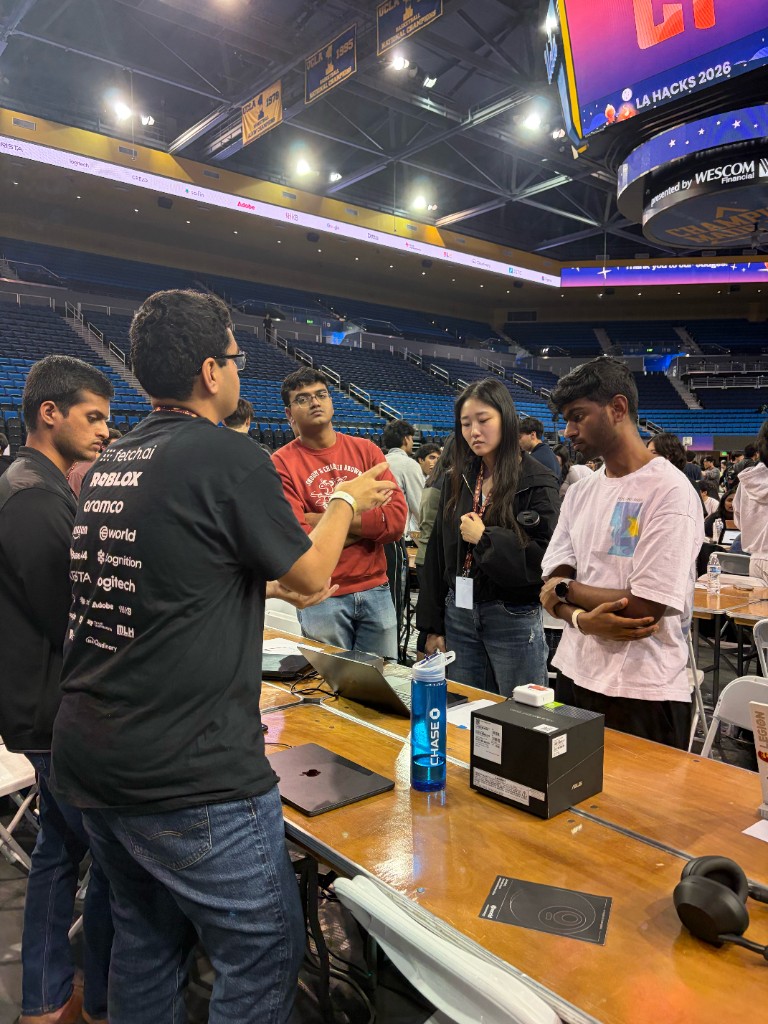
*Tailor the depth and angle to the judge in front of you.*
**Do:**
- Ask the judge's background before going deep
- Lead with the problem, workflow, and impact for non-technical judges
- Go deeper on architecture and tradeoffs for backend judges
- Show polish, interaction, and user flow for frontend judges
**Don't:**
- Pitching backend internals to a frontend-focused judge
- Skipping impact because the judge looks technical
- Assuming the judge cares about the same details your team does
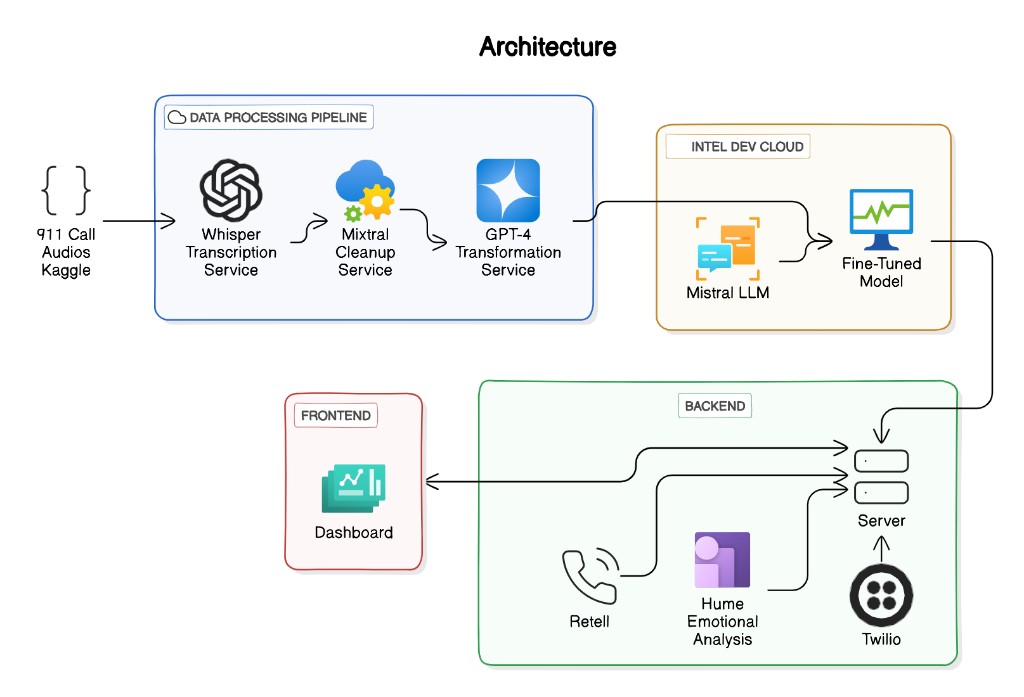
*The architecture slide from our Dispatch AI pitch. A technical judge will want this. For a non-technical one, save it for follow-up.*
## 2. You Let the Whole Team Pitch
At LA Hacks, I sat through pitches where I couldn't follow a teammate, so I burned Q&A time re-asking what they'd already covered.
Every four-person team has a strongest presenter and a weakest one, and the pitch is scored on clarity.
**Do:**
- Let the strongest communicator lead
- Have one teammate drive the demo if it smooths the flow
- Bring specialists into Q&A for deeper questions
**Don't:**
- Giving every teammate equal speaking time by default
- Switching speakers every 20 seconds
- Letting the least confident speaker explain the core value
## 3. You Pitched With No Energy
Smile. It's obvious, but teams forget it the second judging starts. A flat, monotone delivery leaves the judge to figure out what's exciting on their own.
Sound proud of what you built. It shows you care, and it makes the moments that matter easy to notice.
## 4. You Used Slides as a Script
**Never put more than 10 to 15 words on a pitch slide.** If the judge is reading, they aren't listening. Slides frame the problem, show one statistic, or hold a single idea, and then you move into the solution. In most pitches, slides should take 30 seconds max.
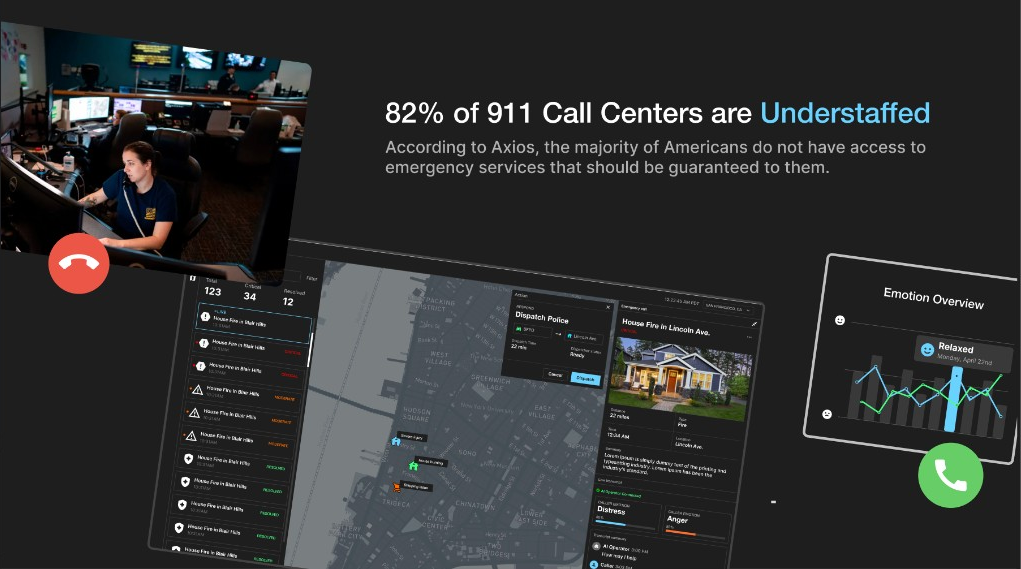
*Our Dispatch AI problem slide: one statistic and enough visual context to feel the pain point. The 82 percent figure comes from The Pulse of 9-1-1, the 2023 NENA and Carbyne State of the Industry Survey.*
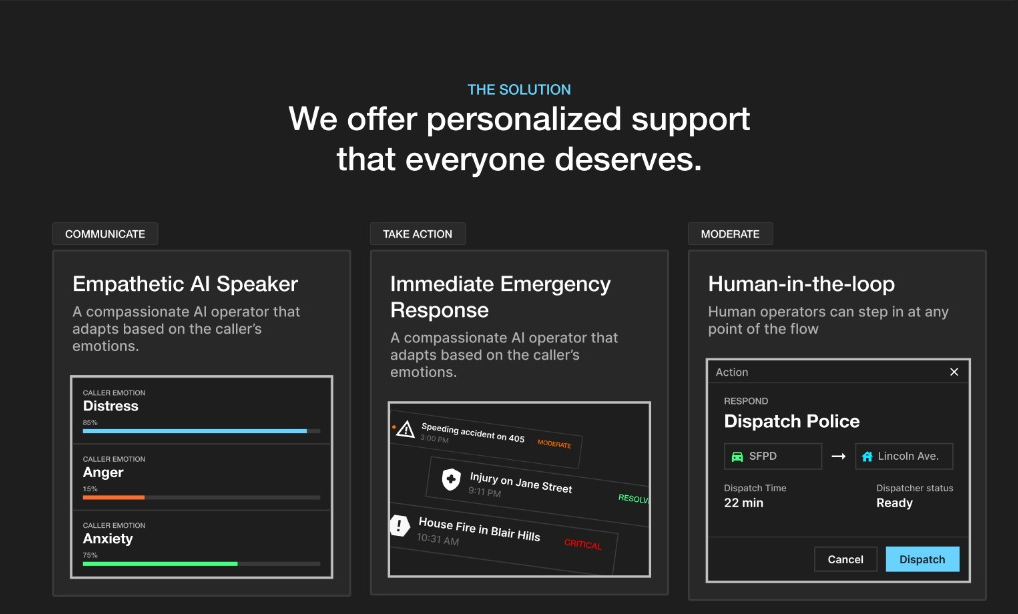
*The solution slide summarizes the workflow, then hands off to the live demo.*
Product screenshots can frame the story, but they can't replace the demo. If a screen proves the solution works, show that flow live in the product.
## 5. You Explained Things the Judge Already Knew
A couple of teams spent around 30 seconds explaining what OpenAI Agents or ElevenLabs Agents are. If the judge has used them, that time is gone.
The fix is one question: "Are you familiar with ElevenLabs Agents?" If yes, skip the definition and go straight to how you used it. If no, give the one-sentence version and move on.
## 6. You Pitched Features Instead of the Main Flow
The judge doesn't need your landing page, auth screen, settings panel, or database schema unless one of them is central to the problem. Show the problem and the user flow that proves you solved it. Everything else goes to Q&A, Devpost, or the appendix.
1. **Problem** State the pain point in one clear sentence.
2. **Main User** Show who feels the problem and what they need.
3. **Core Flow** Demo the shortest path from problem to solved outcome.
4. **Impact** Explain why that outcome matters.
[Hackathon Pitch Guide: How to Present Your Project](https://thehackathonplaybook.dev/blog/hackathon-pitch-guide): A deeper guide on pitch structure, demo flow, and judge Q&A prep.
## 7. You Skipped the Backup Demo Video
Always record a demo video. The LA Hacks Wi-Fi was spotty, and some teams couldn't run their demo because the app or the network died. Without a backup video, I had no clear way to see what the project actually did.
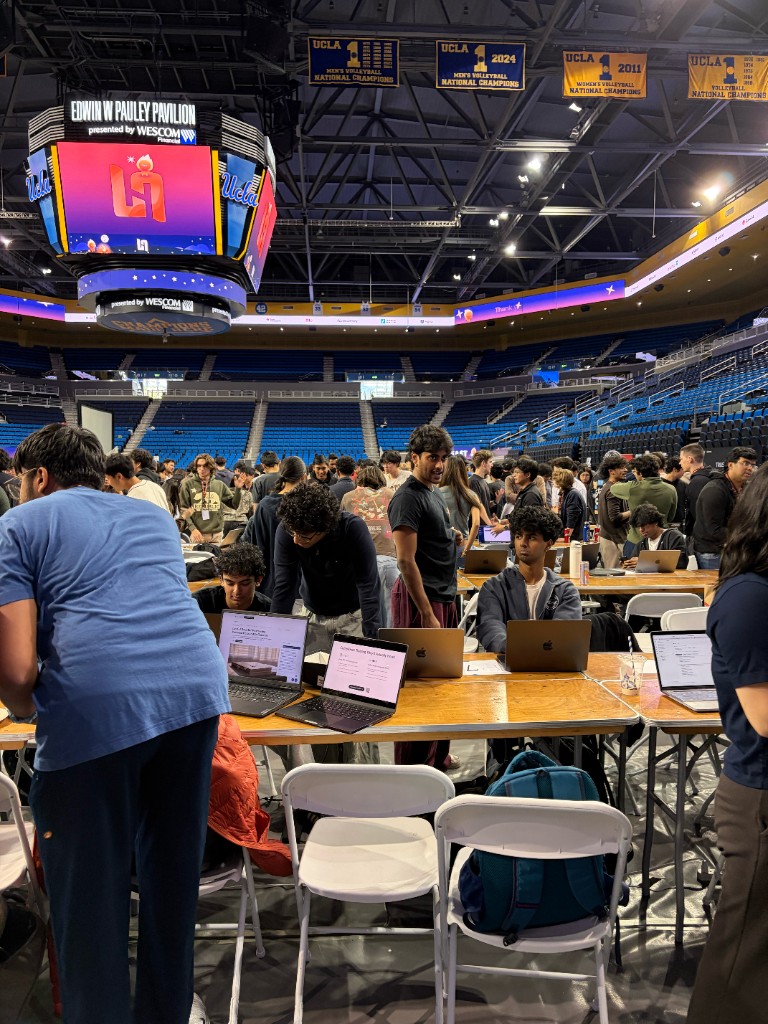
*A backup video still works when the venue Wi-Fi doesn't.*
A video also covers broken APIs, browser issues, and a dying laptop. Judges revisit submissions during deliberation, too, and a clear video on your Devpost keeps the project memorable.
Recording doesn't have to eat your build hours. Code locks at submission, but the Devpost (including the YouTube link) usually stays editable after. Check your event's rules first, because some treat edits after the deadline as a violation. The submission playbook covers the timing.
Here's the demo video from our Dispatch AI project, which won the Grand Prize at the UC Berkeley AI Hackathon 2024:
Video: [Winning Berkeley AI Hackathon demo video example](https://www.youtube.com/embed/hdpdgxrilQM)
*A backup video should make the project understandable even if the live demo fails.*
And our TalkTuahBank demo from HackUTD 2024, where the project won 1st Overall:
Video: [TalkTuahBank demo video, 1st Overall at HackUTD 2024](https://www.youtube.com/embed/YsH_z1azXSA)
*The product is on screen within 30 seconds, and a real money transfer happens on camera.*
## 8. You Had No Appendix
Keep the main pitch simple and the backup material deep. When a judge asks a follow-up, pulling up a ready slide looks a lot better than improvising. That's what the appendix is for, and it stays out of the main pitch.
**Good Appendix Slides**
- [ ] Architecture diagram for technical judges
- [ ] Prompt examples for AI projects
- [ ] Research data or user evidence
- [ ] Future mockups for product direction
- [ ] Technical tradeoffs and constraints
- [ ] Extra metrics that would slow the main story
## 9. You Left No Time for Q&A
I had five minutes per team: about 1.5 minutes for pitch and demo, then 3.5 for questions. Teams rarely hit it. Some spent the entire five minutes pitching.
> When judges cannot ask questions, they cannot score what they never got to understand.
>
> Bill Zhang, LA Hacks judge and author of The Hackathon Playbook
**Q&A is where the judge fills in missing rubric information.** If a rubric category never gets answered, the judge may have to give it a low score, or a zero. Leave room for questions, even if it means cutting the demo short.
## A Checklist for Your Next Pitch
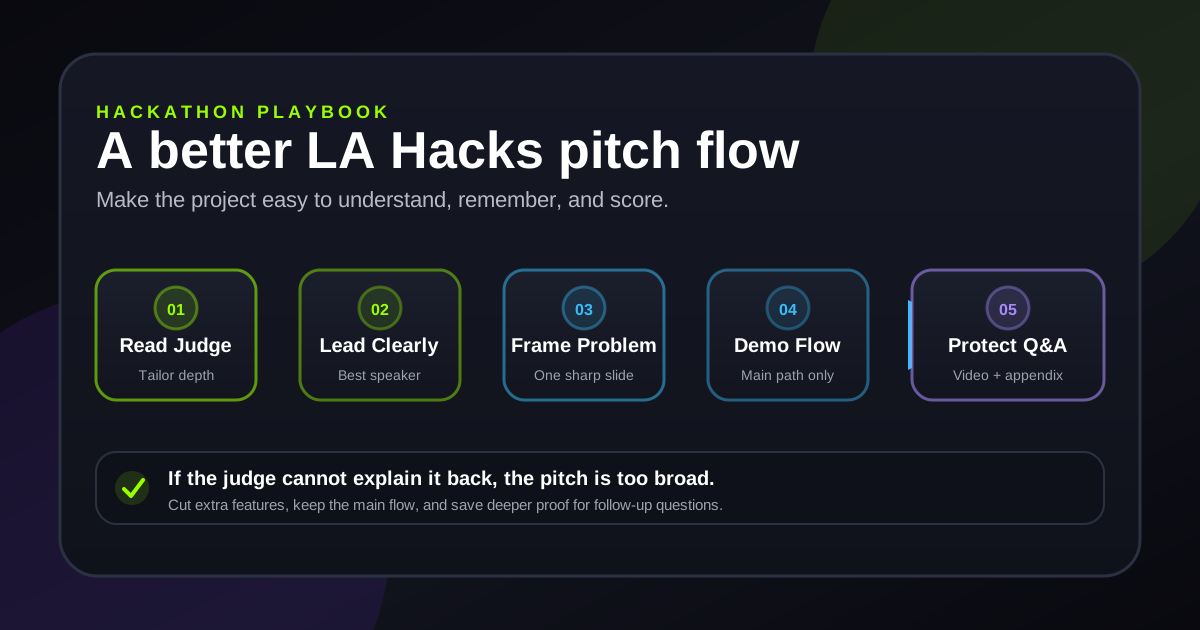
*A simple flow keeps the judge focused on the scoreable parts of your project.*
**Before You Walk Up to the Judge**
- [ ] Know the judge's role, or ask for their background
- [ ] Pick one lead speaker
- [ ] Practice the pitch with a timer
- [ ] Keep slides short and visual
- [ ] Record a backup demo video
- [ ] Prepare appendix slides for likely questions
- [ ] Plan where you'll stop so Q&A has time
[How to Win Hackathons: The Complete Guide](https://thehackathonplaybook.dev/blog/how-to-win-hackathons): The full system for team formation, ideation, execution, pitching, submission, and follow-up.
---
# How to Win Hackathons: A Complete Guide from 36+ Victories
> How to win hackathons, in the seven phases I learned across 50+ events and 36+ wins: from picking your team to following up with people after judging ends.
Canonical: https://thehackathonplaybook.dev/blog/how-to-win-hackathons
Last updated: 2026-09-14
---
## What Losing Teams Get Wrong
Winning a hackathon is a learnable skill. After 50+ hackathons and 36+ wins, the teams I've seen lose usually made one of four mistakes: an idea too big for the clock, no validation, features that never show up in the demo, or a weak pitch.
| Hackathons | Wins | In Prizes | Phase System |
| --- | --- | --- | --- |
| 50+ | 36+ | $100K+ | 7 |
## Phase 1: Build a Team With Complementary Skills
Aim for **3-4 people** who between them cover these four roles.
**Ideal Team Composition**
- [ ] Frontend developer who builds polished UIs fast
- [ ] Backend or full-stack developer for APIs and data
- [ ] Designer or UX-focused member
- [ ] Someone who's good at pitching and storytelling
> **Tip:** Solo? Arrive early for team formation. Introduce yourself by what you're good at, not your major or job title.
## Phase 2: Ideate Around the Judging Criteria
Read the judging criteria and sponsor challenges before you brainstorm, and pick a real problem you can show working in a demo. If you're going for the win, pick it before the event starts so the first hours go to validation.
Try **constraint-based ideation**: list the APIs, sponsor tools, and time you have, then brainstorm ideas that use at least 2-3 of them. Dispatch AI came from two combinations in a row. An LLM plus the Twilio API gave us an AI that answers phone calls, and pointing that at public safety made it an AI 911 dispatcher.
## Phase 3: Validate Before You Build
Before anyone writes feature code, spend **1-2 hours** on these four checks.
1. **Test Your APIs** Call every external service you plan to use. Check rate limits, auth, and data format.
2. **Scope the MVP** List the minimum features the demo needs. Cut the rest.
3. **Check for Prior Art** Search Devpost for this hackathon's past winners, and skip ideas that already won.
4. **Draw the Architecture** Sketch how the pieces connect, then split the tasks.
## Phase 4: Execute With an MVP Mindset
Build the minimum viable **demo** first: the 2-3 features you'll show judges in the pitch. My default stack for that is **Next.js, Python with FastAPI, and Supabase or Firebase**.
> **Warning:** If you're going for the win, use a stack your team already knows, and save new frameworks for a hackathon where learning is the goal.
[Best Tech Stack for Hackathons in 2026](https://thehackathonplaybook.dev/blog/best-tech-stack-for-hackathons): My default stack, and when to swap parts of it.
## Phase 5: Pitch Short and Leave Time for Questions
When I judged at LA Hacks, each team got five minutes, about 1.5 to pitch and 3.5 for questions, and some teams pitched for all five. Questions are where a judge fills in the rubric categories your pitch missed. Slot lengths vary, so ask about yours.
Open with the problem, then show **the product live** instead of on slides. Before you walk up, time at least one full run out loud and mark where you'll stop to leave room for questions.
[Hackathon Pitch Guide: Full Deep Dive](https://thehackathonplaybook.dev/blog/hackathon-pitch-guide): Pitch structure, the live demo, and judge Q&A.
## Phase 6: Polish the Devpost and Demo Video
Judges revisit submissions during deliberation, after you've left the table, so the Devpost has to explain the project without you.
**Submission Checklist**
- [ ] A project description that starts with the problem
- [ ] 60-90 second demo video with screen recording and voiceover
- [ ] Screenshots showing key features
- [ ] Architecture diagram in README
- [ ] List of technologies and APIs used
- [ ] Team member roles and contributions
Here's our TalkTuahBank demo from **HackUTD 2024, where we took 1st Overall**. It runs about two minutes, a bit over that target. Watch how early the product shows up and the $200 transfer that happens live on camera.
Video: [TalkTuahBank demo video, 1st Overall at HackUTD 2024](https://www.youtube.com/embed/YsH_z1azXSA)
[Hackathon Submission Playbook](https://thehackathonplaybook.dev/playbook/submission): Demo video examples, README templates, and the recording setup I use.
## Phase 7: Follow Up Within 48 Hours
Email the sponsors and mentors you met within 48 hours, while they still remember you. Push the code to GitHub with a real README, and post about what you built. That post is how I got my first internship: a LinkedIn post about our LA Hacks 2023 project, which didn't win.
Some projects keep going after the weekend. We won the **Grand Prize at the UC Berkeley AI Hackathon 2024** with Dispatch AI, worth about $64K across prizes: a $25K Berkeley SkyDeck Fund investment with a Golden Ticket to SkyDeck Pad-13, $25K for AI For Good, and roughly $14K of hardware for first place in Best Use of Intel AI (devpost.com/software/dispatch-ai). We kept building it, and it's now a company I co-founded.
[The Post-Hackathon Playbook](https://thehackathonplaybook.dev/playbook/post-hackathon): What to post, who to message, and when.
---
# Best Tech Stack for Hackathons in 2026: Tools That Win Prizes
> The best tech stack for hackathons is the one your team already knows. If you don't have one yet, this is the Next.js, FastAPI, and Supabase default I use.
Canonical: https://thehackathonplaybook.dev/blog/best-tech-stack-for-hackathons
Last updated: 2026-09-14
---
## The Default Stack, In One Glance
After 50+ hackathons, this is the default stack I reach for and recommend to teams I mentor.
1. **Frontend** Next.js 16 + Tailwind CSS + shadcn/ui
2. **Backend** Python FastAPI, or Next.js API routes if you want one language
3. **Database & Auth** Supabase or Firebase (both set up in under 10 minutes)
4. **Deployment** Vercel for the frontend, Railway for the backend
5. **AI** OpenAI or Claude API, plus whatever the sponsor wants
> **Use what your team knows:** If you're going for the win and your team is faster in something else, use that instead. The goal is a polished, deployed demo in 24-48 hours, and a team that writes Vue shouldn't spend those hours learning React.
## Frontend: Next.js
I default to **Next.js with React**. Each page is just a file, and server rendering is built in. For UI, shadcn/ui copies ready-made components into your project as code you can edit.
`terminal`:
```bash
npx create-next-app@latest my-hackathon-app
cd my-hackathon-app
npx shadcn@latest init
npm run dev
```
**Do:**
- Next.js + Tailwind CSS + shadcn/ui (my default)
- Vite + React for a pure single-page app
- Svelte or SvelteKit if your team already knows it
**Don't:**
- Angular: too much boilerplate for 24 hours
- Complex monorepo setups
- Learning a brand-new framework mid-event
## Backend: Python or Node, Nothing Exotic
Pick **Python (FastAPI or Flask)** or **Node.js (Express)**. Python fits AI and ML work better because of its libraries. Node makes sense when your frontend is already JavaScript and you want one language.
`main.py`:
```python
from fastapi import FastAPI
from fastapi.middleware.cors import CORSMiddleware
app = FastAPI()
app.add_middleware(CORSMiddleware, allow_origins=["*"])
@app.get("/api/health")
def health():
return {"status": "ready to hack"}
```
> **Tip:** If your backend is a few simple endpoints, serverless functions on Vercel or AWS Lambda mean no server to manage. For anything heavier, run FastAPI on Railway or Render, which both do one-click deploys.
## Database and Auth: Firebase or Supabase
Both come with sign-up and login built in. Pick between them by how you want to store data.
**Do:**
- Firebase for NoSQL and real-time features
- Supabase for PostgreSQL and SQL
- Free tiers that cover a typical hackathon
**Don't:**
- Self-hosted databases (too much setup time)
- Complex ORM configurations
- Rolling your own auth from scratch
- A database without built-in auth, if your app needs logins
All of this assumes you're there to win. If you're there to learn, a new tool can be worth the whole weekend. At LA Hacks 2023 I spent the hackathon learning vector databases for a RAG-style chat app, and we didn't win. I posted about it on LinkedIn anyway, and that post led to my first internship. The vector database knowledge also landed me a full-time job.
## AI APIs: Read the Docs Before You Arrive
Pick one model provider and make a test call to its API before you arrive. Keys and rate limits are easier to sort out at home.
| OpenAI | Anthropic | Google | Fast Inference |
| --- | --- | --- | --- |
| GPT-4o | Claude 4 | Gemini | Groq |
> **Read sponsor docs early:** If you're going for sponsor prizes, check the sponsor list and read their API docs before the event starts too.
## Deployment: Ship a Live URL
Deploy so judges can open a real URL instead of watching localhost on your laptop. It's one command.
`terminal`:
```bash
# Frontend to Vercel
npx vercel deploy
# Full-stack to Railway
railway up
```
> **Warning:** For mobile, use Expo for React Native and test on your phone with a QR code. For hardware, record a working video demo as a backup in case the live hardware fails.
## Record the Demo Video
The demo video keeps working after you leave the table: judges revisit submissions during deliberation, and recruiters can find it on YouTube. Lock the tools fast so the weekend goes to building, then put your last hours into the video.
**Do:**
- Screen Studio (Mac): what I use, with auto-zoom and cursor smoothing built in
- CanVid (Windows): the closest equivalent
- 60-90 seconds, one take is fine
- Voiceover: problem first, then product
**Don't:**
- QuickTime and built-in recorders (no zoom, no polish)
- 5-minute recordings (judges skip through them)
- Slide-only videos that never show the product
- No voiceover or captions
[Hackathon Submission Playbook](https://thehackathonplaybook.dev/playbook/submission): Demo video examples and the recording setup I use.
---
# Hackathon Tips for Beginners: Your First Hackathon Survival Guide
> You don't need an idea or a team to go to your first hackathon. These hackathon tips for beginners cover what to set up at home and how to spend the 24 hours.
Canonical: https://thehackathonplaybook.dev/blog/hackathon-tips-for-beginners
Last updated: 2026-09-14
---
## If you want to place, read the judging criteria first
Judges score on a published rubric, so read it before you write a line of code. **A simple project that hits every item on it can beat a cooler one that doesn't.**
You don't need an idea or a team just to show up and get something out of it, though. You can find both at the event.
> **You belong here:** Events like HackMIT, HackUTD, and CalHacks run beginner tracks, mentoring, and workshops for people at their first hackathon.
## Set up before you arrive
Do your setup at home so the event hours go to building. Sponsors and challenges usually drop 1-2 weeks early, so you'll have time to research them too.
**Pre-hackathon checklist**
- [ ] Install your IDE (VS Code or Cursor)
- [ ] Install Git, Node.js, and Python
- [ ] Create GitHub and Vercel accounts
- [ ] Sign up on the hackathon platform (usually Devpost)
- [ ] Deploy a basic "Hello World" to test the pipeline
- [ ] Research sponsors, prizes, and challenges
- [ ] Read the judging criteria
- [ ] Join the hackathon Discord or Slack
## Find a team that covers the gaps
No team yet? Join the Discord or Slack and find the **#team-formation** channel. Post an intro with your skills (basic is fine), and message people instead of waiting to be found.
**Do:**
- Diverse skills: frontend, backend, design, pitch
- 2-4 members total
- At least one confident presenter
- People you communicate well with
**Don't:**
- Four frontend developers
- More than 4 people (coordination drag)
- Nobody willing to present
- Friends picked over skill diversity
> **Tip:** If you don't code, lead with your domain expertise and own the pitch.
[Can non-coders actually win hackathons?](https://thehackathonplaybook.dev/blog/non-coders-winning-hackathons): How to be useful on a team without writing code.
## Build small, and plan the clock
Aim for achievable but impressive: something familiar with one twist. Our TalkTuahBank project at HackUTD 2024 was banking over a plain phone call, so it works for people with no internet or smartphone. If you want a sponsor's prize, use their API too.
1. **Hours 0-2: Setup and plan** Scaffold the project with basic routing, then split up the tasks.
2. **Hours 2-8: Core build** Build the 2-3 features your demo depends on, and nothing else yet.
3. **Hours 8-12: Sleep and polish** Rest. Then clean the UI and fix rough edges.
4. **Hours 12-20: Integrate and prep** Connect the pieces, write the pitch, record a backup demo.
5. **Hours 20-24: Submit and rehearse** Finish the Devpost writeup and submit early. Then practice the pitch.
> **Take the sleep block:** Rest in hours 8-12 instead of pushing through. The last 12 hours go to integration and the pitch, and you'll want a clear head for both.
## Mistakes that cost first-timers the win
**Watch for these**
- [ ] Ideating before reading the judging criteria
- [ ] Spending more than 30 minutes on one bug
- [ ] Not asking mentors for help early
- [ ] Skipping the backup demo video
- [ ] Submitting late (often a disqualification)
- [ ] Trying to build too many features
> **Tip:** At the 30-minute mark, ask a mentor. If there's no quick workaround, cut the feature.
Record **the backup demo video**. A 60-90 second screen recording with voiceover lets judges understand your project even if the live demo dies on stage. The clip below is SoundSearch, a solo first-place accessibility tool from the AIATL hackathon that guides users through complex websites with real-time voice over a phone call. After the event, that recording reached a recruiter and turned into an internship offer.
Video: [SoundSearch demo video, solo 1st place at AIATL, that led to an internship offer](https://www.youtube.com/embed/RgH-i9SYj-o?start=22)
> **Tip:** At some events the deadline freezes your code but not the Devpost entry, so you can record the video after you submit. Check the rules first: some events count any edit after the deadline as a violation, or need the video link to submit.
[Hackathon Submission Playbook](https://thehackathonplaybook.dev/playbook/submission): Demo video examples, README templates, and the recording setup I use.
## Win or lose, walk away with more
I started doing hackathons to land an internship. My first internship came from LA Hacks 2023, where I spent the weekend learning vector databases for a RAG-style chat app and we didn't win. I posted about it on LinkedIn anyway, and an interviewer who was building the exact same thing saw it. A week later I had the offer.
1. **During** Go to the workshops, and talk to other teams and the mentors.
2. **After** Push the project to GitHub and your portfolio, even unfinished.
3. **Share it** Post your story on LinkedIn or Twitter.
If you don't place, go to another one. The UC Berkeley AI Hackathon 2023 fell on my UCSC graduation day, and I went anyway. I drove about an hour to get there, left midway through for a ceremony that ran about four hours, and ended up driving roughly four hours that day. That's how dedicated I was to hackathons back then. I didn't win anything. A year later, we won the Grand Prize there with Dispatch AI.
> **Win:** Finishing one project is a fine goal for a first hackathon.
[How to Win Hackathons: The Complete Guide](https://thehackathonplaybook.dev/blog/how-to-win-hackathons): When you're ready to compete, the full 7-phase system.
---
# Hackathon Pitch Guide: How to Present Your Project and Win Prizes
> A hackathon pitch guide with one 3-minute structure: problem, live demo, how it works, and impact. Plus Q&A prep, and how to cut it down for a shorter slot.
Canonical: https://thehackathonplaybook.dev/blog/hackathon-pitch-guide
Last updated: 2026-09-14
---
## A 3-Minute Pitch Structure
I've watched technically weaker projects win because their pitch was better. This is the structure I use. It runs about three minutes, and you can drop your project into it tonight.
1. **Problem (30 seconds)** State the pain point before you say anything about your product.
2. **Solution demo (90 seconds)** Show the product live and walk through it as a user would. Lead with your most impressive feature, not the login screen.
3. **How it works (30 seconds)** High level only. 'We use Claude's API to analyze medical records in real time.' Stop there.
4. **Impact and what's next (30 seconds)** Who it helps, and what you'd build with more time.
## Fit the Structure to Your Slot
When I judged at LA Hacks, each team had five minutes, and about 3.5 of those were for questions, which is where a judge fills in the rubric. Some teams pitched for all five. Formats vary, so ask how long your slot is and how much of it is Q&A. If Q&A comes out of the same slot, shrink this structure to about 90 seconds and keep the same order.
[9 Hackathon Pitch Mistakes I Saw at LA Hacks](https://thehackathonplaybook.dev/blog/hackathon-pitch-mistakes-la-hacks): What I saw from the judging table.
## Open With the Problem
A winning team I watched opened with this: **240 million 911 calls** are made in the US every year, and dispatchers prioritize them by hand while people are dying on the line. (That number is the National Emergency Number Association's estimate: nena.org/page/911statistics.)
**Do:**
- Lead with one statistic that shows the scale
- Open with a personal story
- Describe the problem so the judge can picture it
**Don't:**
- Opening with your team name
- Starting with your tech stack
- A long backstory before the point
- Jumping straight to the solution
## Demo Live, and Always Record a Backup
Demo live whenever you can. Slides are backup only.
> **Warning:** Pre-load realistic data: believable numbers in the dashboard and a real example to process. Never 'test123' or 'lorem ipsum'.
The Wi-Fi at LA Hacks was spotty while I was judging, and some teams couldn't run their demo at all. Without a backup video, I couldn't see what those projects did. A recording also stays on your Devpost for deliberation.
Here's our TalkTuahBank demo from HackUTD 2024, where we took 1st Overall. The problem gets one statistic and five seconds, and the product is running by 0:14. At 1:20, a $200 transfer goes through on camera.
Video: [TalkTuahBank demo video, 1st Overall at HackUTD 2024](https://www.youtube.com/embed/YsH_z1azXSA)
[More demo video examples](https://thehackathonplaybook.dev/playbook/pitching): The TalkTuahBank and SoundSearch demos, broken down.
## Win the Q&A by Naming Your Limits
**Prepare answers for**
- [ ] How does it scale?
- [ ] What's the business model?
- [ ] What were the technical challenges?
- [ ] How is this different from existing solutions?
- [ ] What would you build next with more time?
> **Tip:** When a judge asks what's missing, answer honestly instead of overselling. Something like: 'In a production version we'd add X, but for this demo we focused on Y because it best shows our core value.'
## Delivery: One Speaker, No Apologies
Have one person talk while another drives the demo, and don't switch speakers mid-pitch. Look at the judges instead of your screen, and keep a measured pace even when you're nervous. Run the whole thing out loud with a timer at least once before you walk up.
> **Don't apologize in the pitch:** Don't bring up bugs or say 'we ran out of time.' Judges don't know your original plan, so they can only judge what you show them.
[How to Win Hackathons: The Complete Guide](https://thehackathonplaybook.dev/blog/how-to-win-hackathons): All seven phases, from team formation to follow-up.
---
# Non-Coders Winning Hackathons: What Domain Experts Bring
> A personal injury lawyer took 1st at Anthropic's hackathon without writing code. What that says about non-coders winning hackathons, and where coding helps.
Canonical: https://thehackathonplaybook.dev/blog/non-coders-winning-hackathons
Last updated: 2026-09-14
---
## A Lawyer Won Anthropic's Hackathon Without Writing Code
Mike Brown, a personal injury lawyer, took 1st place at **Anthropic's Built with Opus 4.6 hackathon**, a global virtual event held February 10 to 16, 2026. Co-host Cerebral Valley puts the applicant count at 13,000. According to Anthropic's winners post, 500 were selected and only 1 of the 5 winners was a professional developer. In the same post, **Brown says he didn't write a single line of code, or even read one.**
His project, **CrossBeam**, reads California ADU building-permit plan sets and correction letters, cross-references city and state code, and returns an action plan in about 20 minutes instead of weeks. He built it with Claude Code, drawing on years of legal experience.
## Two More Non-Coders Who Won
Nina Kolari, a non-technical entrepreneur who learned iOS development with AI tools, built **Aphasio**, an iPhone communication app for people with aphasia, in **3 hours** and beat 27 other teams at the Cursor hackathon in Chiang Mai (her write-up on ninakolari.com, December 2025).
Rene Turcios, a self-described 'vibe coder' who doesn't know how to code, has competed in **200+ hackathons** since 2023 and keeps winning prizes (The San Francisco Standard, July 2025).
These three show that AI coding tools like Cursor, Claude Code, and ChatGPT can get someone who knows a problem well to a working prototype. They aren't enough to say non-coders usually beat developers.
## What Domain Experts Bring
Judges reward projects that solve a real problem, and a lawyer or a doctor starts out knowing which problems in their field are real. Kolari's write-up says much the same about her win: she built something simple that solved a specific, painful problem, and the judges responded to clarity.
Dr. Michal Nedoszytko, who placed 3rd at the Anthropic event, is a different case. Anthropic describes him as a cardiologist who had spent 20 years building healthcare software alongside his practice, and he built PostVisit.ai in 7 days. He scopes his own claim:
> Currently, you don't have to know programming to create solutions, or at least prototypes of solutions, for something that you can use personally.
>
> Dr. Michal Nedoszytko, interventional cardiologist and creator of PostVisit.ai, 3rd place at Anthropic's Built with Opus 4.6 hackathon (ReachMD, The Convergence, 2026)
So coding skill still helps. If you don't have it, compete on what you know.
**Do:**
- Win on the problem and the user experience
- Pick one specific problem and keep the build simple
**Don't:**
- Competing on technical complexity
- Copying what developer teams build
- Padding it with extra features
## The Tools: Cursor and Claude Code
**Cursor** is an AI code editor, and **Claude Code**, which Brown used, is Anthropic's AI coding assistant. In both, you describe what you want in plain English and the AI writes the code. People call this **vibe coding**.
1. **Describe it** Say what to build. Be specific about the problem and what the user sees.
2. **Try it** Use what it made. You don't have to read the code to check that it works.
3. **Say what to change** 'Make the button bigger,' 'add a loading state,' 'fix the mobile layout.'
4. **Deploy** Ship it with one command when it's ready.
> **Two Things to Do Yourself:** Keep API keys (the passwords your app uses to reach services like OpenAI) out of your code and off GitHub: put them in a .env.local file yourself, not in the chat. And before you share the link, open the live site and try it the way a judge would.
## Your First Hackathon, Step by Step
**Run this before your first event**
- [ ] Install Cursor and build one tiny app by describing it in plain English
- [ ] Pick a problem from your own field that software could fix
- [ ] Find a hackathon with a beginner track and mentors
- [ ] Lead your pitch with the problem and your expertise, not the tech
[Non-Coder Hackathon Section](https://thehackathonplaybook.dev/non-coders): Installable AI skills, setup guides, and strategies for professionals who don't code.
[Hackathon Tips for Beginners](https://thehackathonplaybook.dev/blog/hackathon-tips-for-beginners): Everything you need for your first hackathon, from prep to pitch.
---
# How to Build with ElevenLabs and Cursor at a Hackathon
> My loop for a voice AI hackathon project: write the PRD first, connect ElevenLabs to Cursor through MCP, then have the agent write each test before the feature.
Canonical: https://thehackathonplaybook.dev/blog/build-with-elevenlabs-and-cursor
Last updated: 2026-09-14
---
## Make Your Demo Talk Back
This is the loop I run to add a voice to a hackathon project. ElevenLabs generates the speech, and Cursor's agent writes the code around it. I write a spec, connect the agent to ElevenLabs, then let it build and test one feature at a time while I babysit the spend.
| Flash Latency | Languages | Free Chars/mo | Free for MLH |
| --- | --- | --- | --- |
| ~75ms | 70+ | 10K | 3 mo |
## Step 0: Write the PRD Before Cursor Opens a File
The agent writes the code, but it can't guess what you want. Before Cursor touches a file, write down what you're building, who it's for, and what done looks like. Save it as **PRD.md** and **AGENTS.md** at the repo root so every prompt reads from the same source.
1. **Run the domain-to-spec skill** It interviews you about your profession and goal, then writes AGENTS.md and PRD.md to the repo root.
2. **List routes and components** Under PRD.md > Frontend Pages and Backend Routes, name every screen and endpoint the agent should scaffold.
3. **Define done** Add an Acceptance Criteria section listing the exact behaviors a working demo must have. It becomes your test plan.
Skip the PRD and the agent keeps reinventing your data model and adding features you never asked for, burning API credits on every wrong guess. With it, the agent can type the CRUD endpoints while you decide what the interface looks like and whether the output is any good. Spend the hours you save on UX polish and the pitch.
## Step 1: Check for an MCP First
An **MCP (Model Context Protocol) server** gives your agent a menu of typed tools for a service. Instead of reading pasted docs, the agent sees real actions like 'generate speech' or 'clone a voice' and gets structured data back.
ElevenLabs ships an official one at github.com/elevenlabs/elevenlabs-mcp. Add this to Cursor's MCP config and the agent can call text-to-speech, voice cloning, sound effects, transcription, and the ElevenAgents platform directly.
`~/.cursor/mcp.json`:
```json
{
"mcpServers": {
"ElevenLabs": {
"command": "uvx",
"args": ["elevenlabs-mcp"],
"env": {
"ELEVENLABS_API_KEY": ""
}
}
}
}
```
## Step 2: No MCP? Paste the Docs URL
Some tools don't have an MCP server yet. For those, put a link to the official docs inside the prompt. Cursor fetches the page and works from the live API instead of the stale version the model remembers from training.
Here's the shape of a prompt I use to build a streaming text-to-speech endpoint without the MCP. The **'Done when' section** tells Cursor when to stop, so it doesn't wander off.
`cursor-prompt.md`:
```markdown
Read https://elevenlabs.io/docs/overview/intro and PRD.md > Backend Routes.
Create app/api/speak/route.ts in Next.js 15 (App Router, TypeScript).
Behavior:
- POST handler, accepts { text: string } JSON body
- Calls ElevenLabs text-to-speech with model_id "eleven_flash_v2_5"
- Voice ID and API key come from process.env (already in .env.local)
- Returns audio as a streaming audio/mpeg response
Constraints:
- Use the official @elevenlabs/elevenlabs-js SDK (install if needed)
- No retries, no caching, no logging
- Do not touch any other route or component
Done when:
- curl -X POST localhost:3000/api/speak -d '{"text":"hello"}' returns audio bytes
- The response Content-Type is audio/mpeg
- npm run build passes with no new TS errors
```
## Step 3: Key In, Then Build and Test
Put your API key in **.env.local** at the project root, and keep that file out of git. Your app code reads the key from there. The MCP server gets its copy from the env block in mcp.json above.
`.env.local`:
```bash
ELEVENLABS_API_KEY=sk_your_key_here
ELEVENLABS_VOICE_ID=JBFqnCBsd6RMkjVDRZzb
ELEVENLABS_MODEL_ID=eleven_flash_v2_5
```
Now hand the agent one clean task: read the PRD, build the next unfinished feature, run the test, and stop only when it passes. You watch the loop and step in when it goes sideways.
**Do:**
- Reference PRD.md and AGENTS.md
- Ask for one feature per prompt
- Name the model (eleven_flash_v2_5 for real-time)
- Say which test has to pass
**Don't:**
- 'Just build the voice feature' (no model, no test)
- Skipping the test to save time
## Make the Agent Write the Test First
The most useful habit I've found: the agent writes the **test first**, then builds the feature that makes it pass. That's test-driven development (en.wikipedia.org/wiki/Test-driven_development) with an LLM writing the code.
1. **Red** Have the agent read PRD.md > Acceptance Criteria and generate a failing test for the next feature. Run it. Confirm it fails for the right reason.
2. **Green** Have the agent write the minimum code that makes the test pass. Run it. Iterate until green.
3. **Refactor** Have the agent clean up that code without breaking the test. Run it once more to be sure.
> Write new code only if you first have a failing automated test.
>
> Kent Beck, creator of Extreme Programming, Test-Driven Development: By Example (Addison-Wesley, 2002)
A test gives the agent a hard pass/fail signal, so it converges instead of guessing. You also end up with a regression suite, which matters when you swap voices or models five minutes before the demo.
## Babysit the Spend, Then Ship
An agent in a tight loop spends real money on your Cursor subscription and your ElevenLabs credits. Runaway retries, endless tool calls, or the same audio regenerated over and over can burn through a free tier, so don't walk away from it at hour 18.
**Pre-Flight Before the Agent Loop**
- [ ] PRD.md and AGENTS.md saved at the repo root
- [ ] ElevenLabs MCP installed (or docs URL ready to paste)
- [ ] API key in .env.local, not committed to git
- [ ] Acceptance criteria written for the next feature
- [ ] ElevenLabs usage dashboard open in a tab
- [ ] Cursor agent chat visible at all times
When you pitch it, don't spend your slot explaining the tools. When I judged LA Hacks, a couple of teams spent around 30 seconds explaining what OpenAI Agents or ElevenLabs Agents are. If the judge has used them, that time is gone, so ask whether they're familiar with ElevenLabs before you explain it.
[Non-Coders Winning Hackathons](https://thehackathonplaybook.dev/blog/non-coders-winning-hackathons): How a lawyer won Anthropic's hackathon without writing code, and what domain experts bring.
[Best Tech Stack for Hackathons in 2026](https://thehackathonplaybook.dev/blog/best-tech-stack-for-hackathons): The default stack I reach for, from frontend to deployment to AI APIs.

